
Ticket Kiosk Integration: Designing the Issuing and Validation Workflow


A ticket leaves the printer with a clean QR code and all the expected information. From the customer’s point of view, the job appears finished.
From the kiosk application’s point of view, it may not be.
The payment system, ticketing backend, printer and validation system each know something different about that transaction. Payment may have been approved while printing failed. A ticket may have been physically delivered while the backend response was lost. A QR code may scan perfectly while the ticketing platform rejects the credential behind it.
These situations require different recovery actions.
For a system integrator, reliable ticket kiosk integration therefore starts by defining the complete ticket lifecycle—not simply by connecting a printer and confirming that a test ticket comes out.
1. What Does “Ticket Issued” Mean in Your System?
This question should be answered before the kiosk software is finished.
Consider a typical transaction:
Ticket Selected
→ Order Created
→ Payment Confirmed
→ Ticket Credential Generated
→ Print Job Sent
→ Ticket Printed
→ Ticket Delivered
→ Backend Updated
The exact order will vary between ticketing platforms.
Some systems may create a reservation or ticket record before payment. Others may create or activate the credential only after payment confirmation. A free queue or admission ticket may not involve payment at all.
What matters is that the project defines which event changes the business state to Issued.
That definition should not be left to the printer.
The printer can report only the states supported by its hardware and software interface. It does not know whether a payment was settled, whether a ticket ID exists in the backend, or whether the credential will later be accepted at a gate.
Keeping those responsibilities separate makes exception handling much easier later.
2. Map the Complete Ticket Lifecycle
Before finalizing the hardware architecture, put the complete transaction on one page.
A ticket vending workflow might include:
User Selection
↓
Ticket Request / Pricing
↓
Payment if Required
↓
Credential Generation
↓
Ticket Rendering
↓
Printing
↓
Physical Delivery
↓
Backend Record / Synchronization
↓
Later Validation
Then assign ownership to each stage.
| Stage | Typical System Involved |
|---|---|
| Ticket selection | Kiosk application |
| Pricing / ticket request | Ticketing application or backend |
| Payment | Payment system |
| Credential generation | Ticketing system |
| Ticket rendering | Application / printer software layer |
| Physical printing | Kiosk printer |
| Physical delivery | Printer output mechanism |
| Ticket record | Ticketing backend |
| Validation | Scanner/validator + ticketing system |
This is not a universal ticketing architecture. It is a planning framework.
A railway ticketing platform, event ticket terminal and public-service queue kiosk can use very different transaction rules.
The value of the exercise is finding those differences before development reaches the recovery stage.
3. The Ticket Record and the Piece of Paper Have Different Jobs
The ticketing system manages the credential.
The printer produces its physical representation.
Depending on the application, the printed ticket may contain:
- ticket ID;
- transaction reference;
- route or destination;
- date and time;
- seat or admission information;
- QR code or barcode;
- payment information;
- instructions for the user.
A printer can reproduce that information correctly without knowing whether the underlying ticket is valid.
This distinction helps during troubleshooting.
Suppose a passenger presents a ticket at a validator. The QR code scans, but access is rejected.
Replacing the printer would make little sense if the scanner decoded the printed code correctly and the ticketing backend rejected the credential.
The reverse can also happen. The backend record may be correct, but the printed code is difficult for the intended scanner to read.
Those are different problems and should remain different in the system logs.
4. Decide How the QR Code or Barcode Will Be Printed
Machine-readable ticket content can reach the printer through different software paths.
One application may generate the QR code itself, render the complete ticket and send the result through a printer driver or SDK.
Another may send supported printer commands for generating the required barcode or QR symbol.
The right path depends on the selected printer and application architecture.
Before development is frozen, confirm:
- which system creates the payload;
- which system renders the code;
- required barcode or QR symbology;
- printer command support if commands are used;
- ticket layout;
- final printed size;
- scanner or validator requirements.
There is also a physical layout issue that is easy to overlook.
DENSO WAVE’s QR Code technical documentation specifies a clear quiet zone around the QR symbol and warns that distorted modules or text and graphics placed too close to or over the code can make reading difficult or impossible.
That matters in ticket design because space is usually limited.
A designer may try to fit the ticket ID, price, instructions, logo and QR code into the same small area. A code that still looks acceptable on the design screen is not necessarily the layout that should be released for production.
Print it and scan it.
If your developers are still deciding how the host application should communicate with the printer, our kiosk printer SDK vs driver vs ESC/POS guide explains the software layers separately.
5. Test the Ticket with the Device That Will Actually Read It
A QR code looking sharp on a computer monitor proves very little.
The real path is closer to:
Ticket Data → Printing Process → Thermal Paper → Printed Code → Scanner / Validator
Each stage affects the final result.
Use the intended printer and representative thermal paper, then test the ticket with the actual validator or a representative scanning device from the deployment.
Do not test only one short sample.
If ticket payload length varies, use representative examples. If the layout changes between ticket types, print those variants too.
QR Code itself also has different versions and error-correction levels, and increasing the amount of encoded data can require more modules in the symbol. DENSO WAVE documents these relationships as part of the QR Code specification.
This does not mean the printer supplier should choose the ticketing system’s QR configuration.
It means the final data + layout + printer + paper + scanner combination should be tested together.
6. A Finished Print Job Is Not Always the End of Physical Delivery
For a simple printer installation, the user may take the receipt directly from the printer output.
Other ticket kiosks use a presenter to control how the finished ticket reaches the customer.
In that architecture, several physical events can occur:
Print → Cut → Present → User Collection
Whether the host can monitor each event depends on the selected printer and the status functions exposed by its integration interface.
This is also where terminology matters.
A cutter separates the printed ticket.
A presenter manages controlled output from the printer.
Ticket-taken detection, when supported, provides feedback related to user collection.
Retract, when supported, is a separate mechanism or function used to recover an uncollected output from the normal delivery path.
They should not be treated as four names for the same feature.
Our kiosk printer presenter vs retract guide covers these hardware functions in more detail.
For ticketing software, the practical question is:
Which physical output states can this exact printer configuration report to the host?
That answer is more useful than simply knowing that the printer has a presenter.
7. What Happens When the Customer Walks Away?
Uncollected tickets deserve their own workflow decision.
Imagine that payment has completed and a valid ticket has been printed, but the customer does not remove it.
What happens next?
The answer depends on the kiosk design.
A system might leave the ticket available and display a reminder. Another may use collection detection if supported. A project using appropriate retract-capable hardware may recover an uncollected output after its own defined conditions are met.
Another application may require staff intervention.
The important part is deciding this behavior before deployment.
Do not assume that every presenter printer can retract an uncollected ticket. Do not assume that every printer can tell the application whether the customer took it.
Those functions must be confirmed for the exact hardware and software interface.
The ticketing application can then decide what the resulting physical state means for the business transaction.
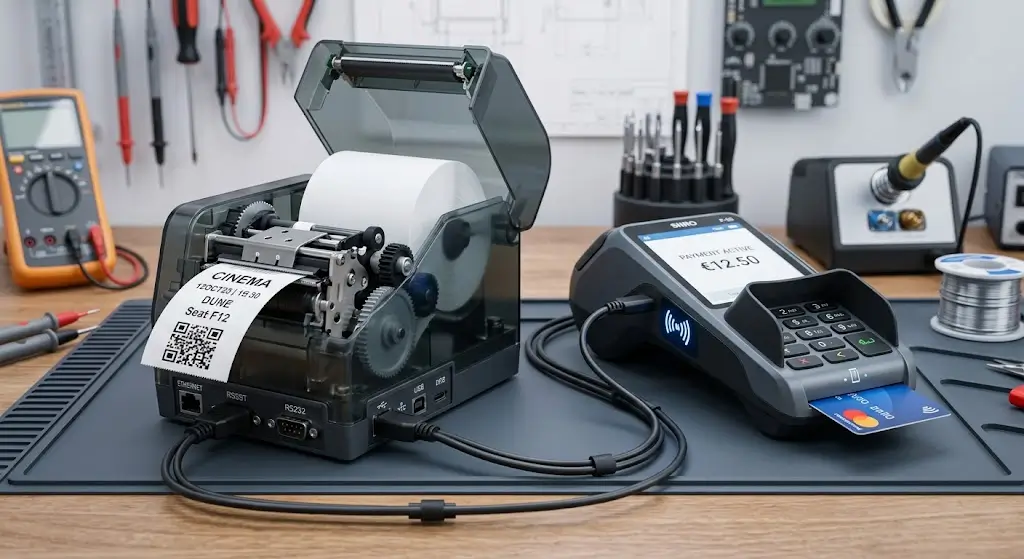
8. Payment Succeeded. Printing Failed. Now What?
This is one of the scenarios worth testing before the kiosk goes anywhere near a customer.
Suppose:
- The customer selects a ticket.
- Payment is approved.
- The kiosk prepares the ticket.
- The printer reports that it cannot complete the output.
At this point, returning to the home screen and forgetting the previous transaction is not enough.
Neither is blindly repeating the entire transaction.
The application needs to preserve what it already knows:
- payment result;
- ticket or order reference;
- whether a credential was generated;
- printer state;
- print attempt;
- recovery action.
What happens commercially after that—reprint, refund, alternative issuance, assistance or another action—is determined by the ticketing and payment systems.
The hardware integration should provide reliable device information so that those systems can make the decision with the correct context.
This is why testing only successful printing gives an incomplete picture of kiosk readiness.
9. The Harder Case: the Ticket Printed, but the Network Response Was Lost
A more difficult problem occurs when a physical action may already have happened.
The ticket prints.
Perhaps the customer takes it.
Then the kiosk loses communication with the backend while updating the transaction.
When communication returns, simply repeating everything from the beginning may create another physical ticket for a transaction that already produced one.
A timeout tells the application that the expected response was not received. It does not automatically tell the application what happened to the physical ticket before that timeout.
Recovery becomes easier when the system retains individual states such as:
- payment confirmation;
- ticket ID;
- print request;
- printer response;
- available output status;
- backend request;
- backend response.
Not every printer exposes every physical event, so the software should distinguish between confirmed state and unknown state rather than inventing certainty that the hardware cannot provide.
This becomes particularly important in unattended systems where there is no operator watching the transaction.
10. Validation Happens After Printing—and Sometimes Much Later
Ticket issuance and ticket validation belong to the same customer journey, but they are different technical operations.
A simplified validation path is:
Printed QR / Barcode
→ Scanner Reads Symbol
→ Credential Data Extracted
→ Validation System Checks Credential
→ Accept / Reject
The scanner answers one question:
Can I decode this symbol?
The ticketing platform may then answer another:
Should this credential be accepted?
For example, the system may check whether a ticket exists, whether it is active, whether it has already been used, or whether it applies to the current service. The exact rules belong to the ticketing platform.
This distinction is useful when investigating complaints.
Cannot scan ticket points toward the physical code, scanner, layout or related reading conditions.
Scans successfully but is rejected points further into the credential and validation workflow.
The two problems may look identical to the customer standing at a gate, but they should not look identical in technical diagnostics.
11. Give Device Status and Transaction Status Different Names
One of the easiest ways to create confusing kiosk software is to use one generic status variable for several unrelated systems.
These states, for example, do not mean the same thing:
| State | What It Tells You |
|---|---|
| Printer Ready | Printer is available according to the status exposed by the selected integration |
| Print Completed | Print operation completed according to available printer feedback |
| Ticket Presented | Output reached a presentation state if supported |
| Ticket Taken | User collection was detected if supported |
| Payment Successful | Payment system confirmed the transaction |
| Ticket Record Created | Ticketing system created the relevant record or credential |
| Code Decoded | Scanner successfully read the machine-readable symbol |
| Ticket Valid | Validation system accepted the credential |
This distinction becomes useful the first time support receives a message such as:
“I paid, but I didn’t get my ticket.”
That report alone does not identify a printer failure.
The application should help determine how far the transaction progressed.
Our kiosk printer status monitoring guide goes deeper into the printer side of this architecture.
12. Test Failure Recovery Before Calling the Prototype Finished
A prototype that prints its first ticket successfully has reached an important milestone.
Now make it fail.
Under controlled test conditions:
- run out of paper;
- interrupt printer communication;
- make the backend temporarily unavailable;
- test an invalid ticket credential;
- test representative QR/barcode variations;
- restart the application during a controlled transaction;
- perform repeated transactions;
- verify what happens after recovery.
Then run the complete lifecycle again:
Select → Pay → Generate → Print → Deliver → Scan → Validate
The objective is not to create every possible failure in the laboratory.
It is to make sure the application can answer:
What has already happened, what is still unknown, and what action is safe to take next?
That is a much stronger test of a ticket kiosk than printing a stack of perfect sample tickets.
Where SNROKIOSK Fits into the Ticketing Architecture
SNROKIOSK focuses on the hardware integration layer rather than the ticketing backend or payment-processing platform.
For an 80mm ticket kiosk requiring presenter-based output, the SNR-KP802-VX can be evaluated as an 80mm kiosk thermal printer with presenter. The product architecture is documented as a printer mechanism, presenter and main control board.
For an 80mm embedded printing application where presenter-based output is not required, the SNR-KP800-VX provides a different integration direction.
The printer should be evaluated against the actual project requirements, including:
- ticket width and layout;
- QR/barcode printing;
- physical output method;
- paper capacity;
- cabinet installation;
- host operating system;
- USB/RS232 or applicable interface;
- driver/SDK/protocol requirements;
- required status feedback;
- maintenance access.
Do not select the printer from the word ticketing alone.
A short queue ticket, railway ticket, event admission ticket and payment receipt may all create different mechanical and software requirements.
SNROKIOSK can provide the applicable printer documentation, SDK/API resources, test tools and mechanical resources available for the selected model. Ticket pricing, credential generation, payment processing and validation rules remain functions of the customer’s ticketing architecture.
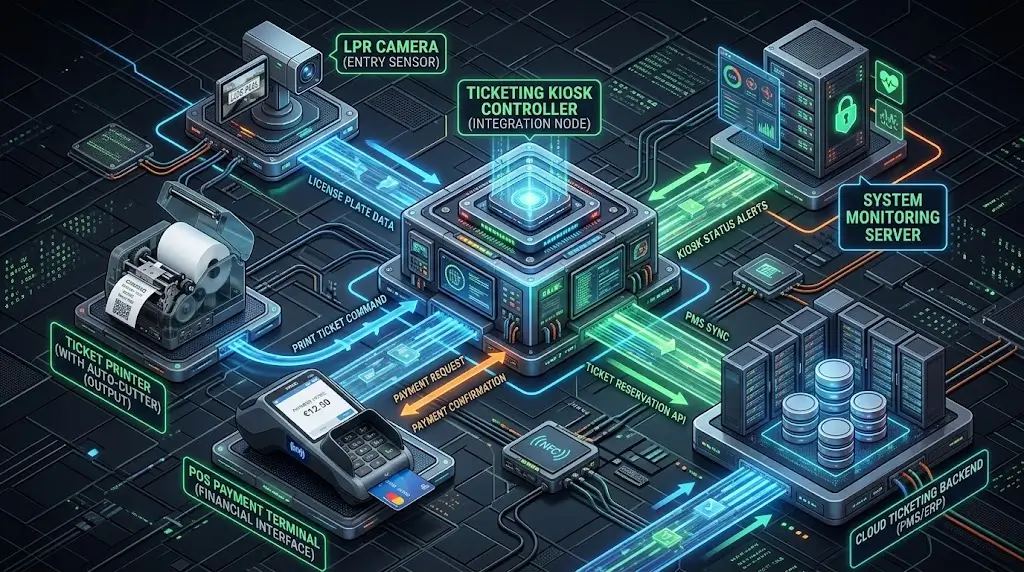
Ticket Kiosk Integration Checklist
Before the hardware and software architecture is frozen, review the complete transaction.
Ticket creation
- Which system creates the credential?
- When does the ticket become active?
- What does your application mean by “Issued”?
- How are reissues or duplicates handled?
Payment
- At what point is payment confirmed?
- What happens if payment succeeds and printing does not?
- Can the original transaction state be recovered after an application restart?
Printing
- Who renders the ticket?
- Is QR/barcode content rendered by the application or generated through supported printer commands?
- Which printer states can the host actually read?
- Has the real ticket layout been printed?
Physical delivery
- Is normal cutter output sufficient?
- Is a presenter required?
- Does the application require ticket-collection feedback?
- Is retract actually required and supported by the selected hardware?
Validation
- Which scanner or validator will read the ticket?
- Has the printed QR/barcode been tested with it?
- Which system makes the final credential-validity decision?
Recovery
- What information is retained after a printer error?
- What information is retained after network loss?
- Can the software distinguish a confirmed failure from an uncertain state?
If these questions cannot yet be answered, the project is not ready to treat ticket printing as a finished integration.
Frequently Asked Questions
What is ticket kiosk integration?
Ticket kiosk integration connects the kiosk application, printing hardware and relevant external systems so that ticket generation, printing, physical delivery and later validation can operate as a controlled transaction. Payment may also be part of that workflow where required.
Does a successfully printed ticket mean the ticket was successfully issued?
Not necessarily. Printing confirms only the physical printing stage according to the feedback available from the printer. The ticketing system may also need to consider credential creation, payment, backend state and physical delivery.
Who should generate the QR code on a ticket?
That depends on the software architecture. The application may render the QR code itself, or a supported printer command may generate the symbol from supplied data. The ticketing system should remain responsible for the actual credential payload.
Why can a QR code look correct but still scan poorly?
QR readability depends on the final printed symbol, including module geometry and the required clear area around the code. DENSO WAVE notes that distorted modules and insufficient surrounding margin can make QR Codes difficult or impossible to read.
Is a readable QR code automatically a valid ticket?
No. Successful decoding means the scanner could read the symbol. The ticketing or validation system still determines whether the credential should be accepted.
Does a kiosk printer with presenter automatically support ticket retract?
No. Presenter and retract are different functions. Retract capability, ticket-taken detection and related status feedback should be confirmed for the exact printer configuration.
What should be tested before deploying a ticket kiosk?
Test the complete ticket lifecycle with the actual or representative printer, paper and validator. Include successful transactions as well as controlled printer, communication, backend and validation failures.
A Ticket Is More Than a Print Job
To the customer, the kiosk transaction may take only a few seconds.
The engineering behind those seconds crosses several systems.
The ticketing platform creates and manages the credential. A payment platform may handle the commercial transaction. The printer produces and delivers the physical ticket. A scanner reads it later, while the validation system decides whether it can be accepted.
A robust kiosk application does not need to pretend those stages are one event.
It needs enough information to know where the transaction is, what has already happened and what remains uncertain when something goes wrong.
That is the difference between proving that a printer works and proving that the ticket issuance workflow works.
If you are developing a ticket vending machine or self-service ticket terminal, send us your ticket format, sample QR/barcode layout, host operating system, printer interface requirements and kiosk layout. We can help evaluate suitable SNROKIOSK printing hardware and provide the available integration resources for prototype development.
Explore Ticketing Solutions
Explore Kiosk Printers
Discuss Your Project