Fixed NFC Reader vs Motorized Card Reader
Self-service systems can use different card reader architectures depending on
how the user presents the credential and how the kiosk needs to handle the card.
A contactless NFC reader module and a motorized card reader solve different
integration requirements.
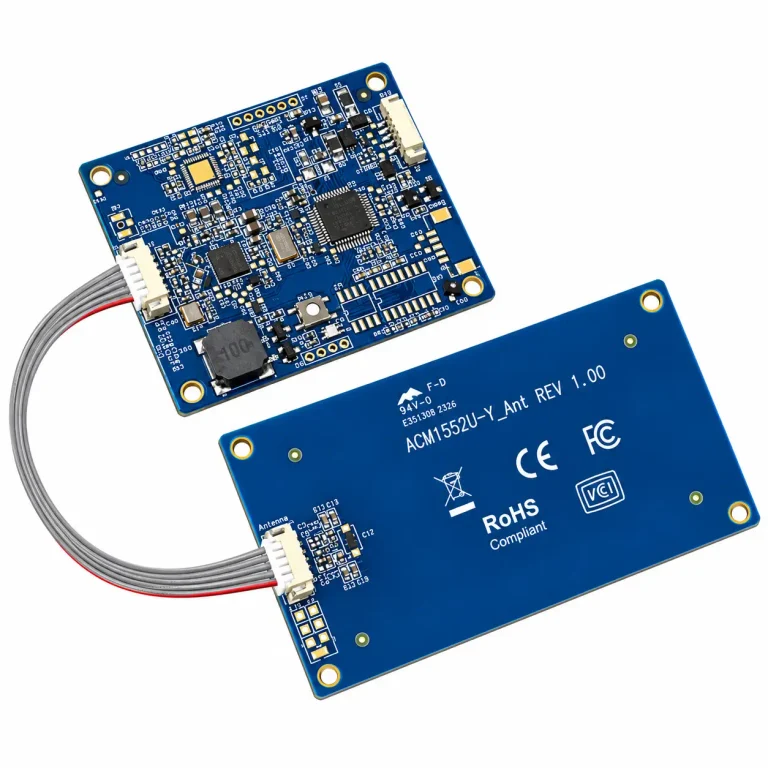
Fixed RFID / NFC Reader Module
A fixed contactless reader allows the user to present an RFID or NFC card
near the antenna without inserting the card into a transport mechanism.
This architecture is suitable for access control, visitor identification,
membership systems, smart lockers and other applications where fast
contactless credential reading is required.
Reader modules with a detachable antenna can also simplify front-panel
integration by allowing the antenna to be positioned close to the
user-facing card area.
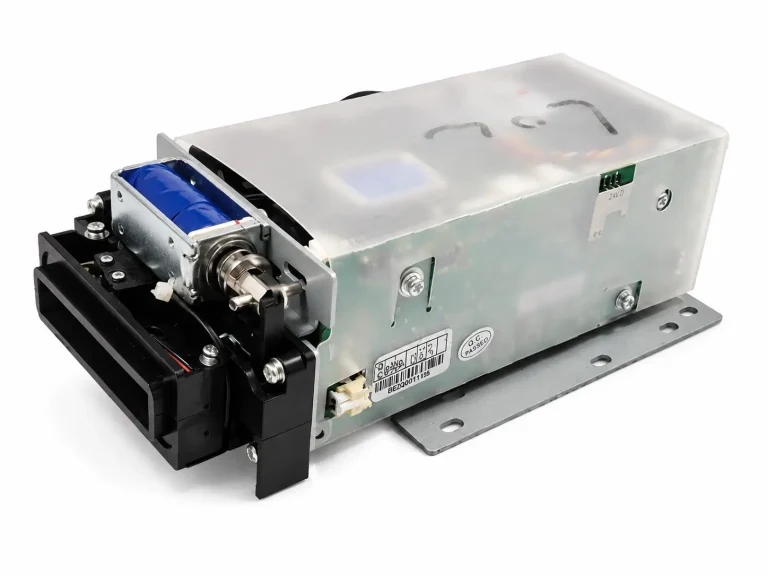
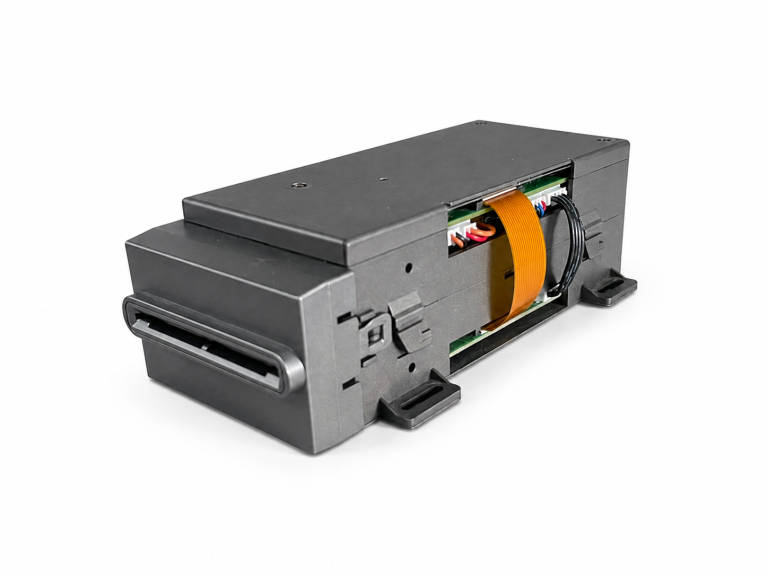
Motorized Card Reader / Writer
A motorized reader accepts a physical card, transports it through the
device and performs the required read or write operation under software control.
This architecture is useful when the kiosk must control card insertion,
process magnetic stripe, contact IC or RFID credentials, and return the
card after the transaction.
Motorized readers are commonly used in unattended terminals where the
application needs tighter control over the physical card-processing workflow.
Card Technology Compatibility
Card reader selection should begin with the actual credential technology rather
than only the physical card size or operating frequency.
RFID / NFC
Confirm the actual contactless standard and card family used by the project,
such as ISO14443, ISO15693, MIFARE, DESFire or another supported technology.
Contact IC
If the application uses contact smart cards, confirm the required IC-card
standard, read/write workflow and security requirements before selecting the reader.
Magnetic Stripe
Multi-technology readers may support magnetic stripe cards in addition
to IC and contactless credentials. Confirm the required track and
read/write functions for the application.
SAM & Security
Some projects require a Secure Access Module for authentication or
protected credential processing. SAM requirements should be confirmed
during the system design stage.
Integration Note:
Supporting the same card frequency does not automatically mean that two readers
are compatible with the same application. Card protocol, security structure,
application data and third-party software compatibility should be evaluated separately.
Card Reader Software Integration
Reader integration depends on the selected hardware, operating system,
communication interface and application workflow. These requirements should
be confirmed before application development begins.
Operating System
Confirm whether the kiosk controller uses Windows, Linux, Android,
macOS or another embedded platform. Supported operating systems vary
by reader model.
Communication Interface
USB, RS232 and other interfaces may be available depending on the model.
The interface should match the industrial PC, embedded controller
or kiosk mainboard.
SDK & Protocol
Check communication documentation, SDK/API availability,
demo software and test tools before integrating the reader
into the host application.
Error Handling
Motorized card-processing applications should consider card position,
transport status, communication errors and recovery logic as part
of the unattended workflow.
Development resources:
SDK & API
·
Test Tools
·
3D Drawings
Mechanical and Antenna Integration
Reader installation should be planned together with the kiosk enclosure.
Reader dimensions, card access direction, antenna location, mounting points,
cable routing and maintenance access can all affect the final design.
Reader Type
→
Card Access
→
Antenna Position
→
Mounting Space
→
Cable Routing
→
Service Access
For contactless readers, the antenna should be positioned where users can present
the credential reliably. Metal panels, installation distance and surrounding
components may affect contactless reading performance.
For motorized readers, allow sufficient space for card insertion, transport,
card return and maintenance. The reader should remain accessible if a card
must be removed manually during servicing.
We recommend using the current dimensional drawing or 3D model for the exact
reader version before the kiosk enclosure design is finalized.
View 3D Drawings →
Card Reader Model Comparison
The appropriate reader depends on whether the kiosk requires fixed contactless
reading or controlled motorized card processing.
| Model |
Reader Type |
Card Technology |
Interface |
Typical Integration |
|
ACM1552U-Y3
|
USB NFC Reader Module |
ISO14443 A/B, ISO15693, ISO18092,
MIFARE, FeliCa, Topaz
|
USB CCID |
Access control, visitor kiosks, NFC terminals
and embedded self-service systems
|
|
SNR-MR800
|
Motorized Multi-Card Reader / Writer |
Magnetic stripe, contact IC,
13.56MHz contactless IC and SAM
|
Project configuration |
Unattended credential processing,
access terminals and multi-technology kiosks
|
|
SNR-MR100
|
Motorized Card Reader / Writer |
Magnetic stripe, contact IC,
13.56MHz contactless IC and SAM
|
RS232 |
Kiosks, access terminals
and automatic card-processing applications
|
Specifications and available configurations vary by model.
Confirm the required card technology, interface and read/write workflow
before final hardware selection.
Card Reader Prototype Integration Checklist
Before approving a reader for production, test the hardware with the actual
cards, host platform and application workflow that will be used in the final kiosk.
1.
Confirm the actual card technology and card samples.
2.
Confirm whether the application requires read-only or read/write operation.
3.
Verify the communication interface and host operating system.
4.
Test the SDK, protocol or application control method.
5.
Check reader dimensions, antenna position and mounting space.
6.
Test actual cards repeatedly under the expected user workflow.
7.
Verify status feedback, error handling and recovery behavior.
8.
Confirm third-party software or credential-system compatibility separately.
Typical Card Reader Applications
Hotel Self Check-in
Read guest credentials or integrate card reading and encoding
into hotel self-service check-in workflows.
Hotel Self Check-in Solution →
Visitor Management
Read visitor credentials and support temporary access-card
processing in unattended registration terminals.
Visitor Management Solution →
Smart Locker Systems
Use RFID or NFC credentials to identify users and control
access to automated locker systems.
Smart Locker Solution →
Access Control Terminals
Integrate contactless or multi-technology credential reading
into self-service access and identity terminals.
Explore Credential Applications →
Card Reader Integration FAQ
What is the difference between an NFC reader and a motorized card reader?
An NFC reader normally reads or writes a contactless credential when the
user presents the card near the antenna. A motorized reader physically
accepts and transports the card through the device so the kiosk can
control the card-processing workflow.
Does a 13.56MHz reader support every RFID card?
No. Operating frequency alone does not determine compatibility.
The card protocol, card family, security structure and application
data requirements must also be supported by the reader and software.
Can the reader write or encode RFID cards?
Read/write capability depends on the selected reader and card technology.
Confirm the exact card type and required encoding workflow before selecting
the hardware.
Do you provide SDKs and integration tools?
SDK/API documentation, communication protocols, demo software and
test tools are available for supported models. Available resources
depend on the selected hardware and host platform.
Can card readers work with Linux or Android kiosks?
Operating-system support depends on the selected reader model.
Confirm the host platform before ordering so the applicable SDK,
driver or protocol resources can be checked.
Does supporting the same card type guarantee compatibility with our existing system?
No. Hardware-level card support and application-level compatibility
are different. Third-party hotel systems, access-control platforms
and proprietary credential applications may require specific software,
security keys or encoding workflows.
What information should we provide before you recommend a card reader?
Please provide the card technology, actual card samples when possible,
required read/write operation, host operating system, communication
interface, kiosk application and expected project quantity.
More technical questions are available in our
Kiosk Hardware FAQ.
Engineering Support for Card Reader Integration
SNROKIOSK supports kiosk manufacturers, system integrators and solution providers
during reader evaluation, prototype testing and host application development.
Depending on the selected model, available engineering resources may include
communication protocols, SDK/API documentation, test software, demo tools,
dimensional drawings and integration assistance.
For projects involving third-party hotel lock systems, access-control platforms
or proprietary credential software, hardware compatibility and application-level
compatibility should always be evaluated separately.
Discuss Your Card Reader Integration
Send us your card technology, read/write requirements, host platform,
communication interface and kiosk application. We can help evaluate
a suitable reader and provide the available SDK, test tools and
mechanical resources for prototype integration.