Hotel Self Check-in Kiosk Integration Checklist: What to Confirm Before Ordering a Sample

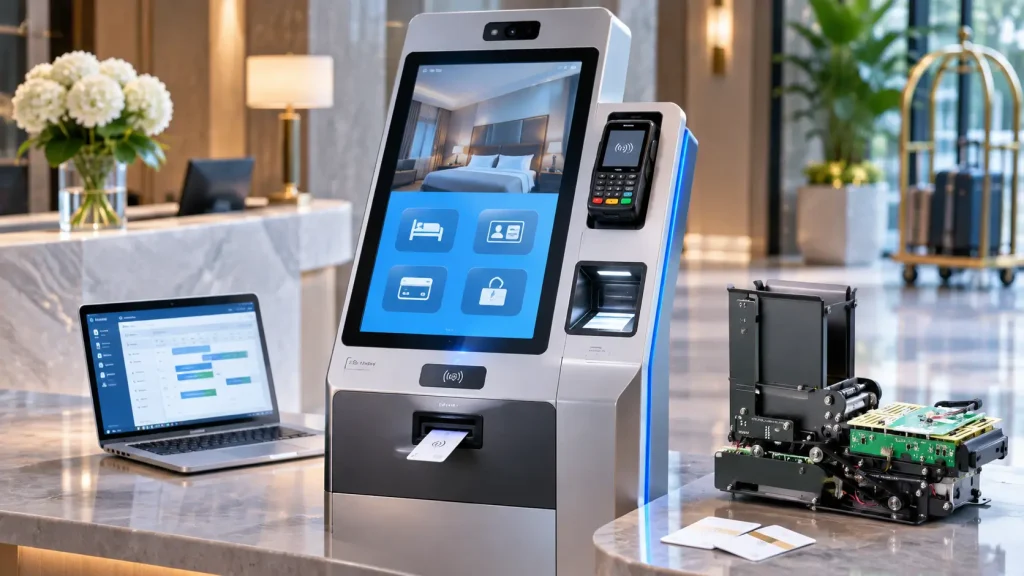
A hotel self-check-in project often starts with a simple request: “We need a kiosk that can check guests in and issue room key cards.”
The hardware itself may not be the biggest challenge. The hotel already has a property management system (PMS), an electronic door-lock system and possibly a payment provider. The real work is getting these systems to communicate with the kiosk application and making sure the correct room key reaches the guest.
A project that initially looks straightforward can change considerably once the customer confirms the encoder model, operating system and card-handling workflow.
For example, a customer may initially request an Android kiosk, only to discover that the hotel’s existing encoder depends on Windows software. Or the team may select a card dispenser before deciding whether returned cards need to be collected or reused.
Neither situation necessarily makes the project unworkable. But both should be addressed before the sample configuration is finalized.
This hotel self check-in kiosk integration checklist covers 12 key decisions to make before ordering hardware, from PMS and encoder requirements to card handling, mechanical integration and sample acceptance testing.
1. Start with Six Questions
Before discussing card capacity, touchscreen size or enclosure design, clarify the basic project requirements.
- Do you need an embedded card dispenser, a desktop key-card issuing unit or a complete self-check-in kiosk?
- Will the guest-facing application run on Windows, Android or another operating system?
- Which PMS will the kiosk connect to?
- Which electronic door-lock system and encoder does the hotel use?
- Does the kiosk require passport or ID scanning and unattended payment?
- Will the kiosk only issue cards, or must it also collect and reuse returned cards?
These questions help determine the hardware format, control architecture and software integration responsibilities.
They also reveal information that may be missing from the initial inquiry.
For instance, a customer might know the hotel lock brand but not the exact encoder model. That is enough to begin a discussion, but not enough to approve the mechanical design.
The first goal is to identify what is already known, what needs engineering review and which party can provide the missing information.
2. Define the Project Scope and Hardware Format
A single-hotel pilot and a multi-property deployment may require different configurations.
Start by confirming the installation country, intended kiosk location, estimated check-in volume, project quantity and rollout schedule.
Also establish whether the kiosk will operate fully unattended or with reception staff nearby.
This affects the hardware design and the way the application should handle exceptions.
Embedded module, desktop unit or complete kiosk?
| Hardware format | Best suited for | Main integration responsibility |
|---|---|---|
| Embedded card dispenser | Kiosk manufacturers with their own enclosure and controller | Mechanical mounting, host communication and card workflow |
| Desktop issuing unit | PMS providers, reception desks and compact self-service stations | Application control, encoder integration and desktop deployment |
| Complete self-check-in kiosk | Hotels and solution providers requiring an assembled hardware platform | PMS, payment, lock-system and application integration |
An embedded module gives the OEM greater freedom over the final enclosure.
A desktop unit reduces the amount of mechanical work required to begin card-issuing tests.
A complete kiosk brings the display, controller and selected peripherals into one coordinated hardware package, although the customer’s application and third-party system interfaces still require integration.
For a detailed comparison, see our Hotel Self-check-in Kiosk Hardware Selection Guide.
The format should be agreed before preparing a detailed quotation.
3. Map the Complete Guest Check-in Workflow
Once the project scope is clear, document what the guest actually needs to do.
A typical workflow may include:
- Select a language.
- Retrieve a reservation.
- Verify guest information.
- Complete the required registration or identity checks.
- Pay any outstanding charges or authorize a deposit.
- Confirm the room assignment and check-in status.
- Generate a valid room-access credential.
- Encode and issue the room key card.
- Display confirmation or print a receipt.
The actual sequence depends on the hotel, PMS, lock system and local operating requirements.
What happens when something goes wrong?
A useful workflow diagram should include failure paths, not just successful transactions.
Suppose the guest completes payment but the encoder cannot write the room key.
The application needs to identify the failed step, preserve the correct transaction state and follow the agreed recovery process.
It should not automatically charge the guest again or issue another card without checking what has already happened.
The same principle applies to interrupted PMS communication, an empty card hopper or a guest who leaves before collecting the card.
Defining these conditions early makes software development and sample acceptance much easier.
4. Hotel Self Check-in Kiosk Integration: Who Is Responsible for What?
A successful hotel self check-in kiosk integration depends on clear responsibilities between the PMS provider, hotel lock system, kiosk software developer and hardware supplier. These responsibilities should be agreed upon before sample testing begins.
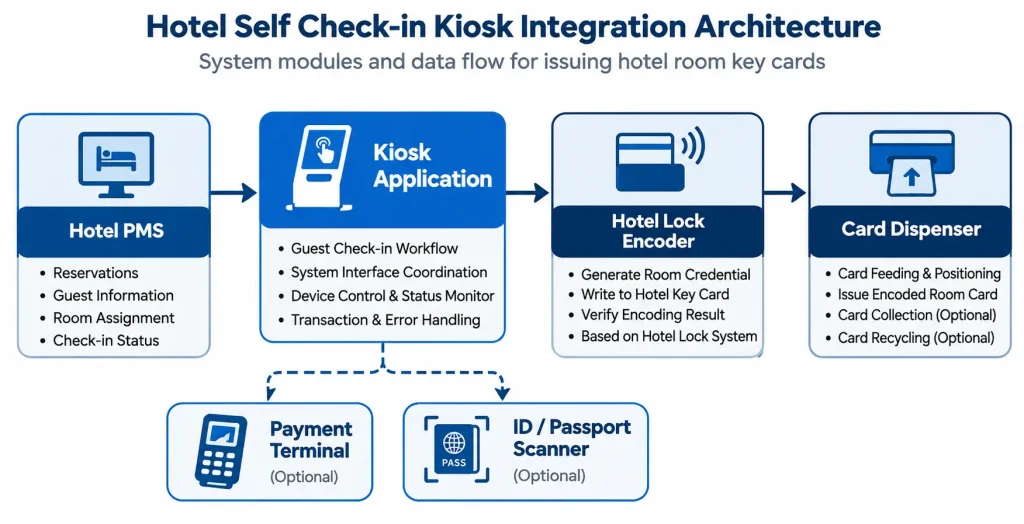
Hotel kiosk integration involves several independent systems. Each needs a clear owner.
| Component | Main function | Typical responsible party |
|---|---|---|
| Hotel PMS | Reservation, guest and room information | Hotel / PMS provider |
| Kiosk application | Guest interface and transaction coordination | Software integrator |
| Door-lock platform | Room-access credential creation | Lock-system provider |
| Hotel encoder | Writing the approved credential to the card | Lock-system provider / integrator |
| Card dispenser | Card feeding, positioning, issuing and collection | Hardware supplier |
| Payment terminal | Payment processing and transaction results | Payment provider / integrator |
| ID/passport scanner | Document reading and data capture | Device supplier / integrator |
| Industrial computer | Application hosting and peripheral connectivity | Kiosk OEM / hardware supplier |
This is a typical allocation, not a universal contractual arrangement.
PMS communication and card encoding are different tasks
The PMS may provide reservation information, room assignment and check-in status.
For hotels using OPERA Cloud, the Oracle Hospitality Integration Platform provides APIs and developer resources for connecting external applications with supported PMS functions. API access and available operations must be confirmed with the hotel and its PMS provider.
The hotel’s lock-management system creates the room-access credential, and the approved encoder writes that credential to the card.
The card dispenser moves the physical card to the encoding position and delivers it after the application confirms the appropriate result.
The kiosk application coordinates these operations.
For a closer look at the hardware and software boundaries, see our Hotel Key Card Encoder Integration Guide.
Before development begins, confirm who supplies the PMS interface, who provides the lock-system SDK and who is responsible for the application that coordinates the complete transaction.
5. Confirm the Actual Hotel Encoder
A hotel may tell you that its room keys use 13.56 MHz RFID or MIFARE technology.
That is useful information, but it does not establish compatibility with the hotel’s door-lock platform.
Different lock systems can use similar card technologies while relying on different security methods, credential structures and software.
For an existing hotel, we generally recommend evaluating the original or approved encoder for the installed lock system.
What information should the customer provide?
Request the encoder’s exact brand and model, physical dimensions or 3D drawing, antenna position, power supply, communication interface and supported software environment.
Where possible, obtain actual room-key cards and the relevant SDK or integration documentation.
Why we ask for the actual encoder
An encoder drawing tells us whether the device may fit inside the card dispenser. It does not tell us whether the card can be encoded reliably.
We also need to check where the antenna sits, how close it needs to be to the card and whether the dispenser can hold the card in the correct position during encoding.
For this reason, we recommend testing with the actual encoder and hotel key cards whenever possible.
If the encoder is supplied by the hotel or its lock-system provider, the customer should also confirm access to the required SDK or software interface.
Mechanical installation and software compatibility are two separate checks.
Example: Third-Party Hotel Encoder Integration with SNR-K750L
The photos below show an actual SNR-K750L card dispenser fitted with a third-party hotel key card encoder.
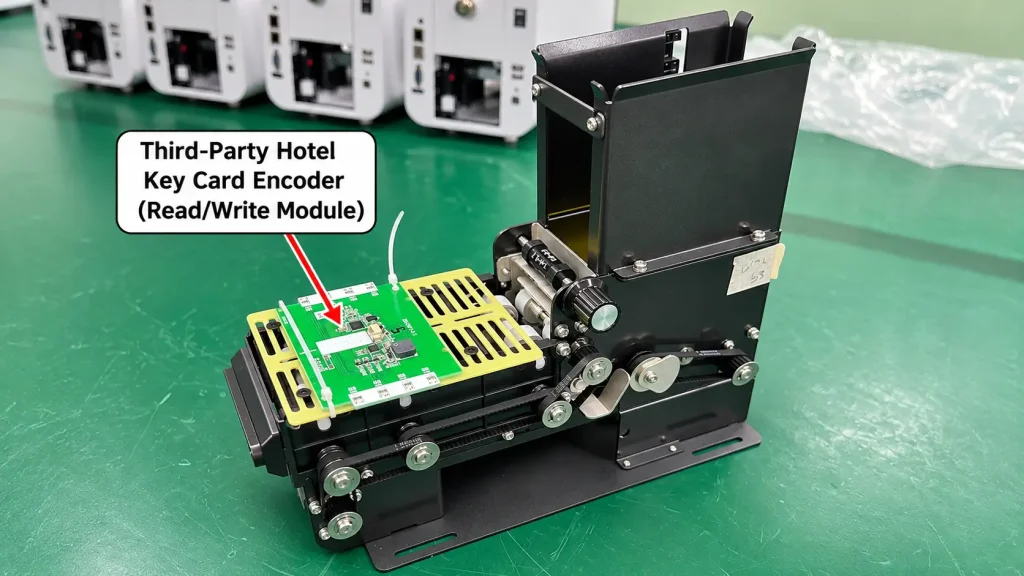
The encoder PCB is mounted above the card transport path using a dedicated mounting plate. This arrangement allows the card to be positioned beneath the encoder during the issuing process.
The photos demonstrate the physical integration arrangement. Final compatibility, including card-to-antenna distance, encoding performance and software communication, must be verified with the selected hotel lock system and actual key cards.
6. Define the Card Issuing, Collection and Recycling Workflow
The next question is what happens to the physical room card throughout its lifecycle.
For a basic check-in application, the kiosk may only need to issue a new card.
Other projects require card collection at checkout, recovery of failed cards or reuse of returned cards.
A typical issuing sequence is:
Feed card → Position card → Encode → Verify result → Dispense
If encoding fails, the application should follow the agreed rejection, collection or retry process.
For reusable cards, the lock-system workflow must also address the validity of previous credentials before reissuance.
Embedded card handling: SNR-K750L
The SNR-K750L card dispensing and recycling module is designed for motorized card dispensing, collection and recycling.
It can be evaluated for hotel projects that require an approved third-party encoder to be installed near the card path.
The dispenser handles physical card movement. Room-key credential generation and writing remain dependent on the selected lock-system encoder and software.
Desktop issuing: SNR-CD760
For desktop hotel key-card issuing projects, the SNR-CD760 offers automatic card dispensing and collection, with optional card recirculation and PC mainboard configurations.
The final hardware and software configuration should be confirmed according to the selected hotel encoder and application requirements.
Neither product should be selected solely because it supports the same physical card size or RFID frequency.
The complete card workflow must be verified with the actual hotel system.
7. Confirm the Software and Controller Architecture
The choice between Windows, Android and Linux should follow the application’s real integration requirements.
A guest-facing application may support one operating system while the hotel lock encoder requires software that runs on another.
For example, an Android-based kiosk may need to communicate with a separate Windows service that controls the hotel encoder.
That can be a workable architecture, but it requires an agreed communication method and additional integration testing.
Before finalizing the controller, confirm:
- Operating system and application version.
- PMS connection method.
- Encoder SDK or middleware requirements.
- Card dispenser communication protocol.
- Required USB, serial and network interfaces.
- Peripheral driver compatibility.
- Device disconnection and restart handling.
- Responsibility for software integration.
SNROKIOSK provides SDK and API resources for supported hardware models.
PMS credentials and API access should be managed through a secure backend service rather than exposed directly in the kiosk’s user-facing application. For OPERA Cloud integrations, refer to Oracle’s API access documentation.
These resources help the customer’s development team control the relevant devices. They do not replace the hotel’s PMS software, lock-management platform or complete kiosk application.
Avoid assuming cross-platform compatibility
If an encoder supplier provides only a Windows SDK, do not describe the encoder as Android-compatible without verifying the intended integration architecture.
A separate Windows controller may be considered, but the communication service, software permissions and transaction handling must be developed and tested.
8. Select the ID Scanner and Payment Terminal Before Finalizing the Enclosure
ID scanners and payment terminals can have a significant impact on the mechanical design.
A small change in device model may require a different mounting bracket, panel opening or cable arrangement.
ID and passport scanner
Confirm which documents need to be supported, the installation country, the scanner model, SDK availability and the intended operating system.
The hotel’s software and compliance team should determine how identity data is processed, retained and protected.
The kiosk hardware supplier can review the physical installation requirements.
Payment terminal
Confirm the payment provider, approved terminal model, dimensions, power supply, communication interface and mounting requirements.
The payment provider and software integrator are responsible for the agreed payment processing workflow.
The kiosk manufacturer may provide the mechanical installation and relevant hardware connections, but this should not be confused with payment authorization or settlement responsibilities.
For customer-supplied devices, providing a 3D drawing or actual sample before production can help avoid enclosure modifications later.
9. Review Mechanical Integration and Maintenance Access
Once the main peripherals are selected, the hardware team can prepare the complete kiosk layout.
Check the card outlet, encoder mounting position, scanner window, payment terminal location, printer paper path, cable routing and service access.
A good mechanical design does more than fit all the devices inside the enclosure.
Hotel staff should be able to refill cards, replace receipt paper, clear accessible jams and service relevant peripherals without unnecessary disassembly.
What if the customer supplies the encoder or scanner?
Where agreed, the customer can provide the actual device for mechanical installation and preliminary testing.
For a hotel encoder, this allows the hardware team to review mounting, card position, cable routing and access.
For an ID scanner, the team can verify the front-panel opening, reading position and mechanical fit.
These checks reduce installation risk, but they do not automatically establish full software or hotel-system compatibility.
10. Build a Sample That Tests the Highest-Risk Interfaces
Before approving a sample, the hotel self check-in kiosk integration team should verify the actual card encoder, operating system, communication interfaces and complete card issuing workflow.
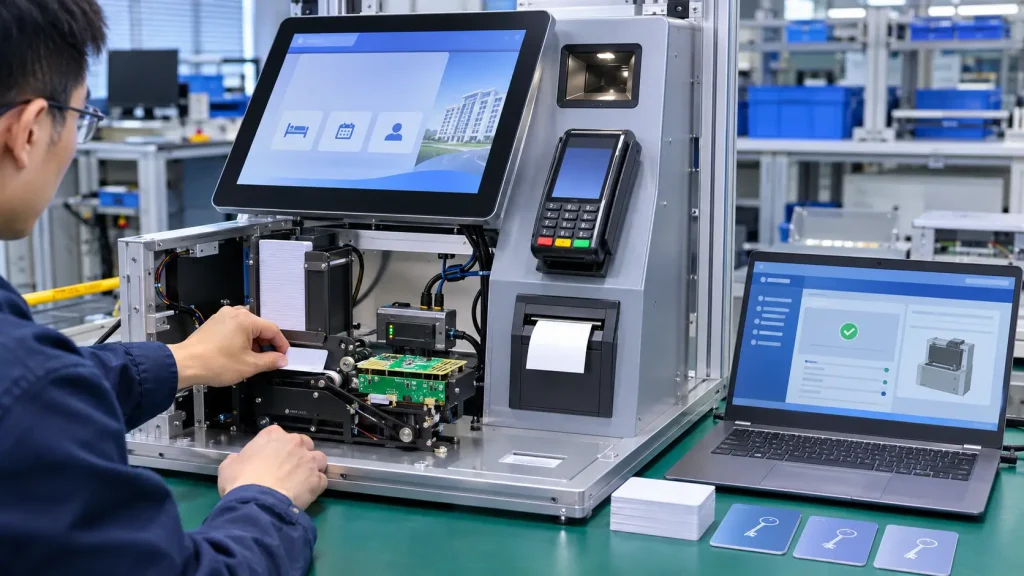
The first sample does not need to reproduce every feature planned for the final rollout.
It should prove the integration points that carry the greatest project risk.
For a hotel key-card issuing system, that usually means confirming that the selected encoder can be installed, the card can be positioned correctly, the approved lock software can write a valid credential and the dispenser can deliver the card after successful encoding.
Once those functions work together, the project team can move on to the remaining guest-facing features and site-specific requirements.
If the PMS or payment interface is not yet available, record those tests as pending.
A successful hardware demonstration should not be presented as approval of the complete hotel check-in system.
Test hardware functions independently first
Before connecting the dispenser to the complete hotel application, the engineering team can use compatible card dispenser test tools to verify basic communication and card movement independently.
This helps distinguish hardware-level issues from problems in the PMS or lock-system integration.
Then repeat the relevant tests using the actual kiosk application.
11. Agree on the Sample Acceptance Criteria
The sample acceptance plan should define the expected result of each test.
A practical starting point is:
| Test scenario | Expected result |
|---|---|
| Reservation retrieval | Correct guest and booking information |
| Card feeding | One card moved to the intended position |
| Encoder positioning | Card aligned with the approved encoder |
| Room-key writing | Credential written and verified |
| Door-lock validation | Issued card opens the assigned room |
| Card dispensing | Correct card delivered to the guest |
| Encoding failure | Failed card and transaction handled correctly |
| Card depletion | Supported status detected and handled |
| Peripheral disconnection | Application follows the agreed recovery procedure |
| Payment interruption | Transaction status reconciled with the payment provider |
| System restart | Pending operation safely resolved |
| Card collection or recycling | Configured workflow completed correctly |
| Maintenance | Required devices and consumables remain accessible |
Not every project requires every test.
The final list should reflect the selected hardware, actual interfaces and agreed guest workflow.
Some tests can be performed at the factory. Others require access to the hotel’s live or approved test environment.
Record the result, responsible party and outstanding issues for each case.
12. Prepare the RFQ and Supplier Handover Package
By this stage, the project team should have enough information to request a meaningful hardware quotation.
The RFQ should include:
| Requirement | Information to provide |
|---|---|
| Hardware format | Embedded module, desktop unit or complete kiosk |
| Application | Operating system and software owner |
| PMS | Brand, version and available interface |
| Door-lock system | Brand, system generation and encoder model |
| Cards | Type, dimensions, thickness and actual samples |
| Card workflow | Issuing, collecting, recycling and failed-card handling |
| ID scanner | Required model or document-reading requirements |
| Payment terminal | Approved model and mounting drawing |
| Receipt printer | Paper format and output requirements |
| Mechanical design | Available space, drawings and service requirements |
| Project volume | Sample quantity and estimated rollout |
| Testing | Required acceptance criteria and responsible parties |
The quotation should distinguish standard hardware from optional modules, customer-supplied devices and project-specific customization.
It should also make clear which party is responsible for PMS, lock-system and payment software integration.
A well-defined RFQ helps the customer compare suitable configurations rather than comparing prices for equipment with different integration scopes.
Frequently Asked Questions
What information is needed before ordering a hotel self-check-in kiosk sample?
Start with the hardware format, operating system, PMS, door-lock system, encoder model, card workflow and required peripherals. Encoder drawings, card samples and project quantities will help the hardware supplier prepare a more accurate proposal.
Can a card dispenser encode hotel room keys by itself?
The card dispenser handles physical card movement. Room-key encoding requires the appropriate encoder and software supported by the hotel’s lock-management system.
Can the SNR-K750L work with our existing hotel encoder?
Integration may be possible, depending on the exact encoder dimensions, antenna position, communication interface and software requirements. The actual encoder and cards should be evaluated before confirming compatibility.
Does the SNR-CD760 include an internal computer?
The SNR-CD760 can be configured with an optional PC mainboard. The appropriate configuration depends on the customer’s application and encoder integration requirements.
Can an Android kiosk work with a Windows-based hotel encoder?
Potentially. A separate Windows controller or service may be used, but the software architecture and communication method must be developed and verified for the project.
Who is responsible for PMS integration?
The customer’s software team, PMS provider or appointed system integrator normally handles PMS connectivity. The hardware supplier provides supported device interfaces and integration resources.
Can SNROKIOSK install our hotel encoder before shipment?
For suitable projects, the customer can provide the selected encoder or mechanical drawings for installation review. Mechanical fit and card positioning can be checked before shipment, while final credential compatibility must be verified with the hotel lock system.
What should the first sample prove?
It should validate the highest-risk interfaces, especially card positioning, encoder operation, valid room-key issuance, dispenser control and the agreed error-handling workflow.
Planning a Hotel Self Check-in Kiosk Project?
A hotel self-check-in kiosk works best when the hardware configuration is selected around the hotel’s existing systems rather than the other way around.
Before ordering a sample, confirm the PMS, door-lock encoder, application environment and card-handling workflow. These decisions determine which hardware configuration is appropriate and what needs to be tested.
At SNROKIOSK, we support kiosk OEMs, PMS providers and system integrators with motorized card dispensers, card collection and recycling modules, desktop key-card issuing units, embedded printers and customized hardware integration.
We can help review the card-handling architecture, encoder mounting, peripheral configuration and mechanical design for your project.
To get started, share your required hardware format, operating system, PMS, door-lock brand, encoder model and estimated project quantity.
If you already have encoder drawings, scanner drawings or card samples, include them in your inquiry.
Explore our Hotel Self Check-in Kiosk Hardware Solution or contact SNROKIOSK to discuss your project.