
How to Integrate a Hotel Door Lock Encoder with a Self Check-in Kiosk
A hotel key card dispenser does not replace the property's door-lock encoder. This guide explains how the PMS, lock system, original RFID encoder and card dispenser work together, and what to confirm before building a self-check-in kiosk.

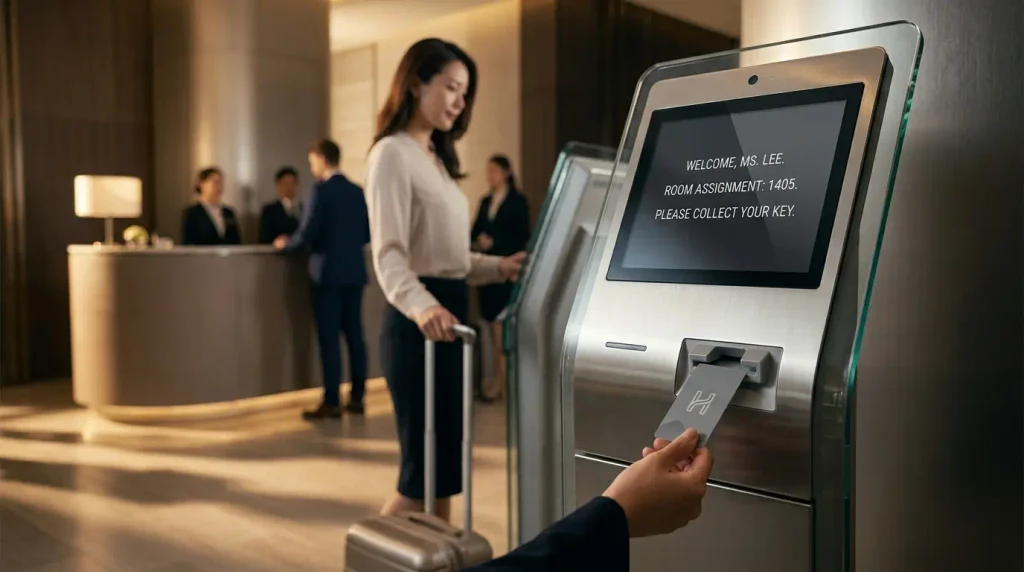
A hotel self-check-in kiosk can verify a reservation, scan an ID, take payment and issue a room key without asking a receptionist to handle each step. The room-key stage, however, is often misunderstood during early project discussions.
We regularly receive enquiries that say, “Our hotel uses 13.56 MHz MIFARE cards. Can your dispenser encode them?” The card information is useful, but it does not answer the main compatibility question.
A card dispenser and a hotel key card encoder do different jobs. The dispenser stores and moves the physical card. The encoder supplied for the hotel’s door-lock system writes the room-access data. A successful kiosk project has to coordinate both devices with the property management system and the lock-management software.
This article explains that architecture, the practical way to mount a compact hotel encoder in a card dispenser, and the information an integrator should collect before ordering hardware.
The short answer
For most hotel projects, use the compact RFID encoder supplied or approved for the property’s existing door-lock system. Install that encoder at the card dispenser’s encoding position. The dispenser moves a blank card into place and holds it still; the lock-system encoder writes the room number, validity period and permitted access; the dispenser then releases the completed key card to the guest.
Do not select an encoder only because it operates at the same RFID frequency as the card. Confirm the lock brand, lock-management system, encoder model, credential type, software interface and physical mounting requirements.
A MIFARE card type is not a complete compatibility answer
Two hotel projects may both use 13.56 MHz cards and still require different encoders and software.
MIFARE describes a family of contactless credential technologies. A property might use MIFARE Classic, Ultralight, Ultralight C, Plus or DESFire. Even when two systems use the same card family, the room-key data structure, security keys and card-issuing workflow may be different.
A generic reader may detect a card and read its UID. That does not mean it can create a valid room key. To make a working key card, the system may need access to:
- the door-lock vendor’s encoding format;
- the property’s security keys;
- the correct lock-system database;
- room and common-area access rules;
- arrival and departure dates;
- vendor software, services or licensing;
- a secure access module, depending on the credential platform.
This is why a hardware supplier should not promise hotel-lock compatibility based only on “MIFARE,” “RFID” or “13.56 MHz.” Those details confirm part of the radio technology, not the complete room-key issuing process.
The five parts of an automatic room-key issuing system
The cleanest way to plan the project is to separate the system into five parts.
| Component | Main responsibility |
| Hotel PMS | Holds the reservation, guest, room, rate and check-in status |
| Lock-management system | Creates the access rights required for the assigned room and stay period |
| Original or approved RFID encoder | Writes the lock-system data to the physical credential |
| Kiosk application | Coordinates the guest journey and controls the handoff between systems and devices |
| Card dispenser | Stores, separates, transports, positions, dispenses and, where required, collects cards |
The exact software connection varies by project. In some hotels, the kiosk application communicates directly with both the PMS and the door-lock system. In others, a middleware service handles one or both connections. The encoder may connect locally by USB, through the hotel network, or through the lock vendor’s controller.
The important point is that the card dispenser does not need to understand the door-lock vendor’s private encoding format. It needs to move the card accurately and expose clear device states to the kiosk application.
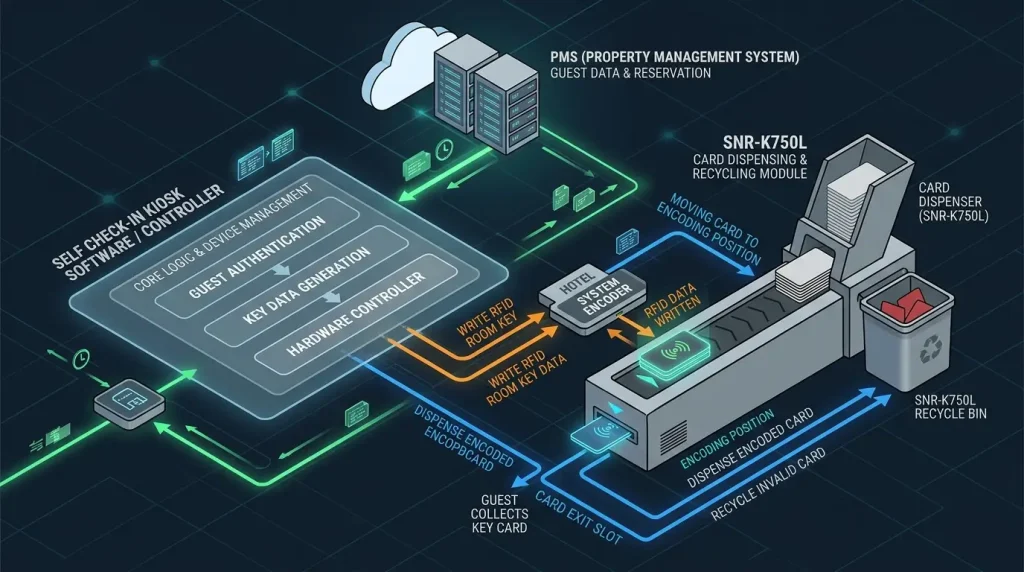
What happens during card issuance
A typical sequence looks like this:
- The guest retrieves a reservation with a QR code, confirmation number or name.
- The kiosk completes the required identity, registration and payment steps.
- The PMS confirms the room assignment and updates the check-in status.
- The kiosk application asks the card dispenser to feed one blank card.
- The dispenser moves the card to the encoding position and holds it there.
- The lock-management system sends the room-key data to its encoder.
- The encoder writes and, where supported, verifies the credential.
- After a successful result, the application tells the dispenser to present the card.
- If encoding fails, the application retries, retains the card or moves it to a collection area according to the agreed error logic.
Steps eight and nine matter. A dispenser should not release a card merely because it reached the writing position. The control workflow needs a clear success or failure result from the encoding side.
Why the hotel’s existing lock-system encoder is usually the safest choice
Hotels rarely replace their door locks just to add a self-check-in kiosk. The new kiosk is normally expected to work with the lock platform already installed at the property.
Using the original or vendor-approved encoder has several practical advantages:
- It works within the hotel’s existing credential and security configuration.
- It keeps room-key creation under the lock vendor’s software and access controls.
- It avoids asking the card-dispenser supplier to reproduce a private encoding method.
- It gives the hotel a clearer support route when the lock system is upgraded.
- It reduces the risk of a card being readable at the kiosk but invalid at the guest-room door.
Well-known systems from ASSA ABLOY/Vingcard, dormakaba/Saflok, Onity, SALTO and MIWA have their own credential-issuing hardware and software. The available encoder varies by product generation and regional configuration. Some are compact USB devices; others use Ethernet, PoE or a vendor controller. Brand name alone is therefore not enough to approve the mechanical design.
Ask for the exact encoder model.
How a compact encoder can be installed in an embedded card dispenser
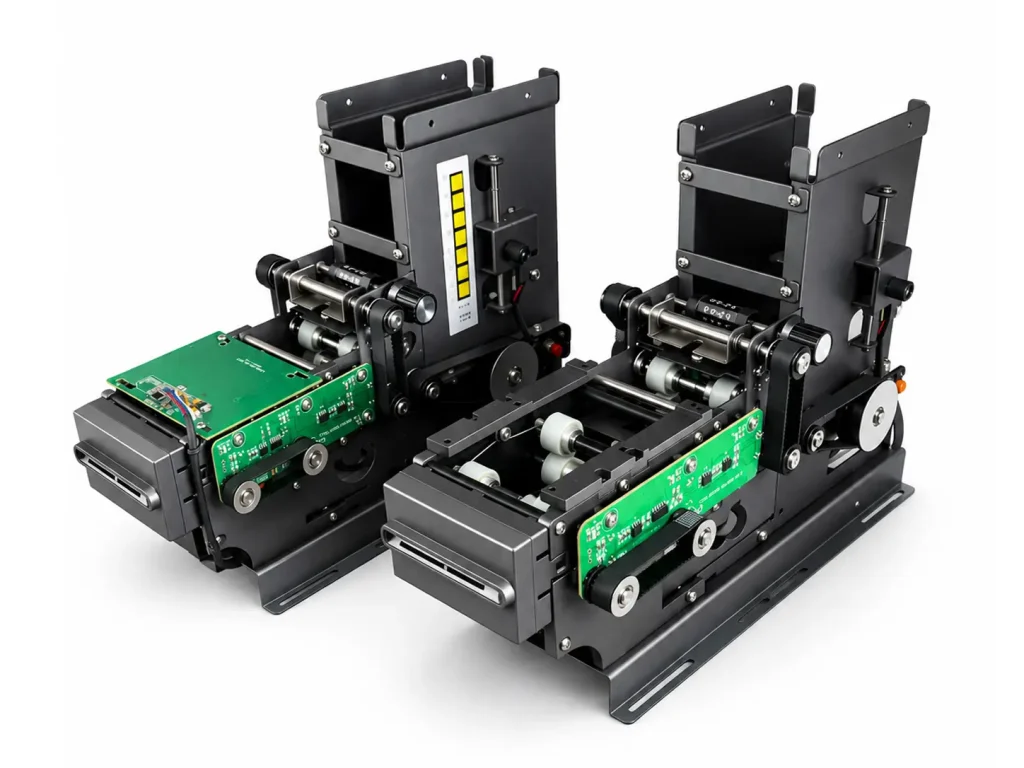
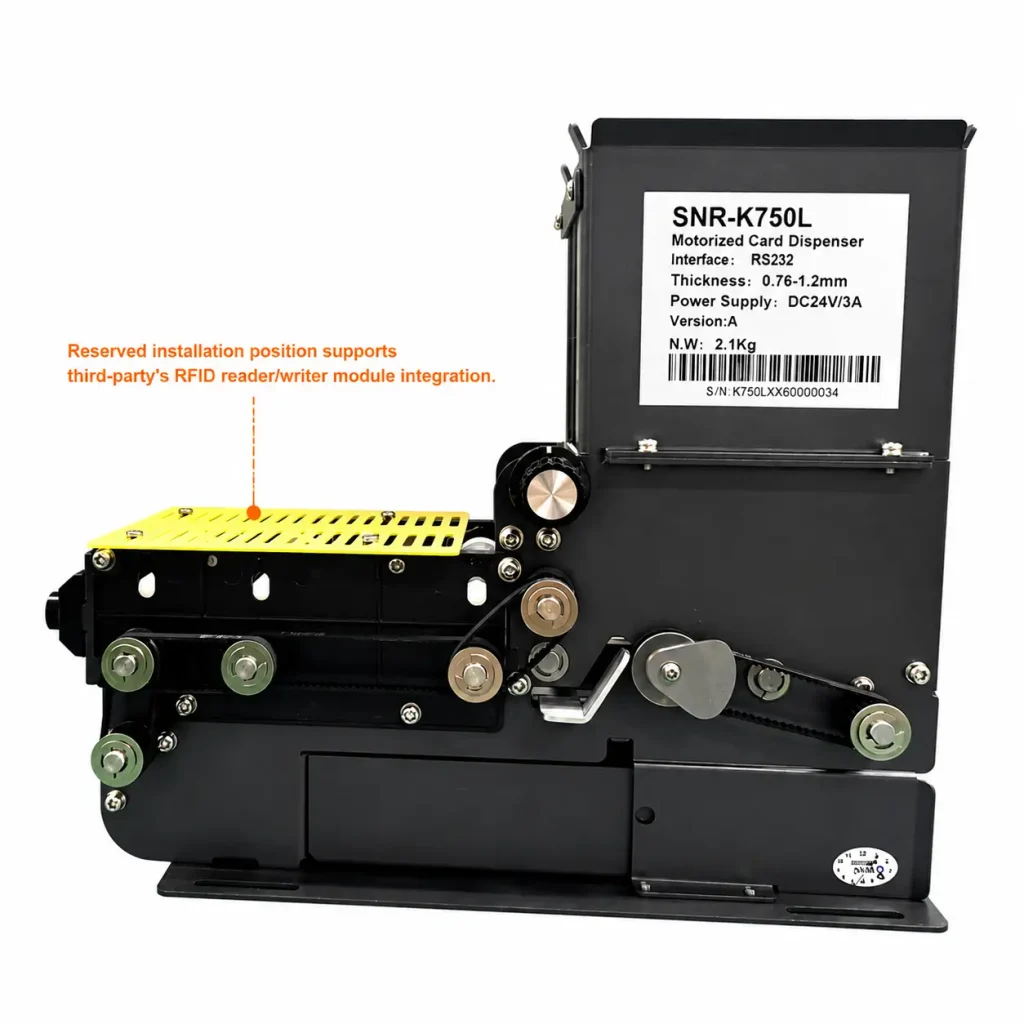
The SNR-K750L is an embedded card dispensing, collecting and recycling module used inside hotel kiosks and desktop issuing units. Above its card path is a removable, slotted plastic mounting plate intended for a compact third-party RFID encoder.
During operation, the K750L moves the card beneath this plate and holds it at the defined writing position. The hotel’s encoder is mounted above the card path, with its active antenna area aligned to the card. After encoding is completed, the K750L moves the card to the outlet.
The plastic plate serves two purposes. It provides a practical surface for mounting or adapting the encoder, and it avoids placing a solid metal barrier between the antenna and the card. The slots also allow different fixing arrangements and help keep the antenna close to the credential.
The encoder does not always need to be a bare PCB. A small enclosed encoder can also work if:
- its active reading face can sit close to the card path;
- its body fits within the available space;
- its cable can exit without interfering with card movement or servicing;
- the manufacturer permits the intended mounting orientation;
- the reading and writing distance remains stable;
- nearby metal, motors and power components do not cause interference.
For a new encoder model, mechanical fit should be confirmed from a drawing and then verified with the physical device. A dimensionally correct installation can still fail if the antenna centre is offset from the stopped card.
Encoder examples: what can and cannot be assumed
The following examples are useful for early planning, but they are not a universal compatibility list.
ASSA ABLOY / Vingcard
Vingcard offers RFID encoding equipment for systems such as Visionline and Vostio. Current and legacy encoders do not all have the same enclosure, interface or installation requirements. A full-featured encoder with a display is a different mechanical proposition from an earlier compact unit.
Before designing the mounting plate, confirm the property’s access-management system, encoder part number, dimensions and connection method.
Dormakaba / Saflok
Dormakaba provides RFID encoders for its lodging access-management platforms, including Saflok and Ambiance configurations. Depending on the system, the encoder may use USB or network connectivity.
For a kiosk project, confirm the exact GEN II or other encoder variant, the credential type and the way the hotel application receives an encoding result. If the customer already owns the encoder, using that physical unit for the first installation test is preferable to working from a product name alone.
Onity
Onity’s OnPortal platform works with a compact RFID encoder. Onity publishes a compact encoder format with USB connectivity and optional network arrangements for supported configurations. Its small footprint makes it a useful reference when planning an internal mounting area, although the exact device still needs to be checked for the project.
SALTO
SALTO uses devices such as NCoder within its credential-management environment. SALTO also works with self-check-in technology partners, showing that automated key-card issuance is a supported project pattern when the software and access platform are correctly integrated.
SALTO projects may involve MIFARE or DESFire credentials, security configuration and vendor-specific issuing permissions. Mechanical installation of the encoder is only one part of the work.
MIWA
MIWA’s hotel card-issuing systems use compact encoders for guest and staff credentials. As with the other brands, confirm the lock-system generation, encoder model and credential technology before finalising the hardware.
Information to request before approving the installation
The following information is normally enough for a first mechanical and integration review.
Door-lock system
- Lock brand
- Lock model or product family
- Lock-management software and version
- Existing PMS-to-lock connection, if any
Encoder
- Exact model and part number
- Photos from the top, bottom and cable side
- Overall dimensions
- Mechanical or 3D drawing
- Antenna centre or recommended card placement
- Recommended reading/writing distance
- Required mounting orientation
- USB, serial, Ethernet, PoE and power requirements
Card
- Card size and thickness
- RFID chip family and exact variant
- Sample blank cards
- Whether returned cards will be erased and reused
Software
- PMS brand and version
- Door-lock API, SDK, service or interface available to the kiosk application
- Encoding command and response flow
- Timeout and retry requirements
- What signal confirms successful encoding
- Who supplies and supports the lock-system integration
If the selected encoder or ID scanner is not available locally, the customer can send the devices to the kiosk manufacturer. They can then be installed and mechanically tested before shipment. This often saves time during the first on-site deployment.
Mechanical checks that should not be skipped
1. Align the antenna, not just the enclosure
The centre of the plastic housing is not always the centre of the RFID antenna. Ask the encoder supplier for the recommended card position or find it through controlled testing.
2. Control the distance between encoder and card
RFID writing is usually more demanding than simply detecting a card. Keep the distance short and repeatable, and include the thickness of the encoder housing and mounting plate in the calculation.
3. Keep metal away from the active area
A solid metal plate close to a 13.56 MHz antenna may reduce performance or change its tuning. Use a suitable non-metallic opening or mounting surface around the active area.
4. Provide adjustment
Slotted holes, a replaceable adapter plate or another adjustable fixing method makes it easier to align different encoder models without changing the main dispenser structure.
5. Leave room for service
The encoder, cable and mounting plate should be removable without dismantling the entire card transport. Hotel equipment is serviced on site, so access matters as much as the first installation.
Software responsibilities should be agreed before the sample is built
Many hardware discussions reach the sample stage before anyone has decided which application controls the sequence. That creates avoidable delays.
The project team should agree on:
- which system starts the encoding request;
- whether the encoder is controlled directly or through the lock-management platform;
- how the card dispenser reports that a card is in position;
- how encoding success or failure is returned;
- who sends the final dispense command;
- how long the application waits before a timeout;
- what happens to a failed card;
- whether two room keys are issued in one transaction;
- how returned cards are cleared before reuse.
Protocols such as FIAS may be part of the communication between a PMS, middleware and another hotel system. They are not automatically the communication protocol of the physical card dispenser. An embedded dispenser such as the K750L is controlled separately through its device interface, while the hotel software coordinates the overall process.
Failure handling is part of the design
A demonstration usually shows a successful card. A production system also needs predictable behaviour when something goes wrong.
| Failure | Recommended system response |
| No blank card available | Stop the transaction, alert the guest and report low/empty card status |
| Card does not reach the encoding position | Retry transport where safe; otherwise retain the card and raise a device error |
| Encoder is offline | Do not dispense an unencoded card; direct the guest to assistance |
| Encoding fails | Retry according to lock-vendor guidance, then collect or quarantine the card |
| PMS or lock-system timeout | Keep the card inside until transaction status is known |
| Guest does not take the card | Hold, retract or collect it according to the dispenser configuration and security policy |
| Returned card cannot be prepared for reuse | Move it to the collection area rather than returning it to the blank-card supply |
The kiosk application should log both the software transaction and the dispenser state. When support teams investigate a failed check-in, they need to know whether the problem occurred in the PMS, lock platform, encoder or card transport.
What to test before a batch rollout
A first sample should be tested with the actual hotel encoder, actual cards and, where possible, the intended software stack.
Recommended tests include:
- repeated card feeding and positioning;
- encoding with the card at the centre and edges of the allowed tolerance;
- issuing one and two cards for the same room;
- opening the assigned guest-room door;
- opening permitted lifts or common areas;
- rejecting access after the checkout time;
- encoding timeout and retry behaviour;
- encoder disconnection during a transaction;
- card jam and recovery;
- empty hopper and low-card detection;
- uncollected card handling;
- returned-card collection and reuse;
- power interruption and restart;
- extended cycling before approving production.
Do not treat “the encoder read one card successfully” as completion of the test. The aim is a repeatable issuing workflow that the hotel can support after installation.
A practical pre-order checklist
Before ordering the card dispenser or completing the kiosk design, confirm the following:
- [ ] Hotel door-lock brand and model
- [ ] Lock-management software and version
- [ ] Compact RFID encoder model
- [ ] Encoder dimensions or 3D drawing
- [ ] Encoder antenna position and writing distance
- [ ] Card size, thickness and chip type
- [ ] PMS and door-lock software interfaces
- [ ] Encoding-success and failure signals
- [ ] Card-dispenser command sequence
- [ ] Failed-card and uncollected-card handling
- [ ] Number of cards issued per stay
- [ ] Collection and recycling requirement
- [ ] Sample test plan and responsible parties
Related guide: If you are still deciding between an embedded card dispenser, desktop issuing unit and complete kiosk, see our guide to choosing hotel key card issuing hardware.
Final recommendation
Treat room-key encoding as a system-integration task, not as a checkbox on the card dispenser specification.
Start with the hotel’s existing door-lock brand and management system. Select the compact encoder supplied or approved for that system. Then verify the encoder’s mechanical fit, antenna position, connection method and software control sequence with the dispenser.
For projects using the SNR-K750L, the removable plastic plate above the card path provides an adaptable position for a compact hotel RFID encoder. Share the encoder model, dimensions or 3D drawing before production. If required, the physical encoder can be sent to us for installation and card-positioning tests before the equipment is shipped.
Frequently Asked Questions
Can a generic 13.56 MHz RFID reader encode a hotel room key?
Not necessarily. It may be able to detect or read the card, but a valid hotel room key also depends on the lock system’s data format, security keys, software and authorisation. For an existing hotel, the original or vendor-approved lock-system encoder is normally the safer choice.
If the card is MIFARE, is the dispenser automatically compatible?
No. MIFARE identifies a family of credential technologies. Confirm the exact chip, card dimensions and thickness for physical handling, and confirm the lock-system encoder and software for room-key creation.
Can the hotel’s existing encoder be installed inside the kiosk?
Often, yes, if it is a compact encoder and its dimensions, antenna position, writing distance and cable routing suit the available mounting area. The exact encoder model should be reviewed before the kiosk structure is finalised.
Does the encoder need to be supplied without an enclosure?
No. A compact enclosed encoder may be installed if its active face can be positioned close enough to the card and the enclosure does not prevent secure mounting or servicing. A bare module is not always required.
What does the SNR-K750L control?
The K750L controls the physical card process: storage, separation, transport, positioning, dispensing, collecting and recycling. The hotel lock encoder and its software control the room-key data written to the card.
Can the SNR-K750L work with Vingcard, SALTO or dormakaba encoders?
The K750L provides an adaptable mounting position for compact third-party encoders, but compatibility must be confirmed by exact encoder model. Mechanical installation does not by itself confirm software integration or door-lock vendor certification.
Can SNROKIOSK install the encoder before shipment?
Yes. The customer can provide the selected encoder, installation drawing or physical sample. We can prepare the mounting plate, install the unit and test card positioning before shipment. Door-lock software configuration and final room-access tests still require the relevant hotel and lock-system environment.
Does the card dispenser communicate through FIAS?
Usually not directly. FIAS may be used between the PMS, middleware or hotel systems. The card dispenser uses its own device communication interface, while the kiosk application coordinates card movement with the PMS and lock-encoding process.
What should be tested before ordering a larger quantity?
Test the actual card, encoder and software together. Include repeated feeding, card positioning, successful door opening, write failures, timeouts, uncollected cards, card collection, recycling and recovery after power loss.
Planning a hotel room-key issuing project?
Send us the door-lock brand, encoder model, room-card type and the equipment format you need: an embedded module, a desktop unit or a complete self-check-in kiosk. We can review the card path, encoder mounting and hardware configuration before sample testing.