
Card Dispensing Kiosk Hardware Architecture: From Card Hopper to Card Output
A practical engineering guide to card-dispensing kiosk architecture, covering the card path, dispenser, reader or encoder, host controller, reject/recycle logic, maintenance access and software responsibility boundaries.

A practical hardware integration guide for kiosk manufacturers and system integrators.
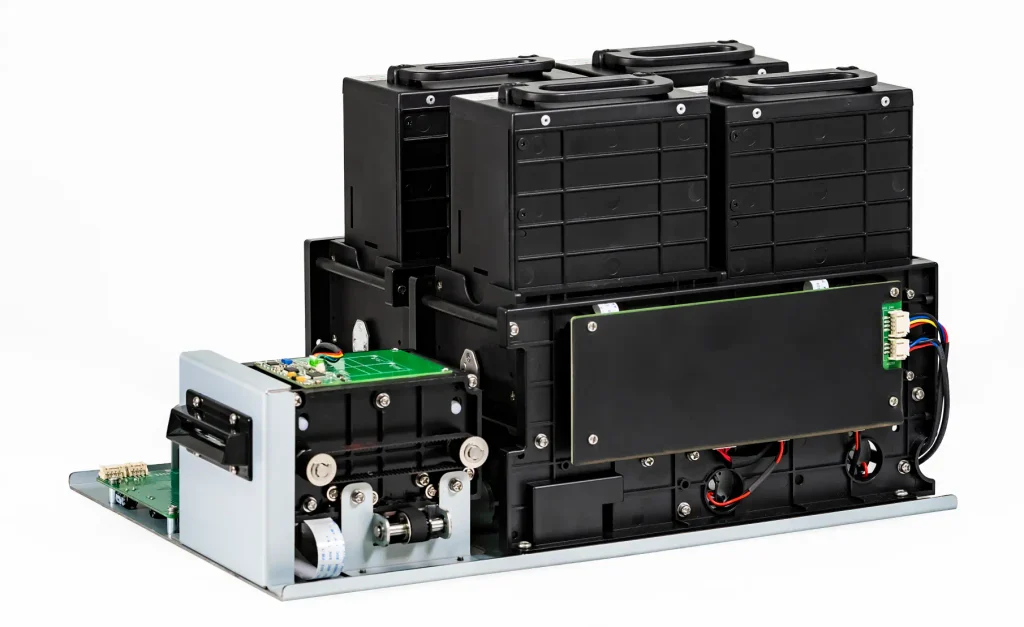
A card dispensing kiosk involves more than a card dispenser installed inside a cabinet. It requires a coordinated hardware architecture covering card storage, feeding, transport, optional reading or encoding, host control, power distribution and the final card destination.
For kiosk manufacturers and system integrators, the main engineering challenge is to make sure that every component works together within the intended card-handling workflow.
A hotel kiosk may need to issue a new room key and accept a returned card for reuse. A parking kiosk may dispense an RFID card at the entrance and collect it separately at the exit. A telecom SIM kiosk may need to identify different card carriers using barcodes and select the correct card from multiple hoppers.
These applications all involve card dispensing, but their hardware architectures are not identical.
This guide explains how to structure a card dispensing kiosk, define the physical card path, select the appropriate reader or encoder arrangement, and verify the hardware before finalizing the kiosk design.
Quick Answer: What Does a Card Dispensing Kiosk Need?
A typical card dispensing kiosk includes:
- A card dispenser with a suitable hopper and feeding mechanism
- A host controller or industrial PC
- A supported communication interface and device control resources
- A suitable power supply and electrical connections
- A defined card transport and output path
- Optional card readers, RFID modules or third-party encoders
- Separate collection, reject or recycling paths when required by the application
The kiosk application coordinates the transaction, while the dispenser controls the supported physical card-handling operations.
The correct configuration depends on whether the project needs simple card issuing, card issuing with separate collection, reusable-card recycling, card reading or encoding, or multiple card types.
1. Start with the Complete Kiosk Hardware Architecture
Before selecting a dispenser, identify the main hardware and software layers.
A typical system can be represented as follows:
System Control Layer
Business Application
↓
Kiosk Host / Industrial PC
↓
Supported Communication Interface
↓
Card Dispenser Controller
Physical Card Handling Layer
Card Hopper
↓
Card Feeding and Separation
↓
Card Transport Path
↓
Card Processing Position
↓
Final Card Routing
Optional Card Processing
RFID Reader / Writer or Third-Party Encoder
Possible Card Destinations
- Present to the user
- Separate collection box
- Reject-card collection box
- Reusable card supply, where recycling is supported
The reader or encoder may be integrated into the dispenser or installed as a separate module, depending on the project architecture.
Power distribution is a separate part of the design. The host computer, card dispenser and optional reader or encoder must each receive the power required by their own specifications.
This architecture helps the engineering team distinguish three different responsibilities:
- The kiosk application manages the business transaction.
- The host communicates with the hardware and coordinates the workflow.
- The card-handling mechanism performs the supported physical operations.
When evaluating available hardware, start with our card dispensers for self-service kiosks to compare the different card-handling configurations.
2. Design the Physical Card Path
The physical card path is one of the most important parts of a card dispensing kiosk.
Before choosing the hardware, define what happens to a card from the moment it leaves the hopper until the transaction is completed.
2.1 Card Storage and Hopper
The hopper stores the cards before they are issued.
The following information should be confirmed:
- Card width and length
- Card thickness and manufacturing tolerance
- Card material and surface condition
- Required hopper capacity
- Number of card types
- Card loading direction
- Expected replenishment frequency
Where standardized identification cards are used, ISO/IEC 7810:2019 provides a reference for physical card characteristics and dimensions.
However, compliance with a card standard does not automatically guarantee compatibility with a particular dispenser.
Actual card samples should be tested before final hardware approval, especially when cards use unusual materials, coatings, embossing or non-standard construction.
2.2 Card Feeding and Separation
After the host application requests a card, the dispensing mechanism moves an individual card from the hopper into the transport path.
Different card dispensers use different mechanical feeding structures.
The mechanism must be evaluated according to the actual card dimensions, thickness, material and operating requirements.
Do not assume that all motorized card dispensers use the same feeding method.
2.3 Card Transport
Once a card is separated from the supply, it travels through the internal card path.
The required transport arrangement depends on the intended workflow.
Some kiosks only need to move a card directly to the user outlet.
Others need to stop the card at an internal processing position for reading or encoding before it is issued.
For these projects, the following should be confirmed:
- Card travel direction
- Required stopping position
- Card alignment
- Reader or encoder mounting location
- Mechanical clearance
- Final card outlet position
2.4 Card Processing Position
If the kiosk needs to identify, read or personalize a card, the card may need to stop at a defined processing position.
At this stage, the reader or encoder performs its supported electronic operation.
The host application then determines what should happen next based on the available result.
Mechanical positioning and electronic card processing are separate functions and should be tested independently before full workflow validation.
3. Choose the Correct Card Handling Configuration
The most important selection decision is whether the kiosk only needs to issue cards or also needs to accept and reuse returned cards.
Three configurations are common.
Configuration A: Card Issuing Only
The dispenser stores and issues cards to users.
This is suitable when cards are pre-personalized or when card processing is handled separately.
Typical applications include:
- Preloaded membership cards
- Visitor credential issuing
- Pre-encoded access cards
- SIM card distribution
If the project requires failed-card handling, confirm whether the selected configuration also provides an appropriate collection path.
Configuration B: Card Issuing with Separate Collection
In this arrangement, the dispenser issues cards and stores returned, rejected or retained cards in a separate collection area.
The collected cards are not automatically returned to the reusable card supply.
For example, the SNR-K750C Motorized RFID Card Dispenser supports automatic card issuing and controlled card collection, with optional RFID reading and writing integration.
This configuration can be suitable for parking, visitor management and access-control applications where card issuing and separate collection are sufficient.
Configuration C: Card Issuing with Recycling
A recycling architecture is required when accepted returned cards need to be reused.
The SNR-K750L Card Dispenser & Recycling Module supports:
- Automatic card issuing
- Returned-card acceptance
- Reusable-card recycling
- Separate reject-card collection
Accepted returned cards can be routed back into the reusable card supply for subsequent issuing.
Invalid, failed or designated cards can instead be routed into a separate reject-card collection box.
This is particularly useful for hotel key card systems, visitor card circulation and other reusable credential applications.
Card collection and card recycling are not the same function. The selected hardware must provide the required physical card paths.
4. Select the Reader or Encoder Arrangement
Not every card dispensing kiosk needs an integrated RFID reader or encoder.
The correct arrangement depends on what the application needs to do with the card.
| Project Requirement | Possible Hardware Arrangement |
|---|---|
| Issue pre-personalized cards | Dispenser without an additional reader |
| Read an existing card | Separate reader or compatible integrated reader |
| Read or write cards before issuing | Compatible reader/writer or encoder |
| Use an existing hotel lock system | Compatible third-party hotel-lock encoder |
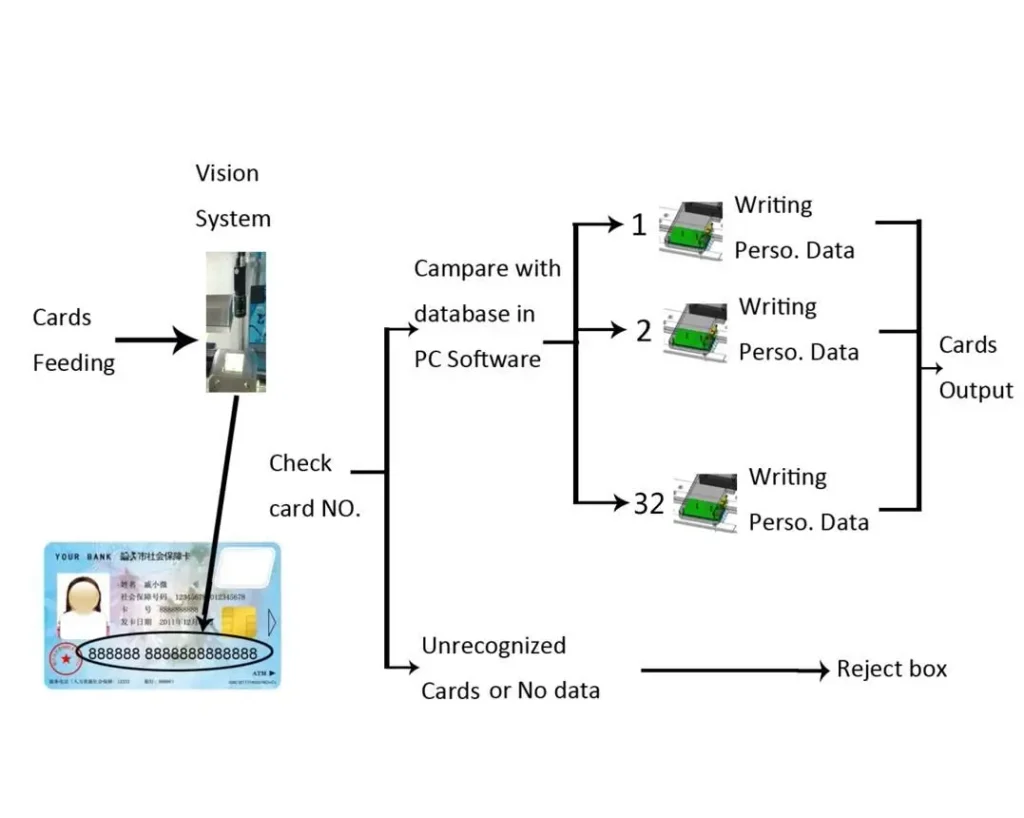
| Identify card carriers using barcodes | Separate barcode scanner and suitable dispensing arrangement |
For hotel projects, the original compatible encoder required by the existing door-lock system should be evaluated.
Using the same RFID frequency or card family does not automatically mean that a generic RFID reader can encode a valid hotel room key.
The encoder’s dimensions, antenna position, reading distance, communication interface and software requirements should be confirmed before the kiosk enclosure is finalized.
For more detailed reader and dispenser integration architectures, see our Card Reader and Card Dispenser Integration Guide.
For hotel-specific requirements, refer to our Hotel Key Card Encoder Integration Guide.
5. Plan the Host Controller and Communication Interfaces
The host controller connects the card dispenser to the kiosk application.
Depending on the project, the host may be an industrial PC, embedded computer or another supported computing platform.
Before selecting the controller, confirm:
- Operating system: Windows, Linux or Android
- Available USB and serial interfaces
- Required RS232 or other communication connections
- Compatible SDK or communication protocol
- Available drivers and development resources
- Device status and error information
- Required communication converters or intermediate controllers
Communication Interface and Protocol Are Different
RS232 or USB defines how a device communicates with the host.
The communication protocol defines the commands, responses and information exchanged through that interface.
An RS232 connection alone does not guarantee that the device is compatible with the customer’s application.
The selected hardware model, protocol, SDK and host environment must all be checked together.
For a deeper explanation of command control, device status and communication handling, see our Card Dispenser Communication Protocol Guide.
The application remains responsible for coordinating the complete card transaction rather than simply sending a dispensing command and assuming that the entire workflow has succeeded.
6. Design the Power and Electrical Architecture Separately
Power requirements should be confirmed during hardware selection, not after the kiosk enclosure and wiring layout have been finalized.
A card dispensing kiosk may contain several electrical loads:
- Industrial PC or embedded host
- Card dispenser
- RFID reader or encoder
- Barcode scanner
- Display and touchscreen
- Payment terminal
- Other connected peripherals
Each device must receive the voltage and current specified for its own configuration.
Important considerations include:
Power Supply Capacity
Calculate the power budget using the actual electrical specifications of all selected modules.
Pay particular attention to peak current and operating conditions rather than relying only on idle current.
Separate Data and Power Connections
An RS232 interface is used for serial communication and does not supply the dispenser’s operating power.
Similarly, a USB connection should not be assumed to provide sufficient power unless the specific device is designed and documented for USB-powered operation.
Power Distribution
Check connector types, cable specifications, grounding requirements and the distribution arrangement inside the kiosk.
Startup and Operating Loads
Consider the power requirements when the host, dispenser and other peripherals start or operate at the same time.
The final power supply selection should be based on the verified specifications of the complete hardware configuration.
Do not assume that a power supply suitable for one card dispenser model will automatically support another.
7. Mechanical Integration: Design for Installation and Maintenance
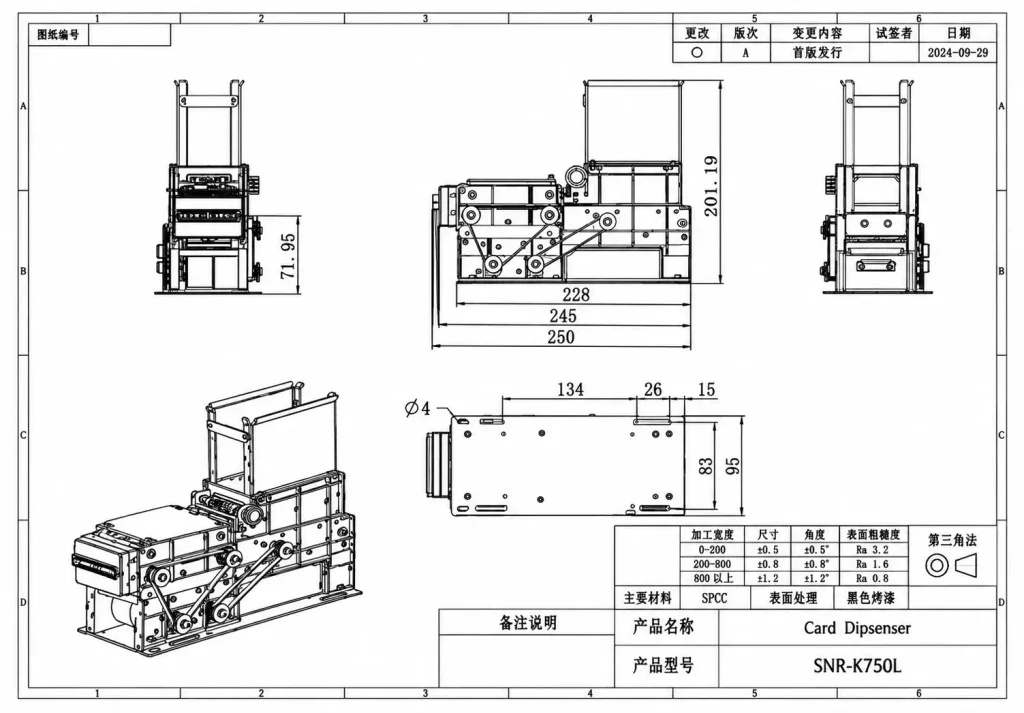
A card dispenser may work correctly on a test bench but encounter mechanical problems after installation inside the kiosk.
The enclosure should therefore be reviewed using the actual hardware drawings and, where available, 3D models.
Card Outlet Alignment
The dispenser outlet must align with the external card opening.
Check the card presentation direction, opening dimensions and clearance around the outlet.
Hopper Loading Access
The service team needs enough space to load cards and inspect the card supply.
Confirm the hopper loading direction and whether the hopper can be accessed without removing other kiosk components.
Reader and Encoder Clearance
If a reader or encoder is installed inside the dispenser, check its physical dimensions, mounting arrangement, antenna position and required card-processing location.
Collection and Reject Box Access
Collection and reject boxes should be accessible for routine maintenance.
The enclosure should allow technicians to remove or empty the boxes without unnecessary disassembly.
Cable Routing
Route power and communication cables away from moving mechanisms and card transport paths.
Serviceability
Before finalizing the enclosure, simulate these maintenance tasks:
- Refill the card hopper.
- Remove a collected or rejected card.
- Inspect the card transport path.
- Access the reader or encoder.
- Disconnect and replace the dispenser module.
Mechanical drawings and available technical documents can be obtained through our Download Center.
8. Define the Card Outcome and Failure Recovery Paths
The kiosk application should know what is expected to happen after each card-handling operation.
A successful transaction and a failed transaction may require different physical card destinations.
Consider the following situations:
| Situation | Design Consideration |
|---|---|
| No card available | Check the supported card-supply status and prevent an invalid issuing request |
| Card feeding error | Use the device’s documented status and recovery procedure |
| RFID reading or encoding failure | Do not treat the card as successfully processed |
| User does not take the card | Define the application response and check whether the selected hardware supports the required behavior |
| Collection box full | Define how the kiosk should respond when the condition is reported or detected |
| Power interruption | Establish the actual card and device state before continuing |
| Communication loss | Confirm the available device status before deciding whether to retry |
One important point is that a communication timeout does not necessarily mean that the card has not moved.
The card may already be inside the mechanism or partly presented at the outlet.
The application should avoid blindly repeating a previous command without checking the available device information.
The exact recovery behavior depends on the selected model, protocol and supported status functions.
The objective is simple:
Every card transaction should have a defined outcome, including failed or interrupted operations.
9. Select the Card Dispenser Architecture for Your Application
Different applications require different card-handling arrangements.
| Application | Typical Hardware Direction | Main Design Consideration |
|---|---|---|
| Hotel Self Check-In | Dispenser, compatible lock encoder and recycling where required | Room key encoding and returned-card reuse |
| Parking Entry / Exit | Dispenser, reader or encoder, separate collector where required | Card issuing and returned-card collection |
| Visitor Management | Dispenser, reader or encoder, collection or recycling | Temporary credential issuing and return |
| Telecom SIM Kiosk | Suitable dispenser, barcode scanner or SIM reading module | Card carrier size, identification and multiple SIM types |
| Access Control | Dispenser and compatible card reader/writer | Credential personalization and collection |
| Multi-Product Card Kiosk | Multi-hopper dispenser and host control | Selecting the correct card source |
For hotel self-check-in applications, see our Hotel Self Check-In Kiosk Hardware Integration Solution.
For parking applications, see our Parking Kiosk Hardware Integration Solution.
For SIM card applications involving barcode identification and different carrier formats, see our Telecom SIM Kiosk Hardware Solution.
The correct configuration should always be selected according to the actual card type, user workflow and installation requirements.
10. Prototype Validation Before Bulk Ordering
After selecting the hardware architecture, verify the complete configuration using actual cards and a representative kiosk installation.
We recommend dividing the prototype evaluation into four areas.
10.1 Card Compatibility
Check:
- Actual card dimensions
- Card thickness and tolerance
- Card material and surface condition
- Hopper loading
- Feeding and transport behavior
- Returned-card compatibility where applicable
10.2 Mechanical Validation
Check:
- Mounting position
- Card outlet alignment
- Reader or encoder clearance
- Collection and reject box access
- Cable routing
- Maintenance access
10.3 Electrical and Communication Validation
Check:
- Operating power
- Peak current requirements
- Host interface
- SDK or protocol availability
- Device initialization
- Supported status information
10.4 Complete Workflow Validation
Test the actual sequence required by the project:
- Card issuing
- Reading or encoding, where required
- Card verification
- User presentation
- Returned-card collection
- Recycling, where supported
- Reject handling
- Power and communication interruption recovery
The test quantity and acceptance criteria should be agreed according to the application and expected deployment conditions.
There is no universal number of test cycles that guarantees compatibility for every project.
Our Card Dispenser Test Tools can help verify basic device communication and supported card-handling functions during prototype development.
11. How SNROKIOSK Supports Card Dispensing Kiosk Projects
SNROKIOSK provides card dispensing and card-handling hardware for kiosk manufacturers, OEMs and system integrators.
Our solutions cover different project requirements, including:
- Automatic card issuing
- Card collection
- Reusable-card recycling
- RFID reading and writing options
- Third-party encoder integration
- Multi-hopper card dispensing
- Hardware configuration and mechanical integration
Depending on the selected model and agreed project scope, we can provide:
Technical Documentation
Product datasheets, user manuals, electrical specifications and mechanical drawings.
SDK and Communication Resources
Available SDKs, APIs, communication protocols and development documentation for supported models.
Demo and Test Software
Tools for verifying basic communication and supported hardware operations before full application integration.
Prototype Integration Support
Technical assistance with hardware selection, card compatibility, installation requirements and prototype testing.
You can access the available resources through our Card Dispenser SDK and Communication Resources.
SNROKIOSK focuses on hardware supply and related integration support. The customer’s kiosk application, business workflow, PMS, payment backend and other third-party software remain the responsibility of the customer or appointed software integrator unless a separate scope has been agreed.
Frequently Asked Questions
What is the difference between card dispensing, card collection and card recycling?
Card dispensing moves a stored card to the user. Card collection routes a returned or retained card into a separate collection area. Card recycling returns an accepted card to the reusable supply so it can be issued again. These functions require different physical card paths.
Does every card dispenser include an RFID reader?
No. Some dispensers are designed for card issuing only, while others support optional integrated readers or third-party encoder installation. The required card technology and workflow should be confirmed before selecting the hardware.
Can I use my existing hotel card encoder with a kiosk dispenser?
Potentially, yes. The encoder model, physical dimensions, mounting position, antenna location, card-processing position and software interface should be evaluated. Hotel lock systems may require their original compatible encoder or approved encoding method.
Does RS232 communication mean the dispenser is compatible with any kiosk application?
No. RS232 defines the communication interface, not the command protocol or application software. The host application needs the correct protocol or SDK for the selected device.
How do I choose between SNR-K750C and SNR-K750L?
The SNR-K750C is suitable when the project needs card issuing and separate collection of returned or failed cards. The SNR-K750L is designed for reusable-card workflows, allowing accepted returned cards to be recycled into the card supply while invalid or failed cards are handled separately.
What information should I provide for a card dispenser hardware evaluation?
Please provide your card dimensions and thickness, card material, required workflow, reader or encoder model, hopper quantity, host operating system, communication interface, available installation space and required card output, collection or recycling functions.
Planning a Card Dispensing Kiosk Project?
Selecting a card dispenser is only the first step. The complete architecture must also account for card processing, power, communication, mechanical installation and the final card-handling workflow.
If you are developing a hotel, parking, visitor management, access control or telecom SIM kiosk, share your card specifications and project requirements with SNROKIOSK.
We can help evaluate suitable card dispensing configurations, provide available technical documentation and support your team during hardware selection and prototype integration.