Ticketing Kiosk Acceptance Testing: A Practical FAT, SAT and Commissioning Guide

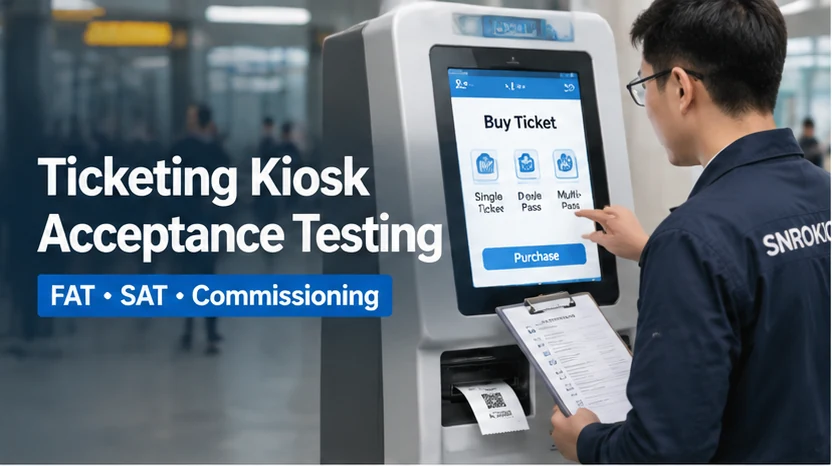
Ticketing kiosk acceptance testing is essential to verifying that a self-service ticketing system works as expected before deployment.
The printer produces a clear ticket. The touchscreen responds correctly. The scanner reads a QR code. Everything looks fine during a quick demonstration.
But what happens when a payment is approved and the printer stops working? What if a customer walks away without collecting the ticket? Can the application identify the printer fault, recover the transaction and prevent an unintended duplicate ticket?
These are the kinds of questions that should be answered before a ticketing kiosk is approved for deployment.
For kiosk manufacturers and system integrators, acceptance testing is not simply a final check that all installed devices can power on. It is a structured process for verifying that the hardware, software, peripherals and external systems work together according to the agreed project requirements.
This guide explains how to organize Factory Acceptance Testing (FAT), Site Acceptance Testing (SAT) and commissioning for a self-service ticketing kiosk, with particular attention to printer integration, ticket delivery, transaction handling and system handover.
1. Understand What FAT, SAT and Commissioning Actually Cover
These activities are related, but they are not interchangeable.
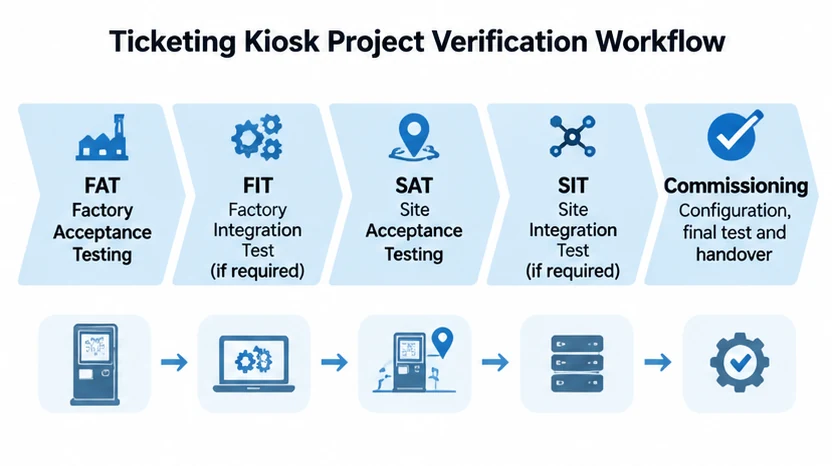
Factory Acceptance Testing (FAT) is performed before shipment to verify that the assembled equipment meets the agreed technical and functional requirements.
Site Acceptance Testing (SAT) takes place after installation to check that the equipment works correctly under the actual site conditions and with the intended external systems.
Commissioning covers the activities required to configure, test and prepare the installed system for operation.
For larger integration projects, a separate Factory Integration Test (FIT) or Site Integration Test (SIT) may also be appropriate when several subsystems need to be verified together.
The project agreement should define the scope, responsibilities and acceptance criteria for each stage.
| Stage | Main objective | Typical checks |
|---|---|---|
| FAT | Verify the assembled kiosk before shipment | Hardware configuration, interfaces, printing and application functions |
| FIT | Verify subsystem integration at the factory, if required | Communication between host, peripherals and controllers |
| SAT | Verify the installed system at the customer’s site | Actual power, network, backend and peripheral connections |
| SIT | Verify integration between site-level systems, if required | Kiosk, ticketing backend, payment and validation infrastructure |
| Commissioning | Prepare the equipment for operational use | Configuration, functional checks, issue resolution and handover |
IEC 62381:2024 provides a useful reference for organizing FAT, FIT, SAT and SIT activities, particularly where responsibilities are shared between the owner, buyer and supplier.
It was developed for process-industry automation systems, however, so it should not be treated as a mandatory ticketing kiosk standard. Its testing and documentation principles can be adapted to the actual project.
2. Prepare the Acceptance Criteria Before Testing Starts
One of the most common causes of disagreement during project acceptance is that different parties have different ideas about what constitutes a successful test.
The printer supplier may consider a test successful when a ticket is printed and cut correctly.
The software integrator may expect the application to receive printer status information and update the transaction accordingly.
The ticketing operator may require proof that the customer received the correct ticket and that the backend recorded the transaction successfully.
All three perspectives matter.
Before FAT begins, prepare a test plan that identifies the expected behavior of each component and the complete system.
At a minimum, the test documentation should include:
- Approved hardware configuration and bill of materials.
- System architecture and interface definitions.
- Software and firmware versions.
- Test cases and expected results.
- Test equipment and required test media.
- Responsible personnel and witnesses.
- Pass/fail criteria.
- Defect recording and retest procedures.
- Required acceptance records.
Each test case should have a clear expected result.
For example, instead of writing “test ticket retract,” define the exact sequence: print a ticket, leave it uncollected, allow the configured retract condition to occur, verify that the ticket is retracted and check how the application records the result.
The timeout, software response and transaction treatment must be agreed before the test begins.
This makes the result measurable rather than subjective.
3. Verify the Hardware Configuration During FAT
Before testing individual functions, confirm that the assembled kiosk matches the approved design.
A typical ticketing kiosk may include:
- Industrial computer or embedded controller.
- Touchscreen display.
- Thermal ticket printer.
- QR or barcode scanner.
- RFID reader, where required.
- Payment terminal, where applicable.
- Network equipment.
- Power supplies and distribution.
- Mechanical enclosure and mounting hardware.
Check the actual model numbers, interfaces and configurations against the approved bill of materials.
Pay particular attention to the following:
Hardware identification
Record the installed model and revision of each critical device. Any substitution should be reviewed and approved before acceptance.
Electrical connections
Check the power supply, connector assignments, cable routing and grounding arrangements against the approved electrical design.
Communication interfaces
Confirm that the host computer uses the correct USB, RS-232, Ethernet or other supported interfaces for each peripheral.
Mechanical installation
Check mounting brackets, alignment, fasteners, connector clearance and access to service panels.
Software environment
Record the operating system, device drivers, firmware and relevant application versions.
The purpose of this stage is to establish exactly what is being tested. If the tested configuration differs from the equipment that will be delivered, the FAT results may no longer represent the final product.
For compatible printer models, system integrators can also review the available printer SDK and software integration resources before finalizing the host application and communication interface.
4. Test the Complete Ticket Printing and Delivery Process
Printing is a central function in most ticketing kiosks, but the acceptance test should cover the entire process from print command to customer delivery.
The test procedure depends on the selected printer and its paper-handling mechanism.
Printing and cutting
Use the actual ticket artwork and approved paper stock whenever possible.
Check:
- Text and graphic clarity.
- QR code and barcode readability.
- Ticket dimensions.
- Paper feeding consistency.
- Cutting position.
- Full-cut or partial-cut behavior, as required.
Test representative ticket lengths rather than relying on a single sample.
If the project uses preprinted paper, black marks or a specific ticket layout, include those materials in the test.
For thick or fan-fold media, use the printer model designed for that paper specification. Do not assume that a printer tested with ordinary receipt paper will perform identically with thicker ticket stock.
Presenter and ticket collection
For unattended applications, the ticket delivery mechanism can be just as important as printing quality.
A presenter controls how the printed ticket is delivered to the customer. It can hold the ticket at the output position and support a controlled collection process.
The SNR-KP802-VX is an 80mm kiosk thermal printer with integrated Presenter and Retract Ticket functionality.
Its Retract function can be enabled or disabled through the printer setting tool. For software integration, SNROTEK can also provide control code that customers can integrate into their own application to manage the Retract function.
This gives the system integrator flexibility when defining ticket collection behavior.
During FAT, test the following sequence according to the approved configuration:
- Send a print command from the host application.
- Verify that the ticket is printed correctly.
- Confirm that the ticket is cut as configured.
- Check that the presenter delivers the ticket to the output position.
- Allow the customer to collect the ticket and verify the normal completion sequence.
- Repeat the test without collecting the ticket.
- Verify that the configured retract behavior is executed.
- Check the printer response and application transaction record.
The retract timeout, trigger conditions and application response should be agreed for each project. They should not be assumed to be identical across different software platforms.
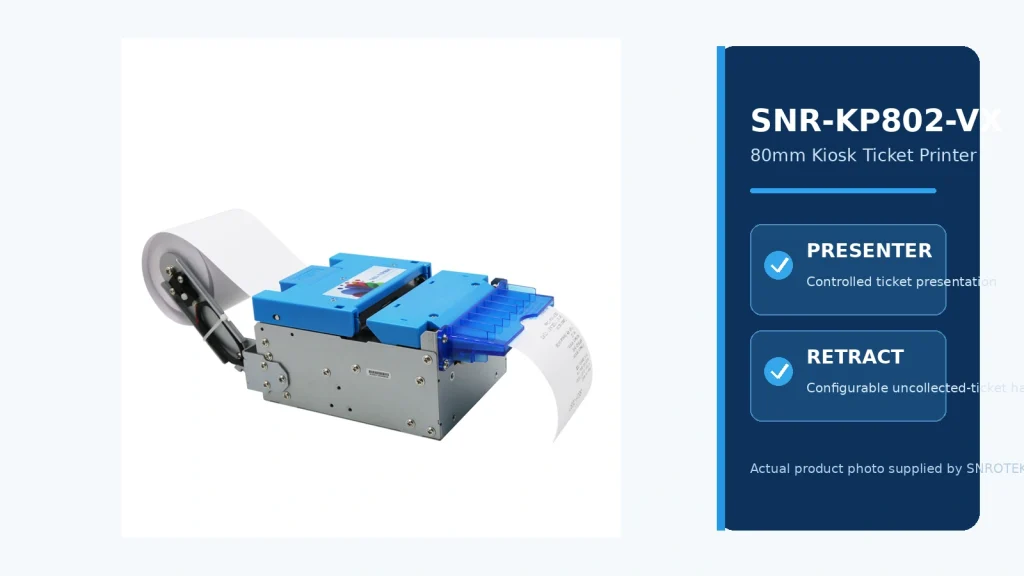
For detailed specifications, see the SNR-KP802-VX 80mm Presenter Kiosk Printer and its product integration information.
To see how the presenter and retract mechanisms operate in practice, watch the SNR-KP802-VX ticket presentation and retract test in our Product Demo Center.
What if the printer does not have a presenter?
Not every ticketing application needs controlled ticket presentation or retract handling.
Some kiosks use a direct-output printer, while others use fan-fold ticket media or a different delivery arrangement.
For example, the SNR-KP83H fan-fold thermal ticket printer is designed for fan-fold ticket applications, with automatic paper feeding and cutting. It should be tested according to its own paper-handling mechanism rather than assigned Presenter or Retract test cases.
The correct acceptance criteria should always reflect the actual printer configuration.
5. Verify Barcode and QR Code Readability
A ticket may look perfectly clear to the customer but still fail when presented to a gate, access terminal or handheld scanner.
This is why barcode and QR code testing should be included in the acceptance plan.
Use the actual ticket artwork and representative printed samples.
Check:
- Code size and positioning.
- Print contrast.
- Quiet-zone requirements.
- Scanning orientation.
- Readability after normal ticket handling.
- Compatibility with the intended validation equipment.
A code that works with the scanner installed in the kiosk is not automatically guaranteed to work with every external gate or validation device.
For transportation, cinema, attraction and access-control projects, include the actual target validation equipment during SAT wherever possible.
The software team should also confirm that the encoded ticket data matches the information stored in the ticketing backend.
6. Test Payment and Ticket Issuance as Separate Transaction Stages
Payment integration is frequently handled by a third-party provider, while ticket issuance is controlled by the ticketing application.
Although these functions may belong to different suppliers, the customer experiences them as one transaction.
The acceptance plan should therefore verify how the systems coordinate.
A typical transaction may include:
- Customer selects a ticket.
- Application retrieves the relevant price and availability.
- Customer confirms the purchase.
- Payment terminal processes the payment.
- Payment provider returns an authorization or transaction result.
- Ticketing backend confirms ticket issuance.
- Kiosk sends the print command.
- Printer produces and delivers the ticket.
- Application records the final transaction status.
The exact sequence depends on the software and payment architecture.
The following cases deserve particular attention:
| Test scenario | Expected behavior to define |
|---|---|
| Payment declined | No unauthorized ticket issuance |
| Payment request times out | Verify transaction status before retrying |
| Payment approved, printer unavailable | Apply the agreed fulfillment or recovery process |
| Printer disconnected during issuance | Record the incomplete operation and provide a recovery path |
| Customer cancels before payment | Close the transaction without unintended charges |
| System restarts during a transaction | Reconcile the previous transaction before creating another |
| Ticket printed but not collected | Apply the agreed presenter and retract workflow |
One important point: a printer fault does not automatically mean a payment should be refunded or a ticket should be issued again.
The payment provider, ticketing backend and kiosk application must follow an agreed transaction-reconciliation process.
Where supported by the application architecture, unique transaction identifiers and idempotent processing can help prevent duplicate operations when requests are retried.
These functions belong to the application and backend design. They should not be presented as automatic capabilities of the printer.
7. Verify Printer Status Monitoring and Error Handling
A ticketing printer should also be tested under conditions that prevent normal operation.
The exact status information depends on the selected printer, firmware and communication protocol.
Depending on the configuration, available information may include:
- Paper near-end or paper end.
- Cover open.
- Cutter error.
- Paper jam.
- Black-mark detection.
- Ticket present or ticket taken.
- Retract or mechanism status.
The system integrator should obtain the relevant technical documentation and identify which status signals or commands are supported.
Do not assume that every printer provides all these functions, or that a particular status can be accessed through every interface.
For the SNR-KP802-VX, the Presenter and Retract functions should be evaluated together with the actual control and status resources provided for the project.
Before application integration, compatible printer tools can be used to verify basic communication and printing functions independently. See our SNROKIOSK Printer Test Tools for available testing resources.
A useful test matrix is:
| Test condition | What to verify |
|---|---|
| Paper end | Does the application detect the condition and prevent inappropriate printing? |
| Cover open | Is the fault handled safely? |
| Cutter error | Is the error reported and recorded? |
| Paper jam | Can the application identify the problem and provide a recovery instruction? |
| Ticket not collected | Does the configured retract workflow operate correctly? |
| Printer disconnected | Can the host detect communication loss? |
| Printer restarted | Can the application re-establish communication? |
Where a feature is not supported by the selected hardware, remove it from the acceptance criteria rather than treating it as a failed test.
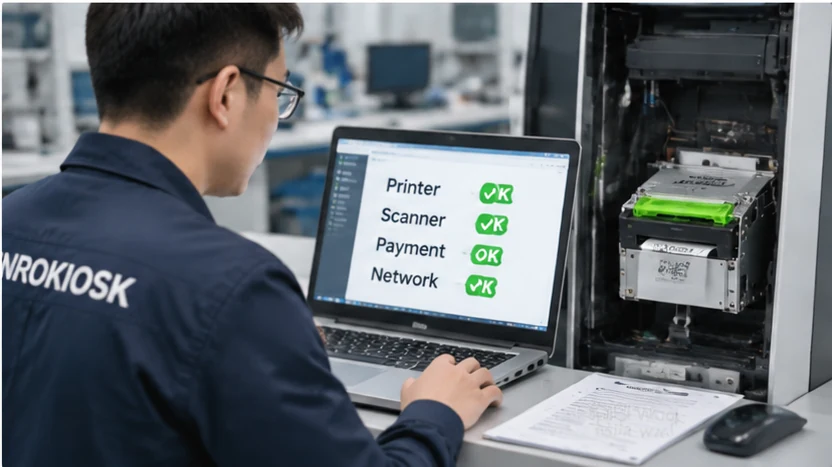
8. Check Mechanical Integration and Maintenance Access
A printer may work perfectly on an engineering bench but encounter problems after being installed inside the kiosk.
The paper path may be restricted by the front panel. A mounting bracket may create unnecessary friction. A cable may interfere with the service cover.
Before approving the mechanical assembly, inspect the complete paper path from the roll holder to the customer-facing outlet.
For presenter-equipped printers, pay particular attention to the alignment between the presenter outlet and the kiosk front panel.
The ticket should be delivered without unnecessary obstruction, and the mounting arrangement should follow the printer’s mechanical installation requirements.
Our kiosk thermal printer mounting guide explains the practical considerations involved in mounting brackets, panel openings, presenter alignment and service clearance.
Also check routine maintenance access:
- Can the paper roll be replaced easily?
- Can the technician access the printer connectors?
- Is there enough space for cutter inspection and cleaning?
- Can the printer be removed without dismantling unrelated components?
- Are cables protected from moving panels and sharp edges?
For unattended kiosks deployed across multiple locations, a small improvement in service access can make routine maintenance considerably easier.
9. Perform SAT Under Actual Site Conditions
A factory test cannot reproduce every condition at the final installation site.
SAT should verify that the kiosk works with the actual power supply, network, backend services, mounting structure and external devices.
Before beginning, confirm that:
- The kiosk is installed according to the approved drawing.
- Power and grounding arrangements are complete.
- Network access is available.
- The correct software and firmware versions are installed.
- All required external systems are accessible.
- The test environment is approved by the site operator.
Then perform complete transaction tests using the intended operating workflow.
For example, a transportation kiosk should be tested with the relevant ticketing backend and validation infrastructure, not just with a local printer self-test.
A parking ticket kiosk should be tested against the agreed entry or payment workflow.
For payment-related tests, coordinate with the payment provider and site operator to avoid unintended live charges or issuance of valid tickets.
Any issues found during SAT should be recorded with:
- Test case reference.
- Observed behavior.
- Expected behavior.
- Severity.
- Responsible party.
- Corrective action.
- Retest result.
This creates a clear record of what has passed, what remains open and who is responsible for resolving each issue.
10. Complete Commissioning and Prepare the Handover
Passing the individual tests is not the same as completing the project handover.
Before the kiosk enters operation, the project team should verify the final configuration, close or formally accept outstanding issues and provide the documentation required by the customer.
A practical handover package may include:
- Approved hardware configuration and bill of materials.
- Final installation drawings.
- Wiring and interface documentation.
- Software and firmware version records.
- Printer configuration and relevant setting records.
- Approved FAT and SAT reports.
- Open-item and deviation records.
- Operating and maintenance instructions.
- Support contacts and escalation procedures.
For multi-site deployments, use a consistent documentation structure across locations.
This makes it easier to compare configurations, identify installation differences and support future maintenance.
For project engineers preparing an integration or handover package, the SNROKIOSK Download Center provides available datasheets, user manuals, drivers and product documentation.
You can also review the SNROPRINTER technical resource and download center for compatible printer drivers, SDKs, manuals and mechanical resources.
Please confirm the exact model, interface and software version before using a technical file in a project.
A Practical Ticketing Kiosk FAT and SAT Checklist
The following checklist can be used as a starting point when preparing a project-specific acceptance plan.
| Test area | FAT | SAT |
|---|---|---|
| Hardware model and configuration verification | ✓ | ✓ |
| Electrical connections and power-up | ✓ | ✓ |
| Host computer and operating system | ✓ | ✓ |
| Touchscreen and user interface | ✓ | ✓ |
| Scanner and barcode readability | ✓ | ✓ |
| Printer feeding and print quality | ✓ | ✓ |
| Automatic cutting | ✓ | ✓ |
| Presenter operation, where installed | ✓ | ✓ |
| Retract operation, where configured | ✓ | ✓ |
| Printer communication and status handling | ✓ | ✓ |
| Payment and ticket issuance workflow | ✓ | ✓ |
| Network interruption and recovery | ✓ | ✓ |
| Mechanical mounting and paper-path alignment | ✓ | ✓ |
| Site backend connectivity | As available | ✓ |
| Actual validation equipment integration | As available | ✓ |
| Maintenance access and service procedure | ✓ | ✓ |
| Final documentation and operator handover | Prepare | Complete |
This checklist is a practical reference, not a universal certification or contractual acceptance standard. The final test scope must be agreed by the project parties.
Frequently Asked Questions
What should be included in a ticketing kiosk FAT?
FAT should cover the approved hardware configuration, electrical connections, software environment, peripheral interfaces, ticket printing, cutting, available delivery functions and agreed application workflows. Any project-specific exceptions should be documented.
What is the difference between FAT and SAT for a ticketing kiosk?
FAT verifies the assembled kiosk before shipment. SAT verifies the installed system under actual site conditions, including network connectivity, backend communication, external validation devices and the agreed transaction workflow.
Does the SNR-KP802-VX support ticket retract?
Yes. The SNR-KP802-VX supports Presenter and Retract Ticket functionality. Retract can be enabled or disabled through the printer setting tool. Customers can also integrate the control code provided by SNROTEK into their own software to control the function.
The trigger conditions and transaction-handling logic should be confirmed for each project.
Does every ticket printer need a presenter and retract function?
No. The requirement depends on the application and ticket delivery workflow. A presenter is useful when the kiosk needs to control how a printed ticket is delivered. Retract is useful when uncollected tickets need to be pulled back into the machine. Other applications may use direct output or fan-fold ticket media.
Who is responsible for FAT and SAT?
Responsibilities should be agreed in the project contract. The kiosk OEM, hardware suppliers, software integrator, payment provider and ticketing operator may each be responsible for different test activities.
Should FAT and SAT use the same test cases?
Some test cases should be repeated at both stages, but the test conditions are different. FAT focuses on the assembled equipment and factory integration. SAT focuses on actual installation conditions and connections to the intended external systems.
What documents should be provided after commissioning?
Typical records include the approved hardware configuration, installation drawings, interface information, software versions, FAT/SAT reports, outstanding issue records, maintenance instructions and support contacts.
Technical Resources for Ticketing Kiosk Integration
For system integrators preparing a ticketing kiosk prototype or acceptance test, the following resources may be useful:
- Printer Test Tools — Verify printer communication and basic operation.
- SDK & API Resources — Review software integration resources for compatible printer models.
- SNR-KP802-VX Product Demo — Watch presenter and retract operation tests.
- Printer Download Center — Access available drivers, SDKs, user manuals and technical documents.
Please confirm model compatibility and software versions before using any technical resource in a project.
Plan Acceptance Testing Before the Kiosk Goes Into Production
Ticketing kiosk acceptance testing should not be left until the equipment is ready to ship.
When the requirements, test procedures and responsibilities are agreed early, the project team can identify integration problems before they become installation delays or customer-facing issues.
For kiosk OEMs and system integrators, this means testing more than whether a printer can produce a ticket. The complete workflow needs to be verified, from the initial transaction to printing, ticket delivery, collection and final system records.
At SNROKIOSK, we support self-service kiosk manufacturers and system integrators with embedded ticket printers, industrial computing hardware and related OEM/ODM integration resources.
Depending on the project, our hardware solutions can include the SNR-KP802-VX Presenter and Retract printer, fan-fold ticket printers and other kiosk peripheral modules.
If you are developing a ticketing kiosk for transportation, parking, attractions or other self-service applications, share your ticket format, software workflow, printer requirements and mechanical drawings with our team.
We can help review the hardware configuration and identify the integration details that should be confirmed before sample testing and production.
Explore our Ticketing Kiosk Hardware Solution or contact SNROKIOSK to discuss your project.