
Kiosk Card Reader Integration Checklist: What to Verify Before Deployment
A practical engineering checklist for integrating card readers into self-service kiosks, covering card compatibility, motorized handling, retention, host interfaces, power-loss recovery, security and prototype testing.

A card reader can look like a simple kiosk peripheral until it is installed behind the front panel of an unattended machine.
On the bench, the reader accepts the card and returns data correctly.
Inside the kiosk, the real questions begin.
Can the user insert the card at the wrong angle? Does the mechanism need to retain the card? What happens if power disappears while the card is inside? Can the host distinguish between card inserted, card positioned, data processing complete and card retained? And can a technician actually reach the reader if a worn card becomes stuck?
For a system integrator, the important question is therefore not simply:
Which card technologies does this reader support?
The better question is:
How should the card reader behave mechanically, electrically and logically inside the complete kiosk?
Quick Answer: What Should Be Checked Before Integrating a Kiosk Card Reader?
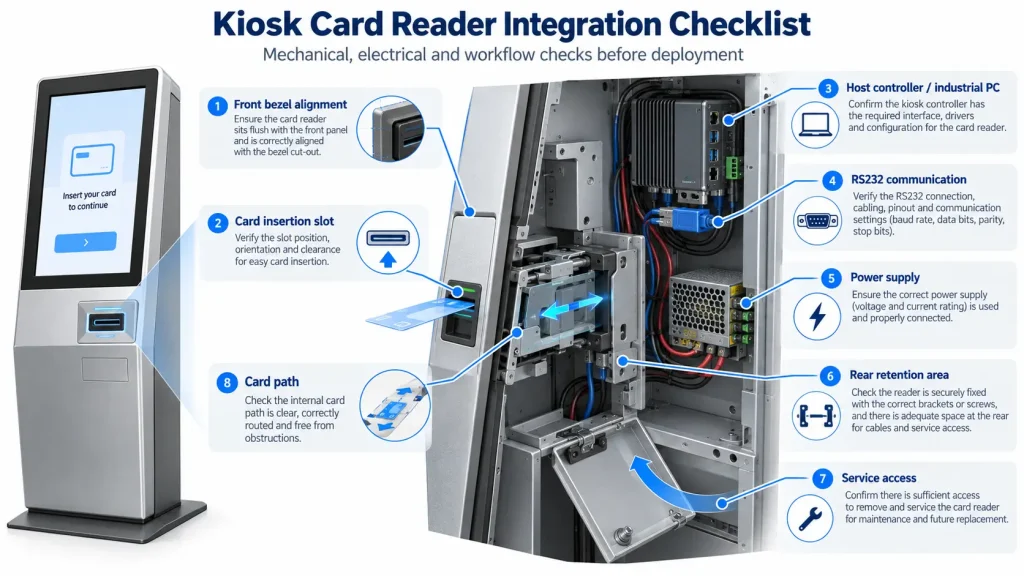
Before approving a card reader for a self-service kiosk, verify at least these ten areas:
- Actual card technology and application compatibility
- Fixed / presentation reader vs motorized reader
- Read-only vs read/write requirements
- Card insertion, positioning, eject and retention behavior
- Front bezel and mechanical installation
- Host interface and device-status handling
- Operating voltage and power-failure behavior
- Gate, retention, SAM and security requirements
- Maintenance access and jam recovery
- Prototype testing with production-intent cards
A reader that supports magnetic stripe, contact IC or 13.56 MHz contactless cards on a datasheet is not automatically compatible with every application using those card technologies.
Start with the workflow and the actual cards, then select the hardware.
1. Define the Card Workflow Before Choosing the Reader
A simple card-identification workflow may be:
User presents card → Reader obtains card data → Application verifies credential → Transaction continues
A motorized workflow can be more involved:
User inserts card → Reader accepts card → Card moves to processing position → Read / write / verify → Application decides result → Card ejects or is retained
Those two workflows require very different mechanics and software control.
Before reviewing products, ask:
- Does the user tap the card or physically insert it?
- Does the kiosk only read data?
- Does it need to write or update the card?
- Does the card need to remain inside during several processing steps?
- Can the application intentionally retain the card?
- What should happen if processing fails?
- What should happen if power fails?
- Does the reader need to work with an existing card platform?
These answers usually make the reader architecture much clearer.
For available hardware families, see our card readers for self-service kiosks.
2. Fixed Reader or Motorized Card Reader?
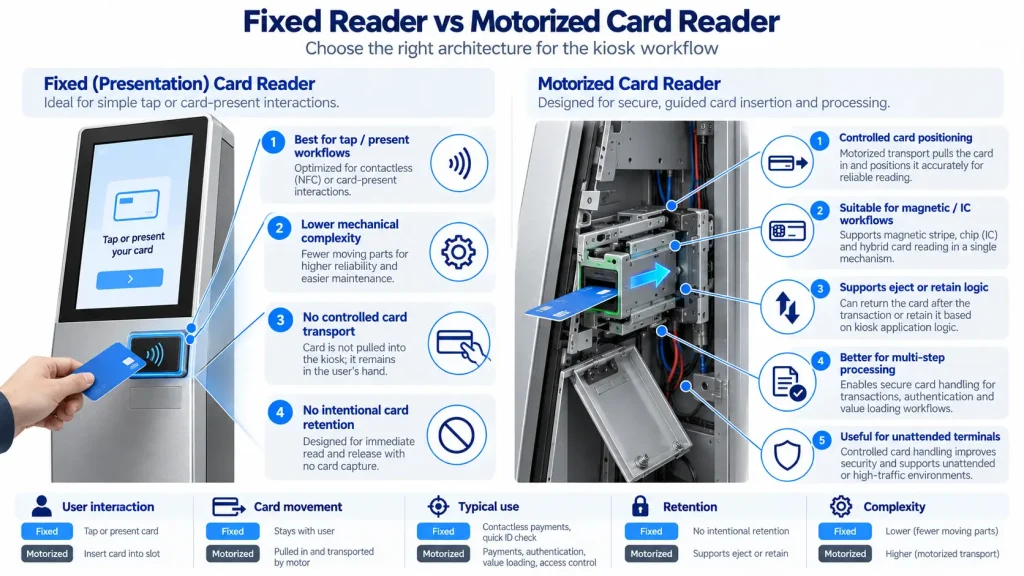
Neither architecture is universally better.
A Fixed or Presentation Reader Is Usually Enough When:
- the user only taps an RFID / contactless card;
- the card stays in the user’s hand;
- controlled transport is unnecessary;
- card retention is not required; and
- mechanical simplicity is a priority.
A Motorized Reader Becomes More Useful When:
- the card must move to a known processing position;
- magnetic stripe, contact IC and contactless processing are combined;
- the kiosk needs controlled insertion and ejection;
- the application may retain cards;
- a controlled gate is needed for unattended operation; or
- the card must remain inside while several operations are completed.
The real advantage of a motorized reader is not simply that a motor moves the card.
It gives the kiosk controlled card positioning.
That means the host can coordinate physical card movement with data processing and application decisions.
For example, the SNR-MR100 motorized card reader/writer provides controlled front insertion/ejection, rear retention and RS-232 host control. The SNR-MR800 motorized multi-card reader/writer adds a more advanced multi-technology configuration with magnetic read/write, contact IC, contactless IC, SAM and additional security-oriented card handling.
3. Supported Card Technology Is Not the Same as Application Compatibility
This is one of the most important distinctions in card-reader selection.
A reader specification may list:
- magnetic stripe;
- ISO/IEC 7816 contact IC;
- 13.56 MHz contactless cards;
- ISO/IEC 14443 Type A/B;
- MIFARE; or
- SAM support.
Those specifications describe the hardware capabilities.
They do not automatically confirm compatibility with your:
- exact card type;
- application structure;
- authentication method;
- sector keys;
- encryption scheme;
- hotel lock platform;
- payment environment;
- membership platform; or
- proprietary software workflow.
For example, two systems can both use 13.56 MHz cards and still require completely different authentication and application logic.
“13.56 MHz supported” should never be treated as “your card system is confirmed compatible.”
Where possible, test with actual production cards during the prototype stage.
4. Separate Mechanical Success from Data-Processing Success
A card can enter correctly and reach the intended position while the electronic transaction still fails.
For a read/write workflow, the system may need to distinguish:
Card accepted → Card positioned → Data read → Data written → Verification passed → Card eject / retain
These are separate states.
Card positioned successfully does not mean card processing completed successfully.
If writing fails, the host needs to know what should happen next.
Should the application retry?
Should the card be returned?
Should it be retained?
Should the transaction stop and request operator assistance?
That decision belongs to the kiosk workflow, not simply to the card transport mechanism.
5. Card Position Should Be Treated as a System State
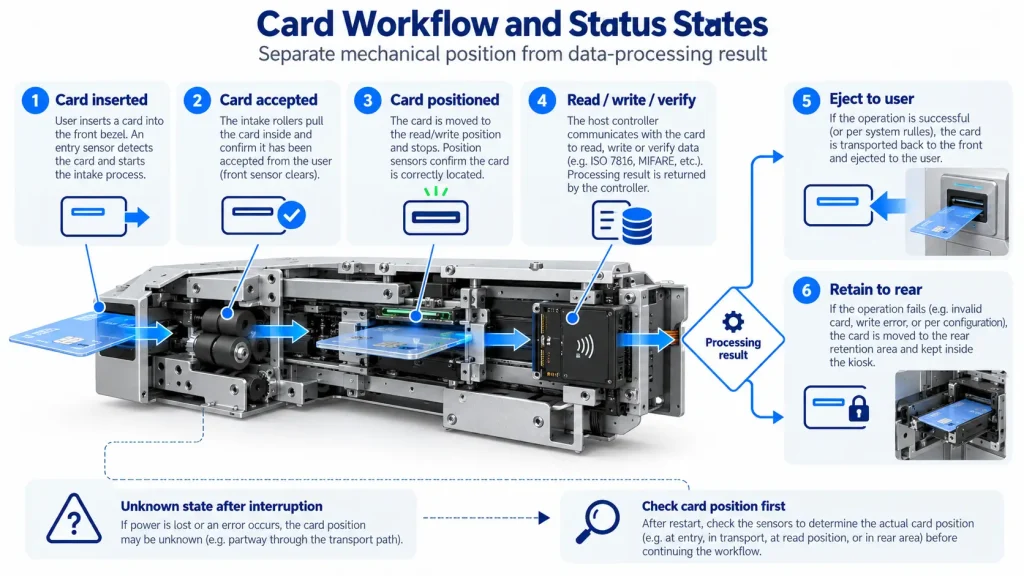
With a motorized reader, the card may be:
- outside the reader;
- entering the mechanism;
- at the processing position;
- between sensors;
- moving toward the front;
- moving toward the rear;
- retained; or
- in an unknown state after interruption.
Reducing all of those situations to one generic “card present” state makes recovery harder.
A more useful control sequence is:
Command → Mechanical action → Status / sensor response → Card processing → Application decision → Next movement
If communication is lost halfway through the transaction, the host should first determine the physical card state before issuing another movement command.
This is particularly important in unattended equipment, where there may be nobody nearby to manually remove the card.
6. Card Retention Can Be an Intended Transaction Result
A retained card is not automatically a reader failure.
The application may intentionally retain a card because:
- the credential fails a defined validation rule;
- the card is expired or cancelled;
- the user does not retrieve it within the allowed transaction time;
- the system has been configured to capture specific cards; or
- the recovery logic needs to move the card away from the user-facing slot.
Motorized readers such as the MR100 and MR800 support rear card retention as part of controlled card handling.
The application therefore needs to distinguish:
intentional retention
from:
unexpected card jam
They require different user messages, logs and service procedures.
7. Power-Failure Behavior Should Be Designed Before Deployment
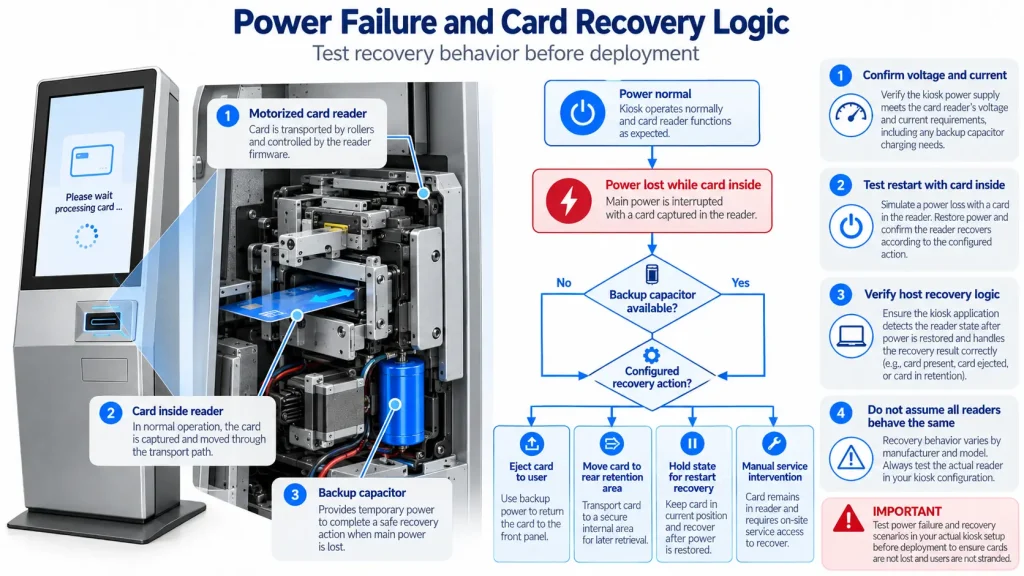
One of the most useful prototype tests is also one of the easiest to forget:
Remove power while the card is inside the reader.
Then observe what actually happens.
Depending on the reader and configuration, the desired strategy may be to:
- return the card toward the user;
- move the card toward a rear retention position;
- leave the card where it is and recover after restart; or
- stop in a defined state for manual intervention.
The MR100 supports optional backup-capacitor power-failure handling, allowing the card to be repositioned toward the exit or rear retention area when the system is configured accordingly. The MR800 also supports backup-capacitor power-failure protection.
Do not assume that every motorized reader behaves the same way.
Power-loss behavior should be confirmed with:
- the actual reader;
- the final PSU;
- the intended backup-capacitor configuration;
- the host application; and
- the production transaction logic.
8. The Front Bezel Becomes Part of the Card Transport System
The reader may operate perfectly before the kiosk front panel is installed.
After installation, the user interacts with the bezel rather than directly with the mechanism.
Check:
- slot width and height;
- card insertion angle;
- distance from bezel to reader mouth;
- alignment between the bezel and internal transport path;
- how far the card protrudes after eject;
- whether the user can grip the card comfortably;
- whether the card can be forced into the slot at an excessive angle;
- whether foreign objects can enter the mechanism; and
- whether the bezel blocks service access.
This is an area where a few millimeters can matter.
If the returned card protrudes too little, users may struggle to take it.
If it protrudes too far, users may pull on the card before the reader has completed its controlled movement.
Prototype testing should therefore use the final or production-intent bezel.
9. Protective Gates Should Be Treated as Part of the Workflow
Some motorized readers use mechanical or electrically controlled protective gates.
These can help:
- limit foreign-object insertion;
- control when a card is accepted;
- reduce dust exposure;
- protect the internal card path; and
- support a more controlled unattended workflow.
The MR100 uses dual protective gates, including a controllable secondary motorized gate. The MR800 also uses dual protective gates with an electrically controlled safety gate that is normally closed.
The important integration question is not simply whether a gate exists.
Confirm:
- what opens it;
- whether the host can enable or disable card acceptance;
- what status is returned if the gate is blocked;
- how the reader behaves when an invalid object is inserted; and
- how the application recovers.
10. SAM Support Does Not Define the Complete Security Architecture
A SAM socket can be useful for secure authentication, key storage or application-specific security workflows.
But the presence of SAM support alone does not tell you whether the complete system is compatible.
The project still needs to confirm:
- SAM type;
- required socket configuration;
- application commands;
- key provisioning;
- reader firmware support;
- host-software ownership; and
- any certification requirements for the final application.
The MR100 supports optional SAM configurations, while the MR800 includes an integrated SAM slot with status detection.
A multi-technology reader should also not be described as a certified payment terminal simply because it can read payment-style cards.
Payment certification belongs to the complete certified payment solution and its exact hardware/software configuration.
11. Count Host Interfaces Before Finalizing the Industrial PC
Motorized card readers commonly use serial communication.
For example, both the MR100 and MR800 use RS-232 host communication. The MR100 uses full-duplex RS-232, while the MR800 specification uses half-duplex RS-232.
The industrial PC should therefore be selected using the complete kiosk interface inventory.
A kiosk may also contain:
- card dispenser;
- kiosk printer;
- QR scanner;
- payment terminal;
- touchscreen;
- camera;
- external I/O; and
- network interfaces.
Before freezing the controller BOM, confirm:
- available COM ports;
- USB ports;
- LAN interfaces;
- connector type;
- serial-port accessibility from the operating system;
- SDK or protocol availability; and
- whether an intermediate controller is required.
For Android-based kiosks in particular, do not assume that every Android board exposes a usable RS-232 interface simply because the operating system can theoretically support serial communication.
Check the actual hardware platform.
12. Data Interface and Power Supply Are Separate Decisions
RS-232 tells you how the host communicates with the reader.
It does not tell you how the reader should be powered.
The MR100 uses 12VDC ±10% and the MR800 uses 24VDC ±10%.
That difference matters when the kiosk contains several peripherals sharing the same internal PSU architecture.
For every reader, confirm:
- operating voltage;
- peak current;
- connector type;
- grounding;
- cable length;
- PSU margin;
- startup behavior; and
- backup power requirements where applicable.
Communication interface and operating power should always be documented separately.
13. Service Access Is Part of the Reader Integration
A card reader is normally mounted deep enough inside the kiosk to align with the front card slot.
Unfortunately, that also means it can end up in one of the least convenient places to service.
Before freezing the cabinet design, verify that a technician can:
- reach the reader mounting screws;
- disconnect power and communication cables;
- inspect the transport path;
- remove a trapped card where the mechanism allows it;
- reach the rear retention area;
- clean the reader and card path;
- replace the reader without removing several unrelated modules; and
- inspect front-bezel alignment.
We would not consider the reader fully integrated simply because it fits in CAD.
If routine card recovery requires removing the printer, display bracket and PC first, the mechanical integration still needs work.
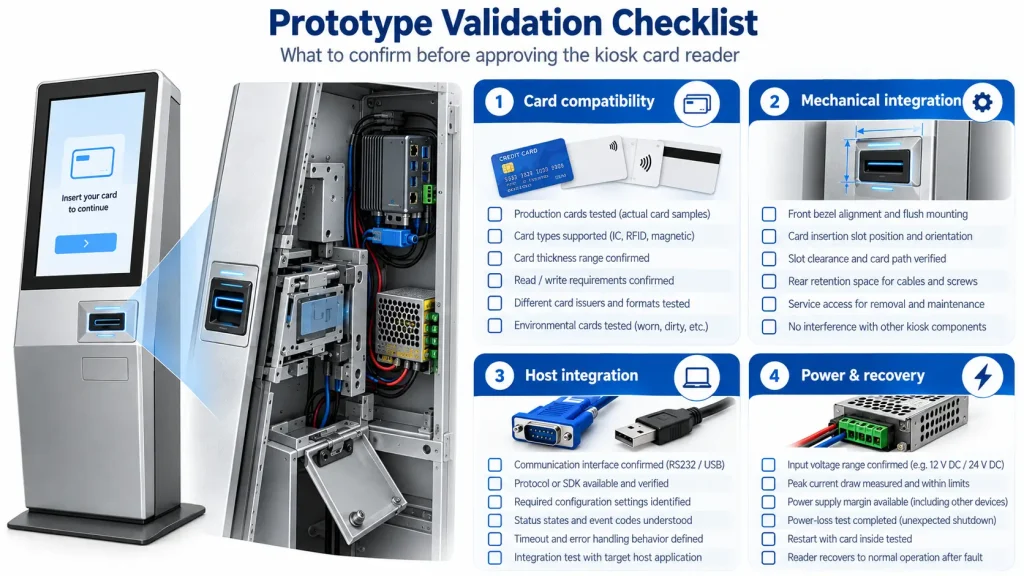
14. Prototype Test with Production-Intent Cards
Do not validate a card reader using one perfect new sample.
Use a realistic test set.
Depending on the application, include:
- new cards;
- older or worn cards;
- several production batches;
- the actual card thickness;
- the required magnetic stripe type;
- production contact IC cards;
- production contactless cards;
- cards inserted at slightly imperfect angles; and
- repeated insertion/ejection cycles.
For motorized readers, deliberately test abnormal conditions too:
- card acceptance and eject loops;
- intentional retention;
- communication timeout;
- serial connection interruption;
- power failure with a card inside;
- restart with an unknown card position;
- blocked insertion;
- user pulling on the card; and
- manual recovery.
A reader that successfully processes ten clean cards on the bench has not yet proved that it will survive unattended kiosk use.
15. Kiosk Card Reader Selection Matrix
| Project Requirement | Typical Hardware Direction |
|---|---|
| User only taps RFID / contactless card | Fixed contactless reader |
| User inserts card for magnetic or IC processing | Insertion or motorized reader |
| Magnetic + IC + contactless in one mechanism | Multi-technology motorized reader |
| Controlled card positioning required | Motorized reader |
| Card retention required | Motorized reader with rear retention path |
| Controlled card acceptance required | Reader with suitable gate / shutter architecture |
| SAM-based application security required | Reader with appropriate SAM configuration |
| Existing proprietary card platform | Verify exact application compatibility before hardware selection |
No single reader architecture is best for every kiosk.
The workflow should decide the hardware—not the length of the feature list.
Prototype Acceptance Checklist
Card Compatibility
- ☐ Production card samples tested
- ☐ Card dimensions and thickness confirmed
- ☐ Magnetic requirements confirmed where applicable
- ☐ Contact IC application confirmed
- ☐ RFID / contactless technology confirmed
- ☐ Read-only or read/write requirement confirmed
- ☐ SAM requirement confirmed where applicable
Mechanical Integration
- ☐ Reader mounting position confirmed
- ☐ Front bezel aligned
- ☐ Card insertion angle tested
- ☐ Card exit / grip length checked
- ☐ Rear retention path accessible
- ☐ Jam recovery accessible
- ☐ Reader replacement possible without major kiosk disassembly
Host Integration
- ☐ Communication interface confirmed
- ☐ COM / USB availability confirmed
- ☐ Protocol or SDK available
- ☐ Device status states understood
- ☐ Timeout behavior defined
- ☐ Eject and retention commands tested
Applicable SDK/API and communication resources can be used during host integration.
Power and Recovery
- ☐ Operating voltage confirmed
- ☐ Peak current confirmed
- ☐ PSU margin available
- ☐ Power-loss behavior tested
- ☐ Restart with a card inside tested
- ☐ Backup-capacitor configuration confirmed where used
Security and Retention
- ☐ Gate behavior tested
- ☐ Foreign-object behavior reviewed
- ☐ Retention rules defined
- ☐ SAM/security requirements reviewed
- ☐ Payment certification treated separately where applicable
Use available kiosk hardware test tools together with the actual production cards during prototype validation.
FAQ
What is the difference between a fixed card reader and a motorized card reader?
A fixed reader normally processes a card presented by the user without controlling its movement. A motorized reader accepts the card into the mechanism, positions it for processing, and can return or retain it according to supported commands and the kiosk workflow.
When should a kiosk use a motorized card reader?
A motorized reader is useful when the kiosk needs controlled card positioning, magnetic or contact IC processing, multi-step read/write operations, card retention, controlled card acceptance or managed eject behavior.
Can one kiosk reader support magnetic, IC and RFID cards?
Yes, selected multi-technology readers can combine magnetic stripe, contact IC and 13.56 MHz contactless processing. Exact read/write functions and card compatibility still need to be confirmed for the project.
Does 13.56 MHz support mean every RFID card is compatible?
No. Frequency and ISO support are only part of compatibility. The actual card type, application structure, authentication method, keys and host software requirements must also be verified.
What happens if power fails while a card is inside?
The result depends on the reader and system configuration. Selected motorized readers can use backup-capacitor support to reposition the card toward an exit or rear retention position. Other systems may recover after power returns. The intended behavior should be tested during prototype integration.
Can a motorized reader retain a card?
Selected motorized readers support rear retention or controlled card capture. Whether a card should be retained is determined by the kiosk transaction logic and the reader’s mechanical capabilities.
Does the card reader SDK control the complete kiosk workflow?
No. The communication protocol or SDK controls supported reader operations and reports device status. The kiosk application remains responsible for business logic, user interaction and coordination with other peripherals.
What integration resources can SNROKIOSK provide?
Depending on the product, SNROKIOSK can provide communication protocols, SDK/API resources, test tools, datasheets and mechanical drawings to support prototype integration. Detailed product resources are also available through the SNROKIOSK Download Center.
Choose the Reader by Workflow, Not by the Longest Feature List
A reader supporting magnetic stripe, contact IC, RFID, SAM, retention and several security functions may look more capable.
That does not automatically make it the right reader.
Start with the transaction:
Does the user tap or insert the card?
Does the card need to move?
Does the kiosk need to write data?
Should the card always be returned?
Can the application intentionally retain it?
What should happen if power disappears halfway through the transaction?
How will a technician reach the mechanism later?
Once those questions are answered, the reader architecture becomes much easier to select.
If you are evaluating a kiosk card reader, send us the card type, card thickness, required read/write functions, motorized or fixed-reader preference, retention requirement, host operating system, interface requirement, available installation space and expected project quantity.
SNROKIOSK can then help evaluate a suitable card-reader configuration and provide the relevant integration resources for prototype development.