Kiosk Controller I/O Planning: How to Map USB, COM, LAN and Display Ports
A kiosk controller can have enough CPU performance and still be the wrong controller for the project. The problem often appears during…

A kiosk controller can have enough CPU performance and still be the wrong controller for the project. The problem often appears during…
A patient completes self check-in successfully, but the kiosk runs out of paper before the confirmation slip is printed. Is the patient…
A visitor completes check-in at a self-service kiosk. A few seconds later, an RFID card comes out of the dispenser. From the…
A customer tells you the card is 13.56 MHz. Your kiosk reader specification also says 13.56 MHz. At first glance, that looks…
A ticket leaves the printer with a clean QR code and all the expected information. From the customer’s point of view, the…
A mechanical drawing says a panel printer is 137 mm wide. That does not mean the equipment needs a 137 mm opening.…
A parking kiosk is rarely a single-purpose device. A typical parking payment or self-service terminal may need to coordinate a touchscreen, industrial…
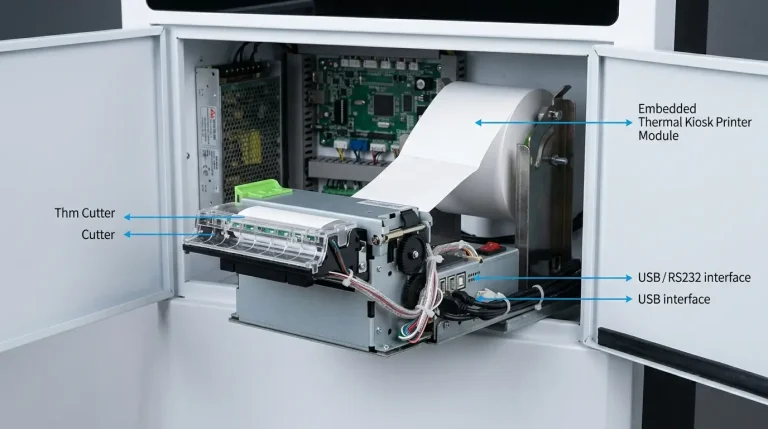
Connecting a kiosk printer to the host computer is only the first step. After USB or RS232 communication is available, the kiosk…
An unattended kiosk should not assume that a print command means a receipt was successfully produced. The host application may also need…
A kiosk printer can work perfectly on a test bench and still experience receipt-delivery problems after installation. The reason is that printing…
When integrating an embedded thermal printer into a self-service kiosk, the interface question is often misunderstood. Many kiosk printers provide both USB…
When selecting a thermal printer for a self-service kiosk, it is easy to treat presenter, retract, auto cutter, ticket-taken detection and anti-pull…