
Visitor Management Kiosk Check-In Workflow: Hardware Integration and Troubleshooting

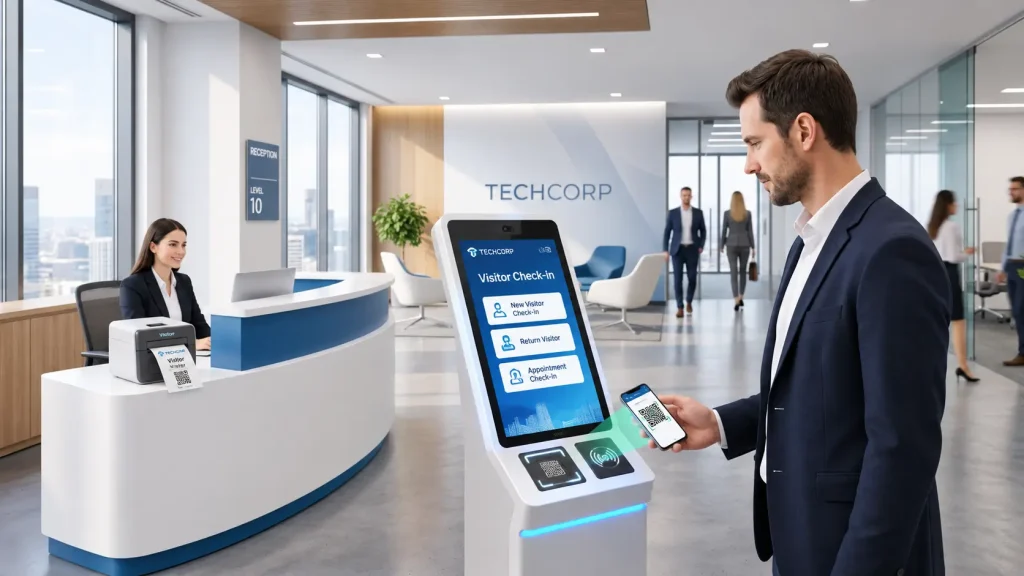
A practical guide for kiosk OEMs, visitor management software providers and system integrators.
A visitor management kiosk check-in system connects visitor identification, registration software, access authorization and physical credential delivery into one self-service workflow.
A visitor may scan an appointment QR code, confirm registration and receive a printed badge or temporary RFID access card. However, each step involves different hardware functions and application decisions.
What happens if the QR code is valid but the visitor has not been approved? What if a badge prints but the visitor does not collect it? What if an RFID card is issued while the application loses communication?
These are integration questions that should be resolved before a kiosk is deployed.
This guide explains how to coordinate visitor check-in hardware, define transaction states, handle exceptions and validate the complete system before installation.
1. How Does a Visitor Management Kiosk Check-In System Work?
Quick answer: A visitor management kiosk collects visitor information, sends it to the visitor management application for verification, and provides an approved credential when required. The application coordinates the hardware and determines when the check-in transaction is complete.
A typical workflow includes:
- Visitor identification: The visitor scans an appointment QR code, presents an accepted identity document or enters registration details.
- Application verification: The visitor management platform checks the appointment, registration status and applicable approval requirements.
- Access authorization: The relevant application or access-control platform determines whether access should be granted.
- Credential preparation: The system prepares a visitor badge, digital credential or temporary access card.
- Credential delivery: The kiosk prints a badge or physically issues a card when required.
- Transaction confirmation: The application records the result according to the approved workflow.
The sequence may vary depending on the facility and software architecture.
For example, some systems require host approval before issuing a badge. Others may allow approved visitors to complete registration immediately.
The important distinction is that reading a credential, approving a visitor and delivering a physical credential are separate operations.
2. Choose the Identification Method Before Selecting Hardware
Different visitor management projects require different identification methods.
| Identification Method | Typical Hardware | Application Responsibility |
|---|---|---|
| Appointment QR code | 2D barcode scanner | Validate appointment and check-in eligibility |
| On-site registration | Touchscreen and host computer | Process visitor information and approval |
| RFID visitor card | Compatible card reader | Identify credential and verify permissions |
| ID or passport | Suitable document reader | Process document data and required verification |
| Digital visitor credential | Scanner or supported communication interface | Validate credential and transaction status |
A kiosk does not necessarily need all these devices.
For a corporate reception project, an appointment QR scanner and badge printer may be sufficient.
A factory visitor access project may require additional authorization checks and temporary RFID card issuing.
The hardware configuration should follow the actual visitor workflow.
QR Code Integration
A QR scanner captures and decodes supported barcode information.
It does not independently determine whether the appointment is valid.
The application must handle expired codes, duplicate check-in attempts, canceled appointments and visitors requiring manual approval.
Before choosing a scanner, confirm the barcode format, expected scanning conditions, communication interface and host operating system.
ID and Passport Reading
If a project requires ID or passport reading, the document reader must support the relevant document types and required data capture functions.
Reading document data does not automatically establish that the person’s identity has been verified.
Any additional verification, privacy controls and retention policies belong to the approved application and compliance design.
3. Separate Visitor Authorization from Hardware Operations
One of the most important integration decisions is identifying which system owns each transaction state.
Consider a visitor who successfully scans an appointment QR code.
The scanner may report a successful read, but the application still needs to determine whether the appointment is valid.
Similarly, a visitor badge may be printed successfully while the access-control platform has not yet activated the required permission.
These events must not be treated as equivalent.
| Event | What It Confirms | What It Does Not Confirm |
|---|---|---|
| QR code decoded | Scanner obtained supported barcode data | Visitor is authorized |
| Appointment validated | Application accepted the appointment according to its rules | Physical credential was delivered |
| Access permission confirmed | Access-control platform reported the required authorization state | Visitor received a card |
| Badge printed | Supported printing operation completed according to available feedback | Visitor collected the badge |
| Card dispensed | Physical card movement or delivery reached a reported state | Credential is valid or activated |
| Check-in completed | Application’s defined completion conditions were satisfied | Visitor physically entered the facility |
This distinction becomes especially important when a kiosk uses hardware from several suppliers.
The visitor management application should coordinate business decisions, while each peripheral performs its supported physical operation.
4. Integrating a Visitor Badge Printer
A badge printer may be used to provide visitor identification, appointment information or a printed QR code.
The required output depends on the facility’s registration process.
Before selecting a kiosk printer, confirm:
- Badge or receipt dimensions
- Required paper or label media
- Printing and cutting requirements
- Whether a presenter or other delivery mechanism is needed
- Available communication interfaces
- Host operating system and driver compatibility
- Paper replacement and maintenance access
Print Completion vs. Badge Collection
A successful print operation does not necessarily prove that the visitor received the badge.
For example, a printer may complete printing while the visitor walks away.
If the application needs to detect badge collection, the selected printer and protocol must provide suitable status information.
Not every printer supports paper-present, ticket-taken or retract functions.
These requirements should be verified against the exact printer model and configuration.
What If the Printer Runs Out of Paper?
The application should have a defined recovery process.
Depending on the facility’s policy, the system may stop physical badge issuing, direct the visitor to reception or use an approved alternative.
The printer itself should not be expected to make that business decision.
5. Integrating Temporary RFID Visitor Cards
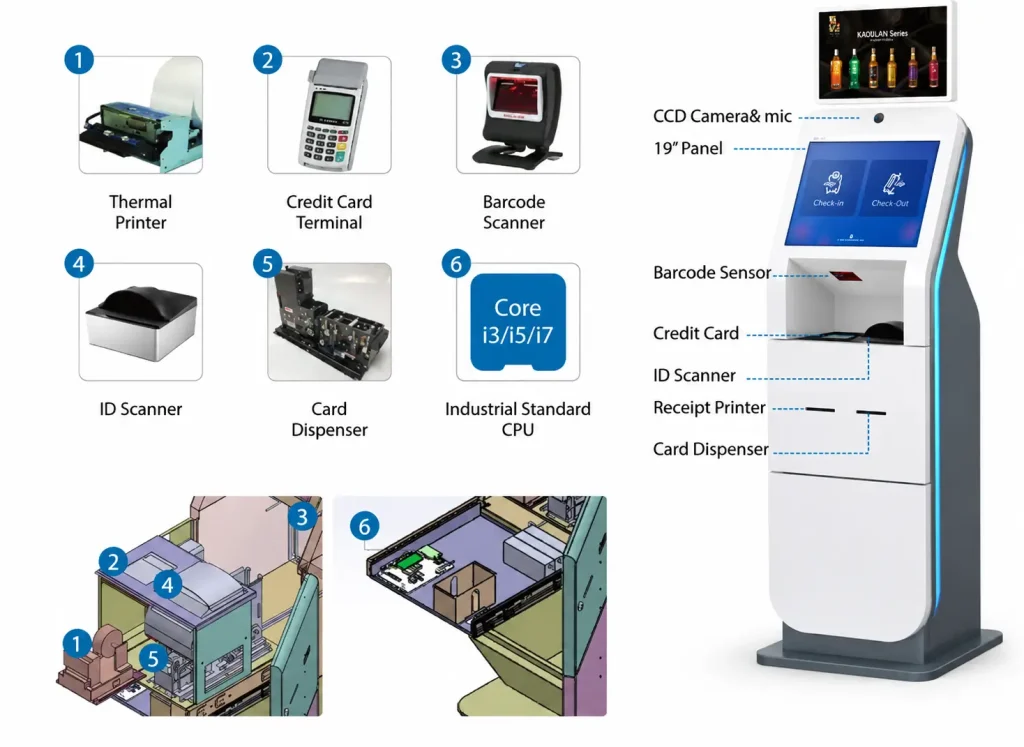
Some visitor management projects issue temporary RFID access cards rather than printed badges.
In these systems, three functions must be coordinated:
- Card handling: Physically moves, positions and dispenses the card.
- Card reading or encoding: Performs the required credential operation using a compatible reader or encoder.
- Access authorization: Assigns or activates the visitor’s permissions through the relevant application or access-control platform.
A card dispenser does not independently manage visitor access permissions.
Selecting the Card Handling Architecture
SNROKIOSK provides different hardware configurations for card issuing and return.
The SNR-K750C supports card issuing and separate card collection. Returned cards are directed to a collection area rather than automatically returned to the issuing supply.
The SNR-K750L supports card issuing, return and internal recycling/reissuing workflows, with a separate path for rejected or invalid cards.
For projects using reusable visitor cards, the recycling architecture may reduce the need to manually transfer returned cards into the issuing supply.
However, physical card recycling does not automatically reset or revoke access permissions.
The customer’s software and access-control platform must manage credential eligibility and authorization state.
For a detailed discussion of these functions, read our Visitor Access Card Workflow Guide.
Confirm Card Compatibility Before Ordering
The system integrator should verify the required card technology, dimensions, thickness and reader/encoder compatibility.
The fact that two devices use 13.56MHz RFID does not guarantee compatibility with every card type or security application.
When third-party encoders are required, their mechanical installation, communication requirements and software integration should be evaluated during prototype development.
6. What Happens When Visitor Check-In Fails?
A visitor management kiosk should not be designed only for successful transactions.
Real users may scan the same QR code several times, abandon registration, forget to collect a badge or leave before taking an access card.
The application should define what happens in each situation.
| Exception | Recommended Recovery Approach |
|---|---|
| QR code cannot be read | Allow an appropriate retry or alternative input method |
| Appointment expired or canceled | Reject automatic check-in and provide assistance instructions |
| Visitor approval pending | Do not issue access credentials until the required approval is confirmed |
| Printer out of paper | Apply the approved alternative or maintenance procedure |
| Badge not collected | Use the defined timeout and recovery policy |
| Card dispenser empty | Prevent further issuing and report the condition |
| Card encoding unsuccessful | Prevent release of an unverified credential where verification is required |
| Device communication timeout | Check available device and transaction states before retrying |
| Network interruption | Follow the approved offline or recovery policy |
| Visitor abandons check-in | Close, expire or recover the transaction according to application rules |
These are recommended application behaviors, not guaranteed features of every SNROKIOSK device.
Why Automatic Retries Need Careful Design
Consider a visitor card dispensing operation.
The application sends a command to issue a card. The dispenser performs the physical operation, but the host does not receive the expected confirmation.
If the application immediately sends the same command again, a second card may be issued.
A more reliable design checks available device status and transaction records before deciding whether another operation is safe.
The same principle applies to badge printing.
The application should distinguish between a confirmed failure and an operation whose final state is unknown.
7. Define the Check-In Transaction States
For software integration, it is useful to document the states that matter to the visitor workflow.
A reference model may include:
| Application State | Meaning | Typical Next Action |
|---|---|---|
| Registration Started | Visitor begins the process | Capture required information |
| Identification Received | Supported input has been captured | Validate visitor record |
| Approval Pending | Additional authorization is required | Wait or direct to assistance |
| Approved | Required authorization is confirmed | Prepare credential |
| Credential Processing | Printing, encoding or card handling is in progress | Monitor available responses |
| Credential Delivered | Required delivery condition is satisfied | Record transaction result |
| Completed | Defined check-in conditions are met | Display confirmation |
| Failed / Recovery Required | Transaction cannot proceed normally | Apply recovery procedure |
This is an example application state model, not a hardware protocol specification.
Different projects may use different state names and completion conditions.
The value of defining these states is that software developers, hardware engineers and system integrators can agree on what each event means.
It also helps prevent duplicate credential issuance after a communication interruption.
8. Design the Kiosk Cabinet Around the Actual Devices
Hardware integration should be considered before the kiosk enclosure is finalized.
Scanner and Reader Placement
The QR scanner should be positioned for convenient use with the expected printed or mobile credentials.
RFID readers should be evaluated in their intended mounting environment, particularly when installed near metal panels or other electronic equipment.
Actual scanning and reading performance should be tested with the project’s selected media and credentials.
Printer Installation
Confirm the paper outlet, loading direction, maintenance clearance and required delivery mechanism.
If the printer includes a presenter, the enclosure must accommodate the complete paper path.
Card Dispenser Installation
Confirm the card hopper access, card outlet alignment, mounting requirements and service clearance.
For configurations using a third-party reader or encoder, the mechanical design must also accommodate the required installation and card positioning.
Host Computer and Power
The industrial PC must provide suitable communication interfaces for the selected peripherals.
Each device’s power requirements should be checked individually.
USB or RS232 communication compatibility does not automatically mean that the host can supply the required operating power.
9. Clarify Hardware and Software Responsibilities
Visitor management projects often involve multiple suppliers.
The responsibilities should be agreed before the prototype is developed.
| Project Function | Typical Responsible Party |
|---|---|
| Visitor registration and appointment records | Visitor management software provider |
| Visitor approval and access permissions | Customer / access-control platform |
| QR and RFID data capture | Selected reader hardware |
| Badge printing | Kiosk printer |
| Physical card issuing and collection | Card dispenser / collector |
| Peripheral command integration | Customer’s software team, supported by supplier documentation |
| Kiosk enclosure and wiring | Kiosk OEM / system integrator |
| Complete transaction testing | System integrator / project owner |
SNROKIOSK supplies kiosk hardware modules and available integration resources, which may include datasheets, mechanical drawings, SDKs, communication protocols and test tools.
Visitor management software, appointment logic, identity verification, access-control permissions and third-party platform integration are normally handled by the customer’s software team or appointed integration partners.
Defining this boundary early reduces misunderstandings during development.
10. Test the Complete Visitor Transaction Before Deployment
Testing individual devices is necessary, but it does not prove that the complete check-in workflow is ready.
The project should validate the sequence from visitor identification to transaction confirmation.
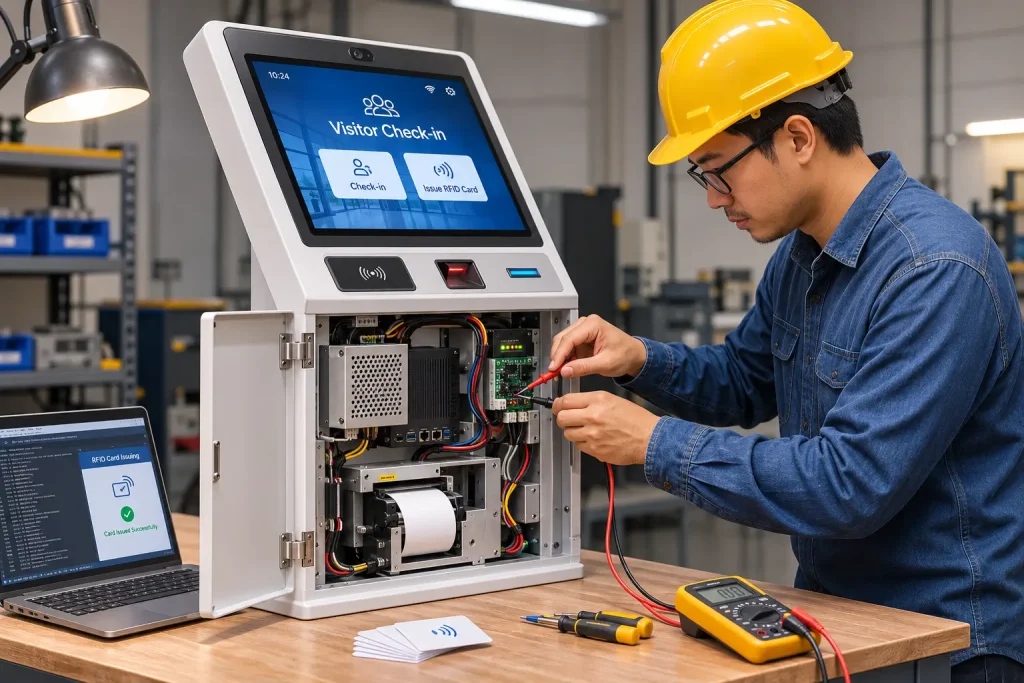
Factory Acceptance Testing (FAT)
Recommended factory tests include:
- Confirm host communication with every selected peripheral.
- Test valid and invalid QR codes or identification inputs.
- Verify the required application approval sequence.
- Test badge printing with the actual project media.
- Test card dispensing and encoding where applicable.
- Simulate empty paper or card conditions.
- Check communication timeouts and recovery behavior.
- Test interrupted and abandoned transactions.
- Verify repeated transactions using agreed acceptance criteria.
Record the tested hardware configuration, firmware, host operating system and relevant software versions.
Site Acceptance Testing (SAT)
After installation, verify the kiosk using the actual facility systems.
Typical checks include:
- Visitor management platform connectivity
- Real appointment and credential formats
- Access-control integration
- Actual visitor approval procedures
- Network interruption and recovery
- Installed scanner and reader performance
- Maintenance and replenishment access
- Check-out and credential return where required
FAT confirms the agreed prototype behavior.
SAT verifies that the installed kiosk works within the customer’s operational environment.
Neither test should be reduced to a demonstration that the printer prints or the dispenser releases one card.
11. Visitor Management Kiosk Integration Checklist
Before confirming a hardware configuration or approving a production order, review the following requirements.
Visitor Workflow
- Registration and check-in methods are defined.
- Visitor approval requirements are confirmed.
- Required identification methods are documented.
- Badge printing or RFID card issuing is specified.
- Check-out and credential recovery requirements are agreed.
Hardware
- Host operating system and available interfaces are confirmed.
- Scanner and reader compatibility is verified.
- Printer media and delivery functions are defined.
- Card technology and handling requirements are confirmed.
- Power supply and mechanical drawings are reviewed.
Software Integration
- Available SDKs and communication protocols are reviewed.
- Application and hardware responsibilities are assigned.
- Transaction completion conditions are documented.
- Timeout, retry and recovery procedures are defined.
- Credential authorization and physical delivery states are handled separately.
Project Validation
- FAT acceptance criteria are agreed.
- SAT acceptance criteria are agreed.
- Normal and failed transactions are tested.
- Relevant configuration versions are recorded.
- Maintenance and technical support responsibilities are assigned.
12. How SNROKIOSK Supports Visitor Management Projects
SNROKIOSK provides hardware modules for visitor management kiosk manufacturers, system integrators and OEM/ODM solution providers.
Our relevant hardware categories include:
- Motorized card dispensers and collectors
- Compatible card reading and encoding solutions
- Embedded kiosk thermal printers
- Panel printers
- Industrial mini PCs and related kiosk hardware
Depending on the selected model and configuration, we can provide available product specifications, mechanical drawings, communication protocols, SDK resources and technical support for hardware evaluation.
Our role is to help customers select and integrate suitable hardware modules.
The visitor management application and access-control software remain the responsibility of the customer’s software team or appointed integration partner unless separately agreed.
Explore our Visitor Management Kiosk Hardware Solution to review the hardware integration approach.
Frequently Asked Questions
What is a visitor management kiosk check-in system?
A visitor management kiosk check-in system allows visitors to register or confirm appointments through a self-service terminal. It connects identification hardware, visitor management software and optional badge printing or card issuing devices.
What hardware is needed for a visitor check-in kiosk?
Common components include a touchscreen, industrial PC, QR scanner, ID reader, badge printer or RFID card dispenser. The required configuration depends on the visitor registration and access workflow.
Can a visitor management kiosk issue RFID access cards?
Yes. A compatible card dispenser and reader or encoder can be integrated with the customer’s access-control system. The application must coordinate credential preparation, authorization and physical issuance.
Does a visitor kiosk need both a QR scanner and an RFID reader?
Not necessarily. A QR scanner may be used for appointment check-in, while an RFID reader may be needed for physical access cards. Some projects use both, but the requirements should be determined by the workflow.
What should happen if a visitor badge fails to print?
The application should follow an agreed recovery procedure, such as retrying when safe, using an approved alternative or directing the visitor to reception. The exact behavior depends on the printer’s available status information and the facility’s policy.
Can returned visitor cards be reused automatically?
With suitable recycling hardware and application logic, returned cards can be handled for reuse. However, the access-control system must separately manage previous permissions and confirm that the credential is eligible for reassignment.
Who is responsible for visitor management software integration?
The customer’s software team or appointed system integrator normally develops the visitor management application and connects it with the required hardware protocols, SDKs and access-control systems.
Planning a Visitor Management Kiosk Project?
The best hardware configuration depends on how visitors register, how credentials are issued and which systems control access permissions.
If you are developing a corporate reception kiosk, factory visitor terminal or temporary access card issuing system, share your requirements with SNROKIOSK.
To help us evaluate your project, please provide:
- Visitor check-in and check-out workflow
- QR, ID or RFID identification requirements
- Badge printing or card issuing requirements
- Card type and access-control platform, if applicable
- Host operating system and communication interfaces
- Estimated project quantity
Our team can help recommend suitable kiosk hardware modules and provide the available integration resources for your prototype evaluation.