
Parking Kiosk Hardware Integration Checklist: What to Verify Before Prototype Approval
A practical parking kiosk hardware integration checklist for prototype approval, covering ticket printers, scanners, card handling, host I/O, power, enclosure layout, maintenance access and failure recovery.

A parking kiosk can contain perfectly good hardware and still become a difficult machine to deploy.
The printer works on the bench. The scanner reads the QR code. The industrial PC has enough performance. The card dispenser feeds correctly.
Then everything is installed inside the cabinet.
The ticket exits at the wrong angle. The paper roll cannot be replaced without removing another module. A scanner that worked perfectly indoors struggles with phone screens behind the kiosk window. Two peripherals need the same COM port. A 24 V device has been planned on a 12 V rail. The card reject box is technically removable—but only after another bracket is taken out first.
These are usually not product failures.
They are integration failures.
For parking-system integrators, the useful question is therefore not simply which printer, scanner or card module to buy. The better question is:
What should be verified before the parking kiosk enclosure, wiring and software interfaces are frozen?
Quick Answer: What Should Be Checked Before a Parking Kiosk Prototype Is Approved?
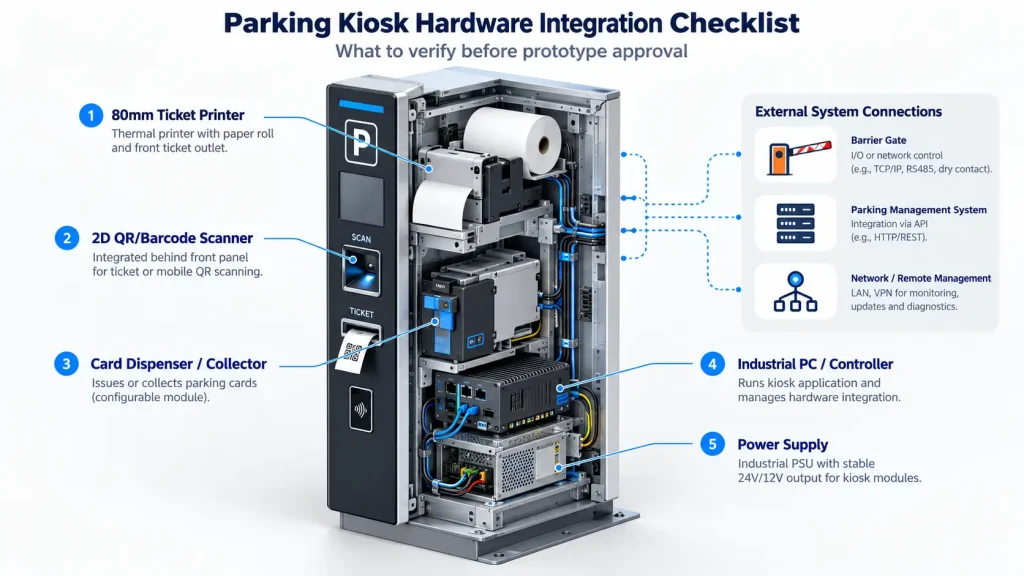
Before approving a parking kiosk prototype, verify at least these eight areas:
- Parking workflow and kiosk role
- Printer and final ticket media
- Scanner position and real-world QR performance
- Card issuing, collection or recycling workflow
- Industrial PC interfaces and I/O capacity
- Power distribution and thermal design
- Maintenance and service access
- Failure recovery and software responsibility
An entry kiosk, exit kiosk and payment kiosk may share some of the same hardware, but they should not automatically share the same BOM or internal layout.
For the broader parking application architecture, see our parking kiosk hardware integration solution page.
1. Define the Kiosk Role Before Selecting the Peripherals
Start with the exact job of the terminal.
A parking entry kiosk may follow a workflow such as:
Vehicle detected → Issue ticket / card / credential → Confirm transaction → Authorize barrier
A payment kiosk may instead need to:
Identify ticket or vehicle → Calculate fee → Complete payment → Print receipt → Update parking platform
An exit terminal may need to:
Read ticket / card / QR → Confirm payment or authorization → Collect credential where required → Authorize exit
Those workflows immediately change the hardware architecture.
A payment kiosk may require an 80 mm receipt printer but no card dispenser. An entry kiosk using reusable RFID cards may need a dispenser and encoder but no payment terminal. An exit terminal may require a card collector rather than a dispenser.
This is why we would not start a parking project by copying a standard peripheral list from a previous kiosk.
Define the lane or payment workflow first. Build the hardware stack around it second.
2. Printer Integration: Confirm the Media Before Choosing the Printer
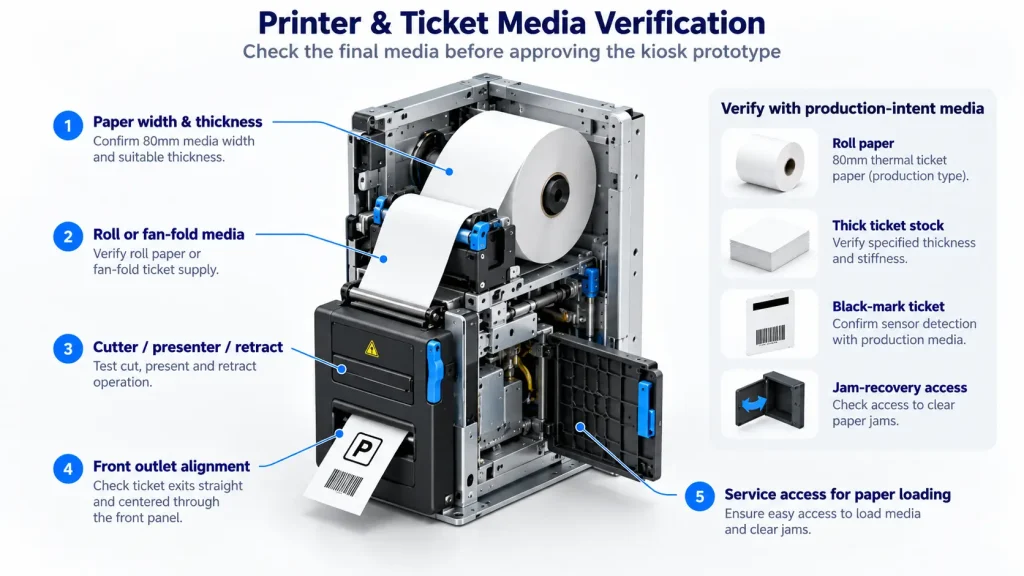
One of the most common mistakes in parking projects is selecting the printer first and confirming the ticket media later.
Reverse that process.
Before approving a printer, confirm:
- paper width;
- paper thickness;
- roll or fan-fold format;
- ticket length;
- black-mark positioning requirement;
- automatic cutter requirement;
- presenter requirement;
- retract requirement;
- maximum paper-roll diameter;
- estimated daily transaction volume; and
- how service staff will replace the media.
You can review available kiosk printers for self-service terminals after those media requirements are clear.
Roll Paper and Fan-Fold Ticket Stock Are Not the Same Job
A normal thermal receipt printer and a printer designed for thicker ticket stock should not be treated as interchangeable.
For standard receipt-style parking tickets, an 80 mm roll-paper kiosk printer may be appropriate.
Where the parking system uses thicker fan-fold or card-size ticket media, the feed path, paper stiffness, black-mark position and cutter design become much more important.
The SNR-KP83H, for example, is designed for fan-fold ticket applications and thicker media. Models such as the SNR-KP800-VX and SNR-KP802-VX are built around roll-paper kiosk printing.
A ticket fitting within the printer’s paper width does not automatically mean the printer is suitable for that ticket.
Cutter, Presenter and Retract Solve Different Problems
An automatic cutter cuts the paper.
A presenter controls how the finished ticket is delivered and held for the user.
A retract function can pull an uncollected ticket back into the kiosk where that function is supported and configured.
For a simple payment receipt, a cutter-only arrangement may be sufficient.
For an unattended entry terminal, a presenter may provide better control over ticket delivery.
If abandoned tickets create an operational or security problem, a retract-capable configuration may be worth considering.
Do not specify these functions simply because they sound more advanced. Match them to the transaction.
3. Treat the Front Ticket Outlet as Part of the Printer
A kiosk printer can feed perfectly on a workbench and still jam after installation.
The front-panel geometry becomes part of the paper path.
Before approving the enclosure, check:
- distance from the printer outlet to the front panel;
- vertical and horizontal alignment;
- ticket exit angle;
- clearance around the bezel;
- whether long tickets can curl against the cabinet;
- whether users can take the ticket without excessive pulling;
- whether the presenter path remains unobstructed; and
- whether rain, dust or debris can enter through the ticket opening.
We recommend testing the assembled kiosk with the actual production-intent ticket stock.
We have seen cases where what initially looked like a printer feeding problem was actually caused by the cabinet opening being a few millimeters out of alignment with the paper path.
That is exactly the type of issue a prototype should expose before production.
4. Scanner Integration: Test the Real Credential, Not Only a Perfect Printed QR Code
A parking kiosk scanner may need to read several different types of credentials:
- printed parking tickets;
- mobile-phone QR codes;
- reservation codes;
- validation vouchers;
- membership credentials; or
- other 1D / 2D barcodes used by the parking platform.
Office testing is useful, but it is not enough.
Check the scanner with:
- the final scanner-to-code distance;
- the intended mounting angle;
- the real front opening;
- protective glass or acrylic installed;
- bright and dim mobile-phone screens;
- screen reflections;
- outdoor daylight where relevant;
- damaged printed tickets; and
- low-contrast or partially folded codes.
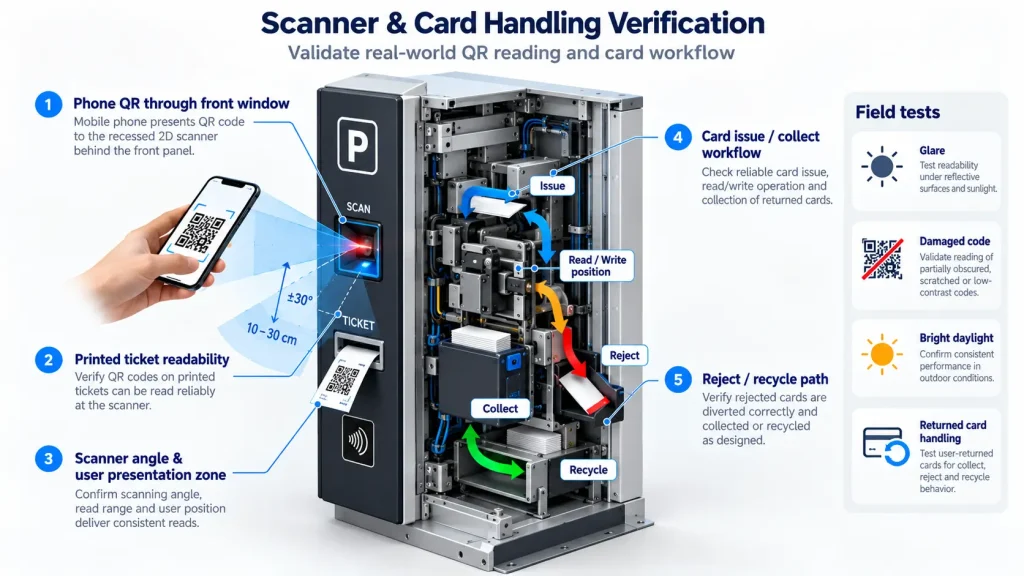
A scanner that reads a clean QR code from a desk at 10 cm has not yet proved that it will reliably read a customer’s phone through a reflective kiosk window on a sunny afternoon.
Fix the Scanner Position Before the Cabinet Is Frozen
The user needs to understand where to present the phone or ticket, and the scanner needs an optical field that actually reaches that point.
If the scanner sits too far behind the front panel, or is mounted at an awkward angle, its effective reading area can become much smaller than expected.
This is a mechanical integration issue as much as an optical one.
5. Card Handling: Issue, Reject, Collect and Recycle Are Different Workflows
Parking systems using physical RFID or access cards should define what happens to the card at every stage.
The system may require:
- card issuing only;
- card issuing plus RFID writing;
- failed-card rejection;
- card collection at exit; or
- card recycling and reuse.
These functions require different card-handling architectures.
An entrance kiosk may use an SNR-K750C-type dispenser where the project needs automated card issuance and RFID processing.
An exit terminal may instead use a dedicated motorized card collector such as the SNR-CD3000-D.
If returned cards need to re-enter the usable inventory automatically, the project should be designed around a recycling-capable workflow rather than assuming that every card dispenser or collector can perform the same function.
For the full card-path discussion—including processing position, reject logic, collection and recycling—see our card dispensing kiosk hardware architecture guide.
6. Count the Host Interfaces Before Finalizing the Industrial PC
Parking kiosks can accumulate interfaces faster than expected.
A system may contain:
- ticket printer;
- QR scanner;
- card dispenser or collector;
- RFID reader;
- payment terminal;
- touchscreen;
- camera;
- barrier or relay interface;
- door sensor;
- network interface; and
- service peripherals.
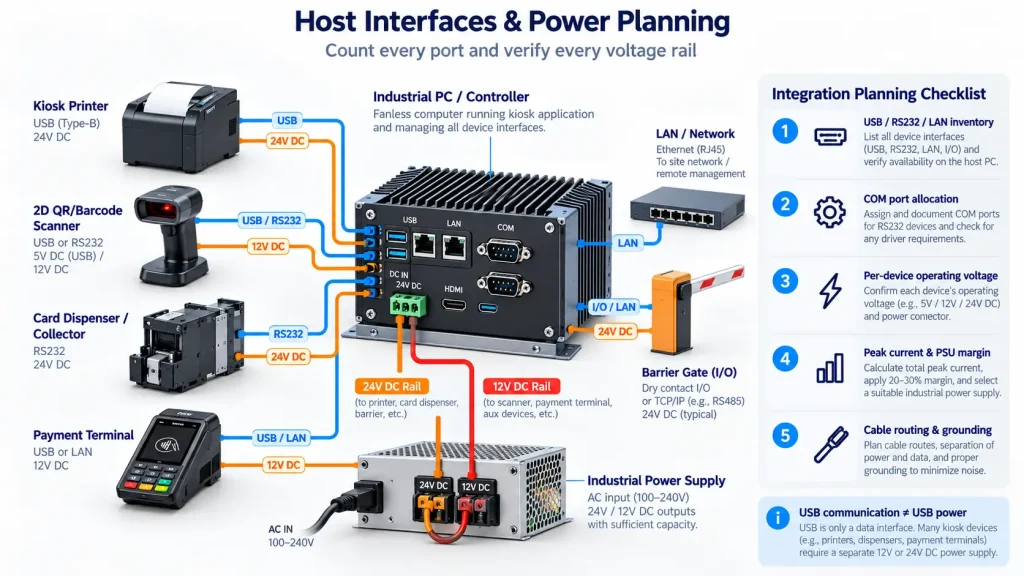
Before selecting the industrial PC, build an interface inventory.
| Peripheral | Typical Interface | Host Requirement | Integration Resource | Power |
|---|---|---|---|---|
| Kiosk Printer | USB / RS232 | USB or COM | Driver / SDK | Separate DC input |
| QR Scanner | USB / RS232 | USB or COM | HID / Serial / SDK | Device dependent |
| Card Dispenser | RS232 / supported interface | COM | Protocol / SDK | Separate DC input |
| Payment Terminal | Vendor dependent | USB / LAN / Serial | Payment provider | Device dependent |
| Barrier / External I/O | Relay / I/O / LAN | I/O or Network | Project specific | Project specific |
This simple table exposes conflicts before the BOM is frozen.
It is much better to discover during design that four devices require serial communication than to discover it after the industrial PC with only two COM ports has already been ordered.
USB-to-serial adapters can be useful, but they should not become the architecture simply because nobody counted the ports at the beginning.
7. Separate Communication Interfaces from Power Requirements
USB or RS232 tells you how the host talks to the peripheral.
It does not necessarily tell you how that peripheral is powered.
A kiosk printer or motorized card mechanism may communicate through USB while still requiring its own 12 V or 24 V DC supply.
USB communication does not automatically mean USB power.
Build a power inventory alongside the interface inventory.
Check:
- operating voltage for every module;
- peak current;
- startup current;
- printer load during dense printing;
- motor load during card movement;
- PSU headroom;
- cable length and voltage drop;
- fuse or circuit protection;
- grounding; and
- whether several high-load peripherals can operate at the same time.
A design based only on average power consumption can look adequate on paper but fail during a transaction peak.
8. Review Outdoor Conditions at the Peripheral Level
An outdoor enclosure may have weather sealing, cooling and heating, but the individual hardware still needs to operate inside that environment.
Review:
- expected internal cabinet temperature;
- printer operating range;
- humidity and condensation;
- thermal paper behavior;
- scanner performance in sunlight;
- front-panel water ingress paths;
- ventilation;
- heater and fan placement;
- dust accumulation; and
- service openings.
A cabinet may achieve a good environmental rating while the printer outlet remains a weak point.
Likewise, adding a heater for winter operation can create a local hot zone next to the PC or printer if the airflow was not designed around the final component layout.
9. Maintenance Access Is Part of the Hardware Design
Parking kiosks are unattended machines, but they are not maintenance-free machines.
Before approving the sheet-metal design, make sure a technician can:
- replace the printer roll;
- reload fan-fold media;
- clear the cutter;
- inspect the presenter;
- clean the scanner window;
- refill card hoppers;
- remove the card reject or collection box;
- reach communication connectors;
- replace the industrial PC;
- inspect power terminals; and
- recover a trapped ticket or card manually.
We would rather give a mechanism slightly more service clearance than save a few centimeters and create a kiosk that requires several unrelated modules to be removed during every routine service visit.
That matters even more in parking applications because a failed entry or exit terminal can affect the entire vehicle lane.
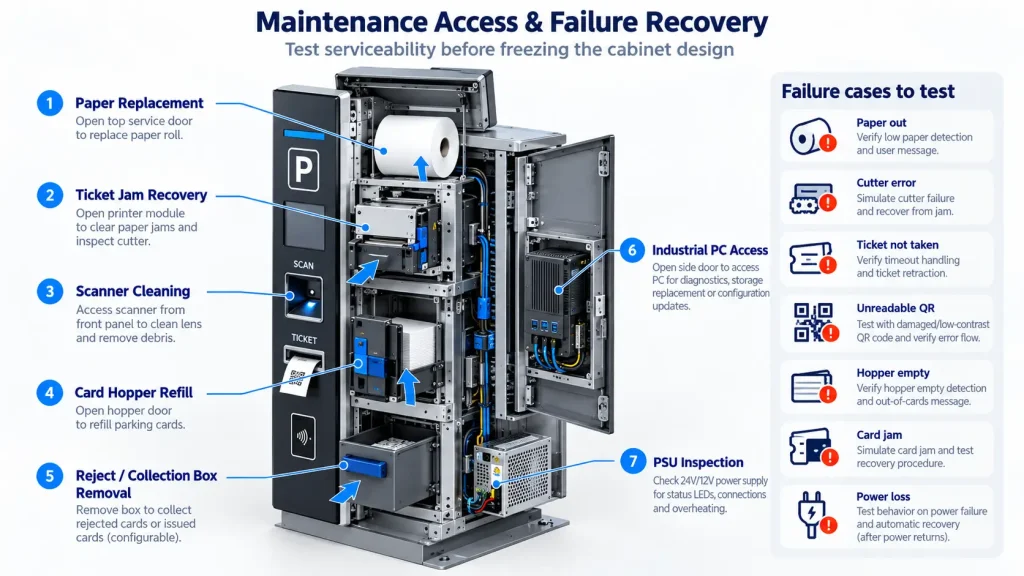
10. Prototype the Failure Cases, Not Only the Successful Transaction
A prototype that completes 100 normal transactions has not yet tested the conditions that usually create field support calls.
Printer Failure Cases
Test:
- paper out;
- paper near-end where supported;
- cutter error;
- presenter jam;
- ticket not taken;
- communication loss; and
- restart after interrupted printing.
If printing is interrupted after the parking transaction has already been created, the application should know whether issuing another ticket is safe.
Scanner Failure Cases
Test:
- unreadable QR code;
- screen glare;
- damaged ticket;
- repeated scanning;
- scanner disconnected; and
- scan timeout.
The UI should provide a recoverable next step instead of leaving the driver staring at a screen that is waiting indefinitely.
Card-Handling Failure Cases
Test:
- hopper empty;
- card jam;
- RFID read or write failure;
- card position unknown;
- rejected card;
- returned card; and
- power interruption during card movement.
The application should establish the physical card state before sending another movement command.
Payment Failure Cases
The payment terminal and financial transaction logic normally belong to the payment provider and the customer’s parking application.
The overall kiosk workflow should still define what happens when:
- payment is declined;
- payment communication times out;
- payment succeeds but the kiosk does not receive the expected response; or
- the receipt printer fails after successful payment.
The hardware supplier should not be expected to define the payment transaction logic, but the hardware architecture must support the interfaces required by that workflow.
Barrier or Backend Failure Cases
A successful QR scan, card read or payment does not necessarily mean the vehicle has been released.
Keep these two states separate:
Transaction completed
and
Exit or entry authorization successfully passed to the barrier system
The parking platform owns that business logic. The kiosk hardware needs to provide the required communication path and reliable device status.
11. Entry, Exit and Payment Kiosks Should Not Share the Same BOM by Default
| Hardware | Entry Kiosk | Exit Kiosk | Payment Kiosk |
|---|---|---|---|
| Ticket Printer | Common | Project dependent | Receipt printing |
| Presenter / Retract | Often useful | Project dependent | Usually optional |
| QR Scanner | Optional / common | Common | Common |
| Card Dispenser | Where cards are issued | Rare | Rare |
| Card Collector | Rare | Where returned cards are collected | Rare |
| Payment Terminal | Optional | Optional | Common |
| Industrial PC | Yes | Yes | Yes |
| Barrier Interface | Common | Common | Usually handled through backend workflow |
| Camera / Intercom | Project dependent | Project dependent | Project dependent |
A standard BOM may look efficient at the purchasing stage, but it often adds unnecessary hardware or creates layout compromises later.
Define the kiosk role first. Standardize only after the architecture is proven.
12. Parking Kiosk Prototype Acceptance Checklist
Workflow
- ☐ Entry, exit or payment role is clearly defined
- ☐ Normal transaction flow is documented
- ☐ Failure paths are documented
- ☐ Hardware and software responsibility boundaries are clear
Printer
- ☐ Final production ticket or paper tested
- ☐ Paper width and thickness confirmed
- ☐ Cutter tested
- ☐ Presenter / retract tested where applicable
- ☐ Ticket outlet aligned with the final cabinet
- ☐ Paper replacement path accessible
- ☐ Jam recovery accessible
Scanner
- ☐ Printed QR tested
- ☐ Mobile-phone QR tested
- ☐ Final protective window installed during testing
- ☐ Bright and low-light conditions checked
- ☐ Scan angle and user presentation area confirmed
Card Handling
- ☐ Production card tested
- ☐ Card thickness confirmed
- ☐ Hopper loading access confirmed
- ☐ Reader or encoder position verified
- ☐ Reject / collection path verified
- ☐ Returned-card workflow verified where required
Host and Communication
- ☐ Every peripheral interface listed
- ☐ Required COM ports confirmed
- ☐ Required USB ports confirmed
- ☐ LAN requirements confirmed
- ☐ Drivers, SDKs or protocols available
- ☐ Cable routing finalized
Available development resources can be found in our kiosk printer SDK and development resources.
Power
- ☐ Device operating voltages confirmed
- ☐ Peak current considered
- ☐ PSU safety margin available
- ☐ Grounding and protection reviewed
- ☐ Power connectors remain serviceable
Maintenance
- ☐ Printer can be serviced without removing unrelated modules
- ☐ Scanner can be cleaned or replaced
- ☐ Card hopper can be refilled
- ☐ Reject / collection box can be removed
- ☐ Industrial PC can be accessed
- ☐ Manual ticket or card recovery is possible
During prototype testing, use available kiosk hardware test tools to verify device communication and basic hardware operation before moving into full application integration.
FAQ
What hardware is normally used in a parking kiosk?
A parking kiosk may include an industrial PC, ticket or receipt printer, QR/barcode scanner, payment terminal, card reader, card dispenser or collector, touchscreen and interfaces to the parking management or barrier-control system. The exact configuration depends on whether the terminal is used for entry, exit or payment.
Should a parking kiosk use a presenter printer?
Not always. A presenter is useful when controlled ticket delivery is required. A cutter-only printer may be sufficient for simpler receipt workflows, while retract capability may be useful when uncollected tickets need to be recovered automatically.
What should be confirmed before selecting a parking ticket printer?
Confirm the actual media width, thickness, roll or fan-fold format, ticket length, black-mark requirement, cutter requirement, presenter or retract requirement, expected paper capacity and available installation space.
Can the same printer handle roll paper and thick fan-fold parking tickets?
Not necessarily. Thick or card-size fan-fold media can require a different feed mechanism and cutter design. Printer selection should be based on the actual media specification, not paper width alone.
What interfaces should a parking kiosk industrial PC provide?
The required interfaces depend on the final peripheral set. Common requirements include USB, RS232/COM and LAN, with digital I/O, relay or other interfaces added where the parking-system architecture requires them. Count the complete interface requirement before selecting the industrial PC.
Does SNROKIOSK develop parking management or payment software?
No. SNROKIOSK focuses on kiosk hardware and hardware integration resources, including supported drivers, SDKs, communication protocols, test tools, mechanical drawings and technical assistance. Parking management logic, payment processing, barrier-control workflow and backend integration remain the responsibility of the customer’s software team, parking platform provider or system integrator.
Freeze the Cabinet Only After Testing the Complete Hardware Stack
A parking kiosk prototype should not be approved simply because every peripheral works independently.
The important test is whether they work together inside the real cabinet.
Use the actual ticket stock.
Use the actual QR credentials.
Use the actual cards.
Use the intended payment terminal.
Connect the final industrial PC.
Run the production-intent PSU and cable layout.
Then deliberately create the failure conditions.
This is the point where mechanical design, electrical design and software integration finally meet.
If you are preparing a parking kiosk project, send us the kiosk role, ticket or card specification, printer requirements, scanner type, host operating system, required interfaces, enclosure limitations and expected project quantity.
SNROKIOSK can help evaluate the appropriate kiosk printer, card-handling hardware and industrial controller configuration for prototype integration.