
Parking Kiosk Entry and Exit Hardware Integration: A Workflow and Commissioning Checklist

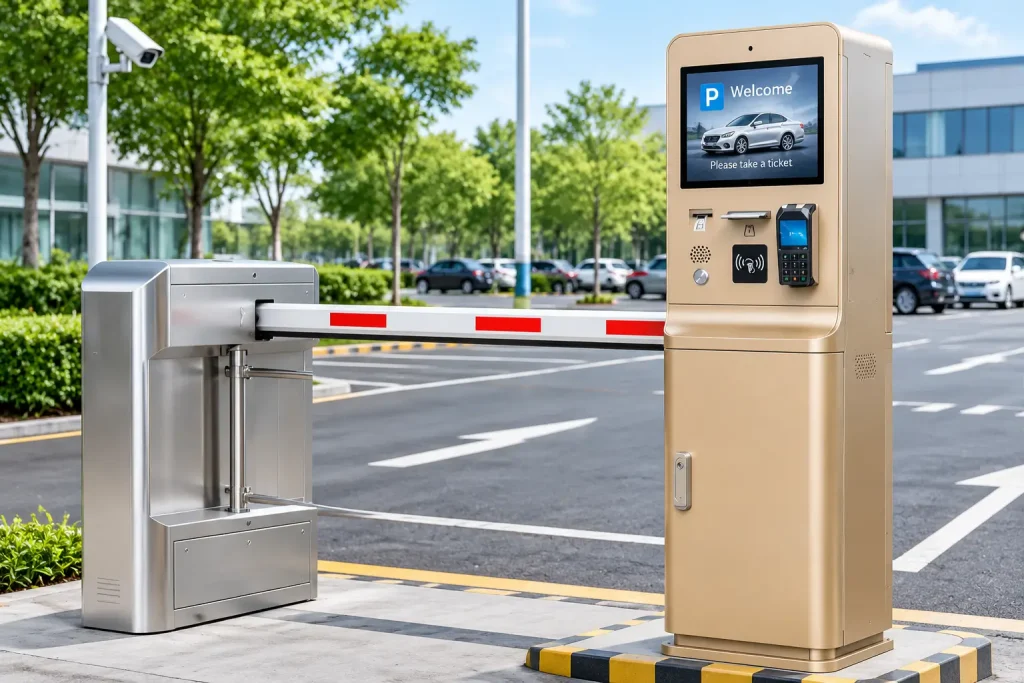
This parking kiosk commissioning checklist helps parking system integrators, kiosk OEMs and hardware engineering teams prepare reliable entry and exit systems before deployment.
A parking kiosk may contain a thermal printer, card dispenser, QR scanner, payment terminal and industrial PC. Each component can work correctly on its own, yet the complete parking lane may still fail during an actual transaction.
For example, the printer may issue a ticket but the parking application may not confirm the transaction. A card may be collected at the exit before its identity is validated. A driver may leave a ticket unclaimed while the system waits for a response that never arrives.
These problems are not always caused by defective hardware. They often result from unclear coordination between devices, software and lane-control equipment.
This guide explains how to organize parking kiosk entry and exit hardware, assign responsibilities, plan exception handling and prepare a practical commissioning checklist before deployment.
Quick Answer: What Must Be Integrated in a Parking Entry and Exit Kiosk?
A typical parking kiosk project requires coordination between five functional layers:
- Parking management application: Controls the parking transaction, credential records, fees and authorization decisions.
- Kiosk host controller: Runs the local application and communicates with peripheral devices.
- Credential hardware: Prints tickets, dispenses cards or reads QR codes and RFID credentials.
- Payment and validation equipment: Handles payment or other exit authorization when required.
- Lane-control equipment: Manages vehicle detection, barrier operation and associated safety functions.
The exact equipment varies by project.
The important point is that a successful printer or dispenser command does not necessarily mean that the entire parking transaction has been completed.
1. Define the Entry and Exit Workflows Before Selecting Hardware
Parking entry and exit terminals perform different tasks.
An entry kiosk usually creates or validates a parking credential before allowing the vehicle to enter.
An exit kiosk typically identifies an existing parking session, confirms payment or authorization and requests permission for the vehicle to leave.
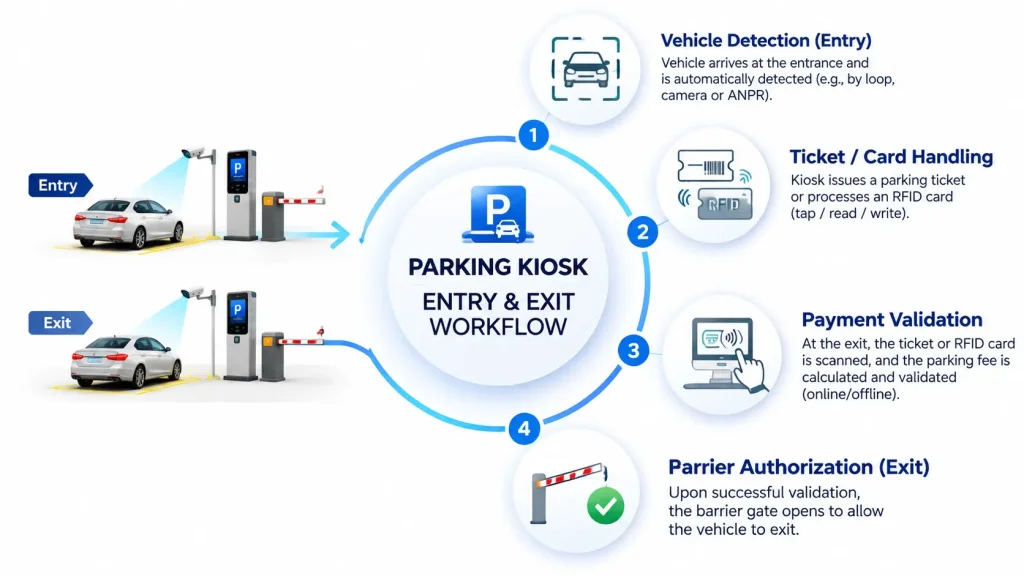
Entry Kiosk Workflow
A representative ticket-based entry process may be:
- Vehicle arrives at the entry lane.
- The parking system detects the vehicle.
- The parking application creates or validates an entry transaction.
- The kiosk prints a ticket or prepares another credential.
- The driver receives the credential.
- The parking system confirms the required conditions.
- The lane controller authorizes barrier operation.
The sequence may differ according to the parking operator’s policy.
For example, some systems require confirmation that a printed ticket has been taken. Others may authorize entry according to a different combination of vehicle detection and transaction events.
The system integrator should define the required condition explicitly rather than assume that ticket printing automatically authorizes barrier opening.
Exit Kiosk Workflow
A representative exit process may include:
- Detect the vehicle at the exit.
- Read the ticket, RFID card, QR code or other credential.
- Retrieve the parking transaction.
- Calculate or validate the required fee.
- Confirm payment or exit authorization.
- Collect the physical credential if required.
- Authorize the lane controller to operate the barrier.
- Record the transaction result.
These steps must be coordinated by the parking application and lane-control system.
The card collector or ticket reader is not responsible for deciding whether the vehicle has paid or is authorized to leave.
2. Match the Hardware to the Credential Type
The first hardware decision is what the driver will receive or present.
| Credential Type | Entry Hardware | Exit Hardware |
|---|---|---|
| Thermal paper ticket | Kiosk thermal printer | Barcode/QR reader or compatible ticket reader |
| RFID card | Card dispenser with suitable reader/encoder | RFID reader and optional card collector |
| Mobile QR code | Display or digital delivery through the application | 2D QR scanner |
| Pre-issued access card | Reader, with dispenser only if needed | Card reader |
| License plate credential | Camera/recognition system | Camera/recognition system |
A parking kiosk does not necessarily need every device in this table.
For example, a parking system using mobile QR credentials may not require a ticket printer or card dispenser.
Conversely, a reusable RFID parking card system may need a dispenser at the entrance and a collector at the exit.
The complete configuration should be determined by the actual credential lifecycle.
For an overview of supported hardware directions, see the SNROKIOSK Parking Kiosk Hardware Integration Solution.
3. Ticket Printing: Print, Cut, Present and Confirm
For ticket-based parking entry systems, the printer must be selected according to the required ticket delivery behavior.
A basic printer may print and cut the ticket.
A presenter-equipped printer can manage the ticket after printing, depending on its supported functions.
For example, the SNR-KP802-VX is an 80mm kiosk thermal printer configuration supporting presenter/hold and ticket retract functions.
However, these mechanical capabilities must not be confused with parking application logic.
The integrator should confirm the following questions:
- Does the ticket need to remain at the outlet until the driver takes it?
- What happens if the driver does not take the ticket?
- Which status or sensor information is available from the selected printer?
- Does the parking application wait for a ticket-taken event?
- What happens after a communication timeout?
- Can the application distinguish an interrupted print operation from a completed one?
The answers depend on the selected printer model, firmware, interface and protocol.
A common integration mistake is to treat a successful print command as proof that the driver has received the ticket.
Those are different events.
4. RFID Card Issuing and Collection
Some parking systems use reusable RFID cards instead of paper tickets.
In this architecture, the entrance and exit hardware have different responsibilities.
At the Entrance
The dispenser moves a card from the hopper to the required processing or output position.
If encoding or verification is required, a compatible RFID reader/writer performs that operation.
The parking application then coordinates card issuing and the entry transaction.
At the Exit
The system identifies the returned card and validates the corresponding parking transaction.
After the required conditions have been met, a compatible card collector may accept and store the card.
The SNR-K750C provides card issuing and separate card collection capabilities. It should not be described as automatically recycling returned cards into the reusable supply.
For projects requiring an independent exit collection module, the SNR-CD3000-D Motorized Card Collector is a relevant hardware option.
Its exact card compatibility, reading configuration, interfaces and status functions should be verified against the selected configuration before ordering.
Collection Is Not the Same as Reuse
A card collected at the exit may be stored for later manual processing.
That does not mean it is automatically available for immediate reissue at the entrance.
If the parking system requires reusable cards to circulate automatically, the integrator must design and verify the complete recycling architecture.
This includes the physical card path, credential state, card inventory and operational procedures.
5. Separate Hardware Events from Business Decisions
A reliable parking system should distinguish device-level events from application-level decisions.
Consider a ticket printer.
The printer may report that a command has been accepted or that a supported operation has completed.
The parking application still needs to determine whether the transaction is valid and whether entry should be authorized.
The same principle applies to RFID cards.
A card collector accepting a card does not independently prove that the parking fee has been paid.
| Hardware Event | Business Decision |
|---|---|
| Ticket printed | Whether the entry transaction is valid |
| Ticket taken | Whether the lane may be opened |
| RFID card read | Whether the credential belongs to an authorized transaction |
| Payment terminal response | Whether payment is confirmed by the relevant payment system |
| Card collected | Whether the parking session should be closed |
| Barrier status received | Whether the lane transaction is complete |
The parking application should own the business decisions.
Peripheral devices should provide the supported physical operations and status information.
The lane-control equipment should operate according to the approved safety and control design.
6. Plan the Exception Handling Before Deployment
The normal workflow is only one part of the project.
Unattended parking kiosks also need defined responses when something goes wrong.
The following matrix can be used during system design.
| Exception | Required Engineering Decision |
|---|---|
| Printer out of paper | Disable ticket issuing, provide an alternative or request assistance |
| Ticket not taken | Define timeout, recovery and entry authorization policy |
| Printer communication lost | Determine actual printer state before retrying |
| Card dispenser empty | Prevent further card issuing and report replenishment requirement |
| Card reading failure | Define retry, rejection or operator-assistance procedure |
| Card collection failure | Define whether the transaction can continue |
| Payment not confirmed | Prevent unauthorized exit according to the approved system policy |
| Network unavailable | Define approved offline behavior |
| Power interruption | Reconcile device and transaction states after recovery |
| Barrier does not respond | Follow the lane controller’s fault and safety procedures |
These are recommended design decisions, not built-in functions guaranteed by every SNROTEK device.
One particularly important rule is to avoid automatically repeating a hardware command after a timeout without first checking the available device state.
The operation may already have taken place.
For example, a ticket may already be printed even though the host did not receive the expected response.
Blindly repeating the command can create duplicate tickets or inconsistent transaction records.
7. Design the Kiosk Cabinet Around the Actual Hardware
Electrical and mechanical integration should be considered before the enclosure is finalized.
Ticket Printer Installation
Confirm the printer mounting orientation, ticket outlet alignment, paper loading access and required maintenance clearance.
A presenter-equipped printer may need additional space for its ticket transport mechanism.
Card Dispenser Installation
Confirm the card hopper loading direction, card outlet position, service access and any optional reader or encoder mounting requirements.
Card Collector Installation
The card intake opening must align with the external cabinet opening.
The service team must also be able to access the collection compartment.
Power and Communication
Check the input voltage, current requirements and communication interface for every selected module.
Do not assume that USB or RS232 communication automatically supplies the operating power required by the device.
Environmental Conditions
Parking terminals may be installed in locations exposed to temperature changes, dust, moisture or vibration.
The enclosure design should address the intended installation environment.
An outdoor parking kiosk must be evaluated as a complete assembly. The environmental rating of the cabinet cannot be inferred from the rating of an individual internal printer or card dispenser.
8. Prepare a Hardware Responsibility Matrix
Before prototype development, document which party is responsible for each part of the project.
| Project Function | Typical Responsible Party |
|---|---|
| Parking application and transaction logic | Parking software provider |
| Fee calculation and payment validation | Parking/payment system provider |
| Barrier and vehicle detection control | Lane-control integrator |
| Kiosk cabinet and mechanical integration | Kiosk OEM |
| Printer, dispenser and collector modules | Hardware supplier |
| Peripheral SDK and protocol integration | Customer’s software team, supported by hardware documentation |
| End-to-end testing | System integrator / project owner |
This matrix is especially important when different suppliers provide the parking software, kiosk cabinet, payment system and peripheral hardware.
SNROKIOSK provides kiosk hardware modules, available SDKs, communication protocols and integration-related technical support.
The parking application, payment workflow, lane-control logic and third-party software integrations remain the responsibility of the customer or appointed integrator unless separately agreed.
9. FAT and SAT: Two Different Stages of Testing
Parking kiosk projects should distinguish between factory acceptance testing and site acceptance testing.
Factory Acceptance Test (FAT)
FAT checks whether the hardware and integrated kiosk prototype operate according to the agreed requirements before shipment or deployment.
Typical checks include:
- Printer initialization and communication
- Ticket printing, cutting and presenting
- Ticket retract, if supported and required
- Card dispensing and reading
- Card collection
- Power supply and wiring
- Error reporting and recovery
- Repeated operation under representative conditions
- Service access and component replacement
The acceptance criteria should be documented before testing.
Site Acceptance Test (SAT)
SAT verifies the kiosk within the actual parking environment.
Additional checks may include:
- Vehicle detection coordination
- Barrier controller integration
- Parking application communication
- Payment system communication
- Network interruption handling
- Driver interaction and credential retrieval
- Site power conditions
- Operator maintenance procedures
- Fault reporting and escalation
A successful FAT does not eliminate the need for SAT.
A kiosk may work correctly in a workshop but behave differently when connected to the actual lane controller, payment platform and parking network.
10. A Practical Parking Kiosk Commissioning Checklist
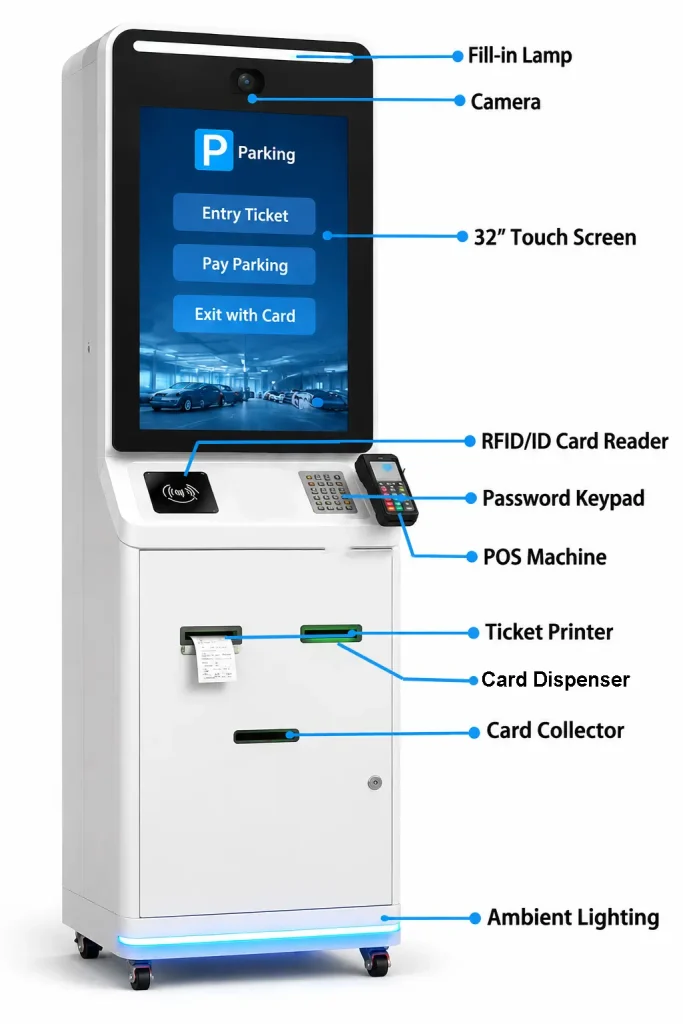
Before approving the installation, confirm the following areas.
Credential Workflow
- Entry credential type is confirmed.
- Exit credential validation is defined.
- Ticket or card delivery behavior is agreed.
- Card collection or recycling requirements are clear.
Hardware
- Printer, dispenser, collector and scanner models are confirmed.
- Communication interfaces are compatible.
- Power requirements are documented.
- Mounting drawings and service clearances are approved.
Software and Control
- Peripheral SDK or protocol resources are available.
- Hardware status handling is defined.
- Retry and timeout behavior is agreed.
- Payment and barrier responsibilities are assigned.
Testing
- Normal entry and exit workflows have been tested.
- Empty media and failed credential conditions have been tested.
- Power and network interruptions have been evaluated.
- FAT and SAT acceptance criteria are documented.
Operations
- Paper and card replenishment procedures are defined.
- Collection-box servicing is planned.
- Maintenance access is available.
- Technical support responsibilities are documented.
11. How SNROKIOSK Supports Parking Kiosk Projects
SNROKIOSK supplies hardware modules for kiosk manufacturers, parking system integrators and OEM/ODM projects.
Relevant hardware categories include kiosk thermal printers, presenter printers, motorized card dispensers, card collectors, readers and industrial computing modules.
Depending on the selected model and project scope, available support may include product datasheets, mechanical drawings, communication protocols, SDK resources and sample evaluation assistance.
For project planning, our team can help evaluate hardware configurations based on the credential type, expected workflow, available installation space and host system.
The objective is to select hardware that fits the complete parking application rather than treating each device as an isolated component.
Frequently Asked Questions
What hardware is needed for a parking entry kiosk?
It depends on the credential type. A paper-ticket system may require a thermal printer with cutting and presenting functions. An RFID card system may require a card dispenser and compatible reader or encoder. The kiosk also needs a host controller and integration with the parking application and lane-control system.
Can a parking kiosk open the barrier automatically after printing a ticket?
The parking application and lane controller must determine when barrier operation is authorized. Printing a ticket alone should not be assumed to satisfy every entry condition.
Can RFID cards be issued at the entrance and collected at the exit?
Yes, this is a possible architecture using compatible card dispensing and collection hardware. The parking application must coordinate credential identification, transaction validation and card handling.
What happens if a driver does not take a parking ticket?
The behavior depends on the selected printer and parking application. A presenter/retract printer may support specific ticket handling functions, but the timeout and transaction policy must be defined and tested.
What is the difference between FAT and SAT for a parking kiosk?
FAT verifies the integrated equipment before deployment. SAT verifies the installed kiosk with the actual parking application, lane controller, network and site operating conditions.
Does SNROKIOSK develop parking management software?
SNROKIOSK primarily supplies kiosk hardware modules and related integration resources. Parking management software, payment logic and lane-control applications are normally provided by the customer or its software partners.
Planning a Parking Entry or Exit Kiosk?
A successful parking kiosk project starts with a clear credential workflow and a defined responsibility boundary between hardware, software and lane control.
If you are developing a parking entry, exit or payment kiosk, share your project requirements with SNROKIOSK.
Please include the credential type, required printer or card-handling functions, host operating system, communication interfaces, installation environment and estimated project quantity.
We can help your team evaluate suitable hardware modules and prepare for prototype integration.