
Dual-Hopper Card Dispenser Integration: QR Verification Before Card Issuance

An engineering guide for kiosk manufacturers, system integrators and OEM/ODM developers.
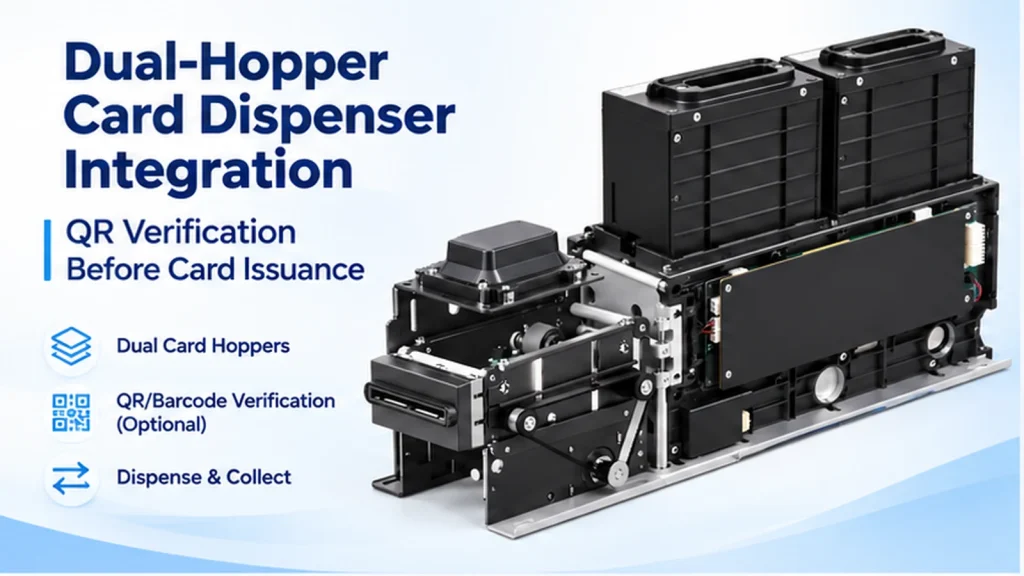
Dual hopper card dispenser integration becomes more complex when a self-service kiosk needs to verify a QR code or barcode before issuing a card.
The system must do more than select a hopper and send a dispensing command. It must coordinate card movement, code scanning, backend verification and final card release.
For example, a kiosk may contain two types of membership cards. The application selects the correct hopper, moves a card to the scanning position and checks its printed identifier against the approved transaction.
If verification succeeds, the card can be released. If verification fails, the application must follow a defined recovery procedure.
But what happens if the barcode cannot be read? What if the wrong card stock is loaded? What if communication is interrupted after a dispensing command?
These are practical integration questions that should be resolved before a card-issuing kiosk enters production.
This guide explains how to design a controlled dual-hopper card issuance workflow, including hardware configuration, QR verification, software responsibilities, exception handling and prototype testing.
1. What Is Dual Hopper Card Dispenser Integration?
Quick Answer: Dual hopper card dispenser integration connects a two-hopper card dispensing mechanism with a kiosk host application. The software selects the required card source, controls card movement and coordinates additional identification or verification steps before the card is released.
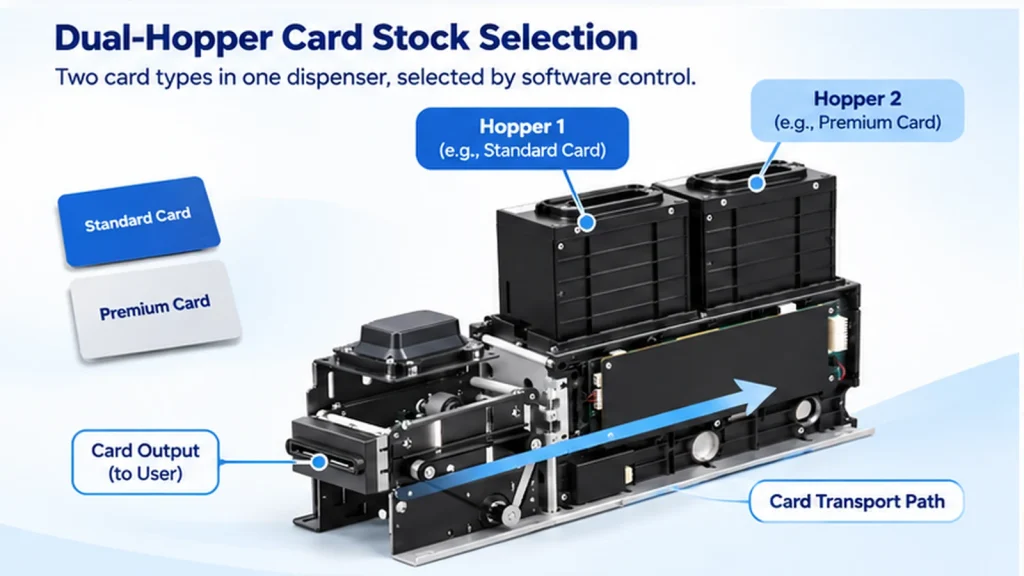
A dual-hopper dispenser is useful when one kiosk needs to handle two different card stocks.
Typical applications include:
- Standard and premium membership cards
- Two types of gift cards
- Visitor cards with different access categories
- Different pre-printed service cards
Instead of installing two independent dispensing mechanisms, the kiosk can use one dual-hopper assembly.
However, both card stocks must meet the mechanical requirements of the selected dispenser.
The software also needs to maintain a reliable mapping between the requested card type and the physical hopper.
When QR or barcode verification is required, the system becomes more than a card dispensing mechanism.
It becomes a coordinated card identification and issuance system.
2. Understand the Dual-Hopper Hardware Architecture
A typical dual-hopper card issuing system includes the dispenser, kiosk controller, identification module and application software.
| Component | Main Function | Integration Responsibility |
|---|---|---|
| Hopper 1 | Stores the first card stock | Card loading and inventory assignment |
| Hopper 2 | Stores the second card stock | Card loading and inventory assignment |
| Card Transport Mechanism | Moves cards through the device | Physical card movement |
| QR / Barcode Scanner | Reads printed card identifiers | Card identification |
| Kiosk Host Application | Controls the issuance workflow | Transaction coordination |
| Backend System | Validates card identifiers | Business rules and authorization |
| Card Collection Mechanism | Collects cards through a supported path | Physical card recovery |
The SNR-CD2604J-M7S is a dual-hopper card dispenser designed for self-service kiosk integration.
It supports software-controlled hopper selection through RS232 communication.
The published configuration includes two removable card hoppers, with a standard capacity of 100 cards per hopper for nominal 0.76 mm cards. An optional 150-card hopper configuration is available.
The front-end processing position can be configured with a compatible RFID reader/writer or QR/barcode scanner.
These are alternative module configurations. The required option should be confirmed before ordering.
For detailed hardware specifications and available configurations, see the SNR-CD2604J-M7S Dual-Hopper Card Dispenser.
For projects involving RFID encoding rather than printed-code identification, our Card Reader and Card Dispenser Integration Guide explains the broader integration considerations.
3. How Does QR Verification Work Before Card Issuance?
A QR verification workflow combines physical card handling with software-based validation.
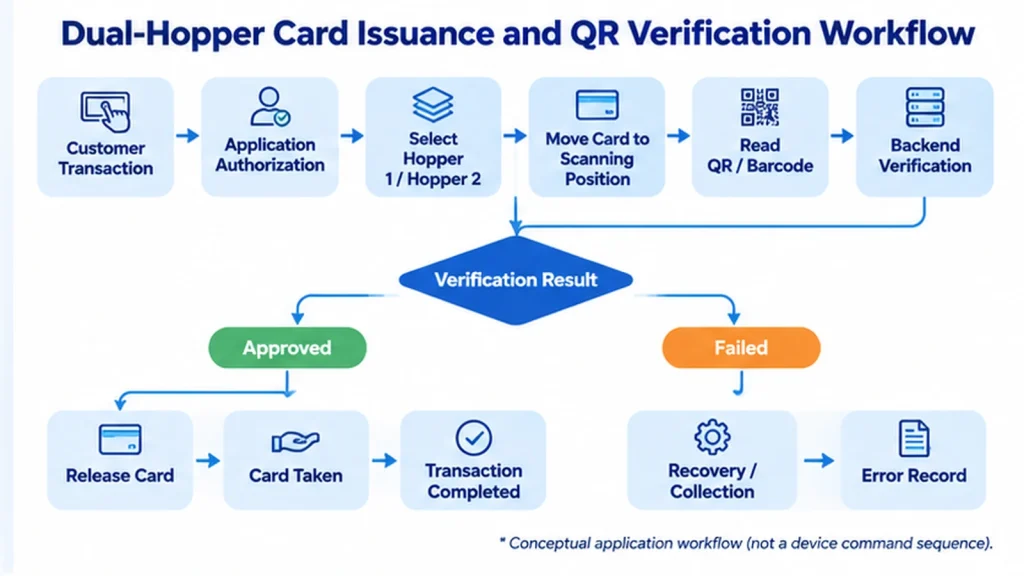
The following sequence illustrates a recommended integration architecture.
Step 1 — Confirm the Customer Transaction
The kiosk application determines whether the customer is authorized to receive a card.
This may involve membership registration, payment confirmation, visitor authorization, gift card purchase or another application-specific approval process.
The exact authorization rules belong to the customer’s application.
A card should not be released simply because a customer has selected an option on the touchscreen.
Step 2 — Select the Correct Hopper
The application identifies which card type is required.
It then selects Hopper 1 or Hopper 2 through the supported dispenser command.
For example:
- Hopper 1: Standard membership cards
- Hopper 2: Premium membership cards
The physical loading arrangement must match the application configuration.
Selecting the correct hopper does not guarantee that the correct card stock has actually been loaded.
This is one reason card identification can be valuable.
Step 3 — Move the Card to the Scanning Position
The dispenser transports a card from the selected hopper to the configured processing position.
When the optional QR/barcode scanner is installed, the system can read the printed identifier before final card delivery.
The actual card movement sequence and available position feedback depend on the selected hardware configuration and communication protocol.
Step 4 — Read and Verify the Card Identifier
The scanner reads the QR code or barcode.
The host application obtains the scanning result through the configured integration interface.
The application or backend then determines whether the identifier is acceptable.
Possible checks include:
- Is the code readable?
- Does the identifier exist in the card database?
- Does the card belong to the expected category?
- Is the identifier associated with the current transaction?
- Has the identifier already been issued or activated?
These checks are application-level functions.
The scanner reads the code. It does not independently determine the business validity of the card.
Step 5 — Release or Collect the Card
If verification succeeds, the application can authorize the supported card release operation.
If verification fails, the application should follow a defined exception workflow.
Depending on the hardware configuration and available commands, this may involve another verification attempt or collection of the rejected card.
The exact sequence must be confirmed during integration testing.
A successful scan should not automatically trigger release unless the application has completed all required checks.
4. QR Code Identification Is Not the Same as Card Authentication
This distinction is particularly important for applications involving stored value, membership privileges or access credentials.
A QR code can contain or represent a card identifier.
However, successfully reading that identifier does not necessarily prove that the physical card is genuine.
For example, a copied QR code may still be readable by a scanner.
The scanner cannot determine whether the printed identifier has been duplicated unless the application performs additional checks.
Depending on the application, a stronger verification process may require:
- Backend database validation
- Transaction-to-card matching
- Card inventory management
- Activation controls
- Duplicate-issuance prevention
- Cryptographic authentication where appropriate
For basic inventory identification, a readable printed code may be sufficient.
For security-sensitive applications, additional verification may be required.
The project team should define the purpose of QR verification before selecting the hardware.
For general QR code symbology requirements, refer to ISO/IEC 18004:2024 — QR Code Symbology Specification.
This standard describes QR code characteristics. It does not establish the business validity or authenticity of a card identifier.
5. How to Prevent Incorrect Card Issuance
A dual-hopper system can encounter several types of card mismatch.
The application may select the wrong hopper.
A technician may load the wrong card stock.
The printed barcode may be damaged.
Or the card identifier may not match the expected transaction.
A reliable integration design should address these risks at different levels.
Hopper Assignment
Each hopper should have a clearly defined card category.
The application configuration and physical card loading arrangement must remain consistent.
Card Identification
Where required, the QR or barcode scanner can provide an additional identification step before release.
Backend Verification
The application should compare the scanned identifier against the expected transaction or inventory record.
Controlled Release
If verification is mandatory, the application should not authorize normal release until the required checks have succeeded.
Transaction Logging
For troubleshooting, the system may record:
- Transaction ID
- Selected hopper
- Scanned card identifier
- Verification result
- Card release command
- Available device response
- Final application transaction status
This provides more useful diagnostic information than recording only that a dispensing command was sent.
6. Separate Card Movement, Verification and Collection States
One important principle in card dispenser integration is that different events represent different stages of the transaction.
Card Dispensed ≠ Card Verified ≠ Card Collected by User
A card reaching the output position does not necessarily mean it has been verified.
Similarly, a card being presented does not necessarily mean the customer has collected it.
| Event | Meaning | What It Does Not Confirm |
|---|---|---|
| Hopper Selected | Application selected a card source | Correct stock is physically loaded |
| Card Feed Started | Transport operation was initiated | Card reached the required position |
| Card at Processing Position | Card reached the processing position, where supported feedback confirms it | QR verification succeeded |
| QR Code Read | Scanner obtained an identifier | Identifier is valid |
| Verification Approved | Application accepted the identifier | Card was delivered |
| Card Presented | Card reached the output position | Customer collected it |
| Card Taken | Collection was confirmed through supported feedback | Every backend operation was finalized |
| Card Collected | Device completed the supported collection operation | Application records were automatically reconciled |
The available device events depend on the selected firmware, sensors and communication protocol.
This table is a recommended application-state framework, not a list of guaranteed device responses.
Separating these states helps the software team identify where a transaction failed.
7. Handle QR Scan Failures and Card Dispensing Errors
A production kiosk must be prepared for unsuccessful card issuance.
For example, the card may reach the scanning position, but the scanner cannot read the code.
The application should not treat this as successful verification.
Instead, it should follow a defined recovery policy.
| Exception | Recommended Application Response |
|---|---|
| QR code unreadable | Apply an approved retry or exception procedure |
| Identifier mismatch | Do not authorize normal release |
| Wrong card category | Stop the transaction and use the supported recovery path |
| Hopper empty | Notify the application and prevent issuance from that hopper |
| Card transport error | Check supported device status before continuing |
| Scanner timeout | Mark verification as unresolved |
| Host communication interrupted | Reconcile the current operation before repeating commands |
| Card not collected | Apply the configured collection or operator-assistance policy |
| Collection failure | Stop the affected workflow and request maintenance |
The actual retry count, timeout period and recovery commands must be defined during project testing.
They should not be assumed to be identical across different dispenser models or firmware versions.
Should an Unreadable Card Be Released?
If QR verification is mandatory, an unreadable card should not be released through the normal approved workflow.
The application should either retry verification within the agreed limits or follow the supported exception procedure.
The exact physical recovery action depends on the device configuration.
8. Avoid Duplicate Card Issuance After Communication Failure
One of the more serious integration problems occurs when communication is interrupted during card movement.
Consider the following sequence:
The application sends a dispensing command.
The dispenser begins moving a card.
Before the application receives the expected response, communication is interrupted.
After reconnecting, the application does not know whether the original operation was completed.
If it blindly repeats the dispensing command, another card may be issued.
A safer application design uses transaction records and device-state reconciliation.
Recommended Recovery Logic
- Record the original card issuance transaction.
- Preserve the last confirmed application state.
- Reconnect to the dispenser.
- Request the available device status through the supported protocol.
- Determine whether the previous operation can be safely resolved.
- Continue only when the physical and application states are sufficiently understood.
- Request operator intervention when the outcome remains uncertain.
This approach can reduce the risk of duplicate issuance.
However, it does not mean that every card dispenser provides transaction-level duplicate prevention or automatic recovery after a host restart.
Those capabilities must be confirmed for the selected firmware and software configuration.
9. Card Collection and Rejection Workflow
Card collection can be useful when a card fails verification or remains uncollected.
The SNR-CD2604J-M7S supports card collection as part of its card-handling capabilities.
However, the application must determine when collection is appropriate.
For example, a card may fail QR verification because the identifier is unreadable.
The application may need to prevent normal release and use the supported collection path.
Another scenario involves a card presented at the outlet but not collected by the customer.
Whether the device can automatically collect that card, and under what conditions, depends on the selected configuration and command sequence.
The integrator should confirm:
- Supported collection commands
- Available card position feedback
- Collection-box capacity
- Collection-box status reporting
- Timeout handling
- Recovery behavior after collection errors
These details should be included in the prototype acceptance criteria.
10. What Should Be Tested Before Production?
A successful demonstration of one card does not prove that the complete kiosk workflow is ready for deployment.
Testing should use the actual card stock, intended scanner module, host application and mechanical installation.
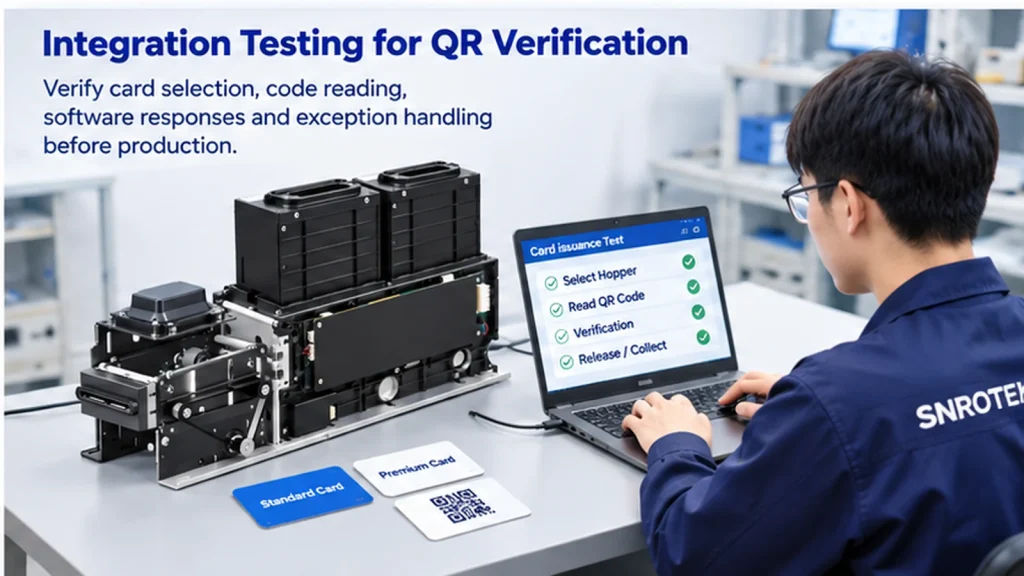
Recommended Prototype Test Matrix
| Test Scenario | Expected Result |
|---|---|
| Hopper 1 issuance | Correct card stock is selected and handled |
| Hopper 2 issuance | Correct card stock is selected and handled |
| Valid QR identifier | Application accepts the expected identifier |
| Invalid QR identifier | Normal release is prevented |
| Unreadable barcode | Defined retry or exception procedure is triggered |
| Wrong card stock | Mismatch is detected where verification rules support it |
| Empty hopper | Application receives the supported condition or error |
| Scanner communication failure | Application does not assume successful verification |
| Card transport error | Device and application follow the defined fault procedure |
| Host restart | Unfinished transaction is reconciled where possible |
| Collection operation | Supported collection workflow completes as expected |
| Repeated card issuance | Required functions remain consistent under agreed test conditions |
Each test should record the expected behavior, observed result and supporting evidence.
Useful evidence may include application logs, device responses, video recordings and test reports.
The project should also record:
- Dispenser model and configuration
- Firmware version
- Scanner model
- Card material and dimensions
- Barcode format and print quality
- Host operating system
- Communication interface
- Application version
Testing should be performed with the intended production configuration wherever practical.
For a broader testing methodology, see our Kiosk Prototype Testing Guide.
11. Selecting a Dual-Hopper Card Dispenser for QR Verification
The SNR-CD2604J-M7S is one hardware option for kiosk projects requiring two selectable card stocks and optional QR/barcode identification.
Its published configuration includes:
| Item | Published Specification |
|---|---|
| Model | SNR-CD2604J-M7S |
| Card Hoppers | 2 removable hoppers |
| Standard Capacity | 100 cards per hopper |
| Optional Capacity | 150 cards per hopper |
| Card Dimensions | 85 ±0.5 × 54 ±0.5 mm |
| Card Thickness | 0.7–1.3 mm |
| Communication | RS232 |
| Optional Front Module | RFID reader/writer or QR/barcode scanner |
| Card Functions | Dispensing, front-end holding and collection |
Card capacity depends on card thickness and the selected hopper configuration.
RFID and QR/barcode scanning are alternative front-end configurations. The exact module must be selected according to the application.
Before ordering, the integrator should confirm the actual card specifications, required verification workflow, software platform and mechanical installation conditions.
For current product details and configuration options, refer to the official SNR-CD2604J-M7S product page.
12. What Information Should You Send Your Hardware Supplier?
To receive a useful hardware recommendation, provide the following project information.
Application
What type of kiosk are you developing?
For example, membership card issuing, gift card distribution, visitor registration or another self-service application.
Card Specifications
Provide:
- Card dimensions and thickness
- Card material
- QR or barcode format
- Sample card images
- Required card quantity per hopper
Verification Requirements
Explain whether the QR code is used for identification, inventory tracking, transaction matching or another purpose.
Also confirm whether the system must validate the identifier before card release.
Software Environment
Specify the host operating system, intended communication method and available application development environment.
Mechanical Integration
Provide the available installation space, card outlet requirements and service access conditions.
Project Quantity
Indicate the expected sample quantity and estimated production volume.
These details help the hardware supplier evaluate the configuration before sample testing.
Frequently Asked Questions
Can a dual-hopper card dispenser issue two different card types?
Yes. A dual-hopper dispenser can select between two card stocks through the supported control interface. Both card types must meet the dispenser’s mechanical requirements.
Can a QR code be scanned before a card is released?
Yes, with a suitable scanner configuration and supported card-processing workflow. The application must coordinate scanning, verification and release according to the selected hardware protocol.
Does the SNR-CD2604J-M7S include a QR scanner by default?
No. QR/barcode scanning is an optional front-end configuration. The required scanner module should be confirmed before ordering.
Can the dispenser automatically reject an invalid card?
The SNR-CD2604J-M7S supports card collection. However, the exact rejection and collection sequence must be confirmed against the selected configuration and communication protocol.
Can the dispenser prevent duplicate card issuance?
The application should implement transaction tracking and recovery logic to reduce duplicate issuance risks. Device-level behavior and supported recovery functions must be verified for the selected firmware.
Can the same machine support RFID and QR verification?
The published product configuration offers RFID reading/writing or QR/barcode scanning as alternative front-end options. A combined configuration should not be assumed without separate engineering confirmation.
Is RS232 sufficient for integrating the dispenser with Windows or Android?
RS232 provides a communication interface, but integration also requires the correct protocol, software implementation and compatible host connection. SDK and operating-system support should be confirmed for the project.
Should QR verification be tested using production cards?
Yes. Card material, barcode dimensions, print quality and scanner positioning can affect reading performance. Prototype testing should use representative production cards.
Planning a Dual-Hopper Card Issuing Kiosk?
A reliable card issuing system requires more than selecting a dispenser with two hoppers.
The card stock, QR verification process, software logic, card movement and exception recovery must work together.
SNROKIOSK supports kiosk manufacturers, OEM/ODM partners and system integrators with card dispenser selection, mechanical integration and available communication resources.
If you are developing a kiosk that needs to issue two different card types with QR or barcode verification, share your project requirements with our team.
Please include your card specifications, required verification workflow, host operating system, installation space and estimated quantity.
We can help evaluate a suitable dispenser configuration and provide available technical documentation for prototype integration.
Contact SNROKIOSK to discuss your dual-hopper card dispenser project.