
SNR-CD2604J-M7S Dual Hopper Card Dispenser
Dual-hopper motorized card dispenser for self-service kiosks requiring selectable card output, card collection, controlled front-end presentation and optional RFID or 1D/2D barcode identification.
- 2 removable card hoppers
- 100 cards per hopper, optional 150 cards
- RS232 protocol control, 9600bps default
- Optional RFID reader or 1D/2D barcode scanner
- Front-end card holding and collection functions
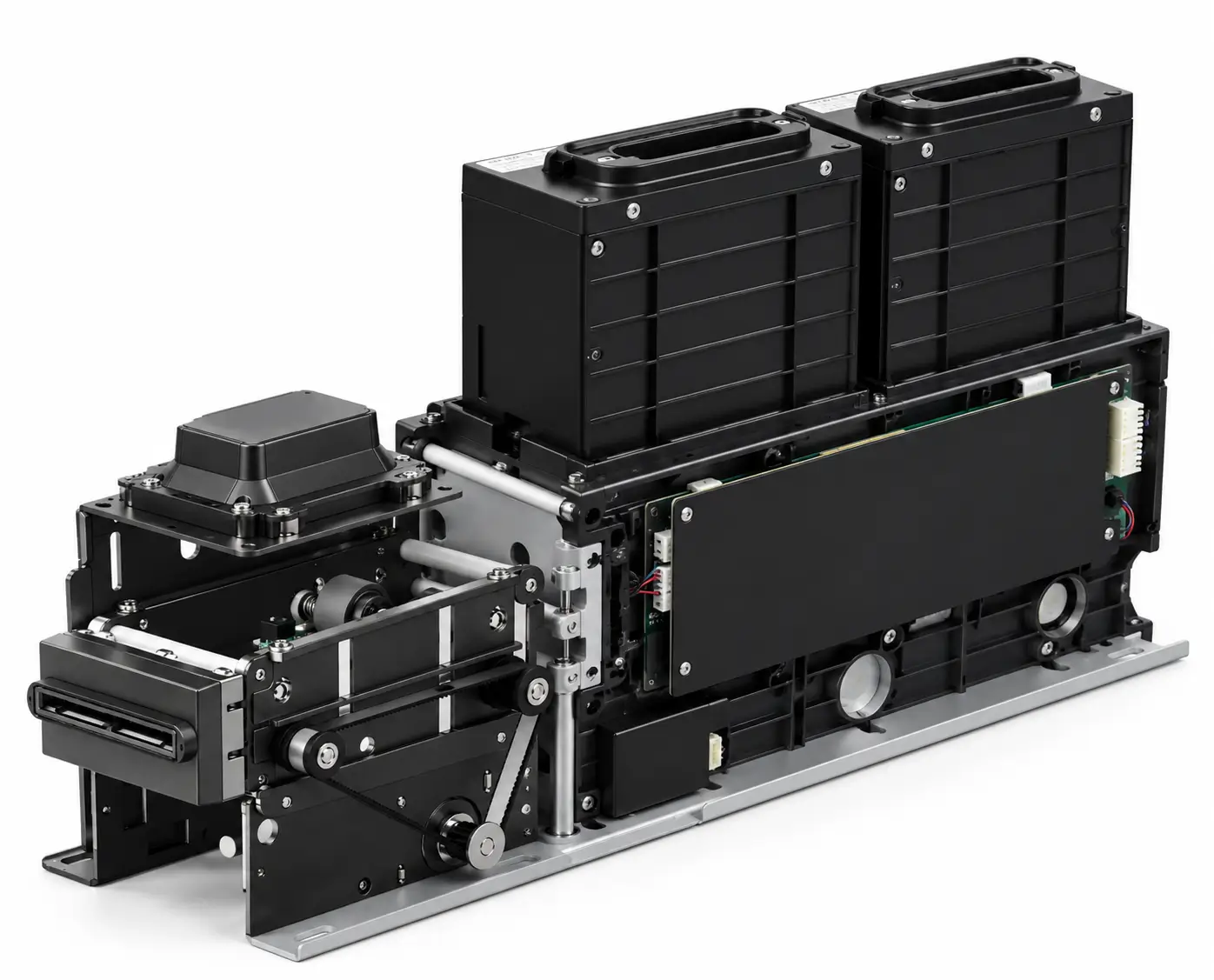
Dual-Hopper Card Dispensing for Multi-Card Kiosk Projects
The SNR-CD2604J-M7S is a dual hopper card dispenser designed for self-service kiosks and unattended terminals that need to manage more than one physical card inventory.
Cards can be issued from either hopper by protocol command, allowing the kiosk software to select the required card source according to transaction type, user category, backend logic or card inventory.
Returned or rejected cards can be collected internally, while the front card channel supports controlled card presentation before final release to the user.
For projects that require card identification before dispensing, the front-end channel can be configured with either an RFID reader or a 1D/2D barcode scanner.
Key Features
Dual Hopper Architecture
Two removable card hoppers allow the host system to manage two separate card supplies from one integrated card dispensing module.
Software-Controlled Hopper Selection
The kiosk application can select the target hopper by protocol command, allowing different card inventories to be issued automatically.
Controlled Front-End Card Holding
The front-end holding mechanism keeps the card in the presentation position while the host software completes verification or transaction logic.
RFID or Barcode / QR Identification
The front card channel can be configured with an RFID reader or 1D/2D barcode scanner for identification before card output.
Card Collection
Returned, rejected or invalid cards can be routed into the internal collection area according to the project workflow.
Fault Self-Recovery
Automatic fault self-recovery helps clear the transport channel after abnormal conditions and supports stable unattended operation.
Status Monitoring
The system can report low-card conditions, empty hopper status, hopper presence, collection-box status and collection-box-full conditions.
Infrared Sensor Detection
Infrared reflective photoelectric sensors monitor card transport and work together with a dust-resistant channel design.
Kiosk Integration Support
Communication protocols, available SDK/API resources, test tools and mechanical drawings can be provided for prototype development.
How the Dual-Hopper Card Dispensing Workflow Works
The final workflow is controlled by the customer’s kiosk software. A typical integration can operate as follows:
1. Transaction Starts
The kiosk receives the user request and determines which card category is required.
2. Hopper Is Selected
The host controller sends a protocol command to select Hopper 1 or Hopper 2.
3. Card Is Transported
The selected card moves from the hopper into the front card channel.
4. Card Is Identified
If configured, the system reads RFID data or scans a barcode / QR code before output.
5. Card Is Held at the Front
The front-end holding mechanism can keep the card in position while the application completes verification.
6. Card Is Released or Collected
The approved card is presented to the user, while rejected or returned cards can be routed to the collection area.
Why Use a Dual Hopper Card Dispenser?
A single-hopper dispenser is sufficient when every transaction uses the same card stock. A dual-hopper architecture becomes useful when one kiosk must manage two different card groups without manual card replacement.
Different Card Designs
Store different branded cards, customer tiers or service cards in separate hoppers.
Different Service Types
The host software can select the required card source based on transaction logic.
Inventory Separation
Maintain two independent physical card inventories while controlling both from one kiosk application.
Reduced Manual Intervention
Multiple card products can be supported without requiring staff to replace card stock between transactions.
If your kiosk project needs two separate card inventories or a primary-and-backup hopper setup, review our multi-hopper card dispensing system design guide before finalizing the enclosure and control workflow.
RFID, Barcode and QR Card Identification
Some card issuing systems need to identify the exact physical card before it is released to the customer.
The SNR-CD2604J-M7S front card channel can be configured with either an RFID reader or a 1D/2D barcode scanner.
With the RFID configuration, supported card types include S50, S70 and CPU cards. With the scanner configuration, the system can read machine-readable card identifiers such as barcodes or QR codes before the card is presented to the user.
The scanned or read data can then be processed by the host application for verification, database matching, inventory control or transaction binding.
Technical Specifications
| Model | SNR-CD2604J-M7S |
|---|---|
| Product Type | Dual-Hopper Motorized Card Dispenser |
| Card Hopper | 2 removable card hoppers |
| Hopper Capacity | 100 cards per hopper at 0.76mm card thickness; optional 150 cards per hopper |
| Total Card Capacity | 200 cards standard / up to 300 cards with optional hoppers |
| Card Size | 85 ±0.5 mm × 54 ±0.5 mm, ISO7810 / CR80 / ID-1 |
| Card Thickness | 0.7–1.3 mm |
| Card Material | Paper card / PC card |
| Card Functions | Dispense / collect / front-end hold |
| Collection Capacity | Approx. 10 cards at 0.76mm or 5–7 cards at 1.2mm thickness |
| Optional Front Module | RFID reader or 1D/2D barcode scanner |
| RF Card Support | S50 / S70 / CPU card with RFID configuration |
| Communication | RS232, default 9600bps |
| Power Supply | 24VDC ±5% |
| Current | 2A operating / 150mA static |
| Operating Temperature | 0℃ to 45℃ |
| Operating Humidity | 30–90% RH |
| Control Method | Protocol command control |
| Sensor | Infrared reflective photoelectric sensor |
| Installation | Embedded installation inside kiosk / cabinet |
| Approx. Dimensions | 355.7 × 125 × 213.4 mm |
Typical Applications
Banking & Card Issuance
Support different physical card products or service categories according to backend authorization or transaction type.
Hotel & Membership Kiosks
Issue different card inventories for hotel access, membership programs or customer service applications.
Visitor Registration
Dispense different visitor credentials according to access level or visit type.
Ticketing & Access Control
Issue physical credential cards for ticketing, access or identity workflows.
Identity & Service Kiosks
Integrate card issuance into unattended identity registration or service terminals.
Multi-Card-Type Terminals
Use the dual-hopper architecture where two card inventories must be stored and controlled independently.
Integration Considerations
Confirm the Actual Card
Provide the real card dimensions, thickness, material and surface finish before final hardware approval. For barcode or QR projects, also confirm the code size, location, orientation and print quality.
Define Hopper Selection Logic
The host application should clearly define when Hopper 1 or Hopper 2 is selected. Selection may depend on card category, user type, backend response or service workflow.
Confirm RFID or Scanner Configuration
The front-end card channel supports either an RFID reader configuration or a 1D/2D barcode scanner configuration. The required option should be confirmed before ordering.
Reserve Maintenance Access
The kiosk enclosure should allow sufficient space for card loading, hopper removal, collection-box access, abnormal-card handling and routine maintenance.
Confirm Electrical and Communication Design
The dispenser uses RS232 communication and 24VDC power. The source manual specifies that the communication cable should be connected before applying power.
Test Before Freezing the Enclosure
Complete actual-card tests, mechanical installation checks, software communication and card-identification verification before finalizing the kiosk enclosure.
Prototype Integration Checklist
- Confirm card dimensions and thickness.
- Provide actual production card samples.
- Define Hopper 1 and Hopper 2 card allocation.
- Confirm standard 100-card or optional 150-card hopper requirement.
- Define card collection and reject-card workflow.
- Confirm RFID reader or 1D/2D scanner configuration.
- Provide barcode / QR position information if scanning is required.
- Confirm RS232 host communication architecture.
- Reserve 24VDC power supply capacity.
- Verify installation dimensions with the current mechanical drawing.
- Check hopper-loading and maintenance clearance.
- Run repeated dispensing tests before pilot production.
FAQ
What is a dual hopper card dispenser?
A dual hopper card dispenser contains two independent card storage channels. The host system can select which hopper supplies the card for each transaction.
How many cards can SNR-CD2604J-M7S hold?
The standard configuration holds 100 cards per hopper at 0.76mm card thickness, for a total of approximately 200 cards. Optional 150-card hoppers increase total capacity to approximately 300 cards.
What card sizes are supported?
The dispenser supports ISO7810 / CR80 / ID-1 cards measuring approximately 85 × 54 mm, with supported card thickness from 0.7 to 1.3 mm.
Can the machine read RFID cards?
Yes. The front-end card channel can be configured with an RFID reader. Supported RF card types include S50, S70 and CPU cards with the corresponding RFID configuration.
Can the machine scan barcodes or QR codes?
Yes. A 1D/2D barcode scanner can be configured at the front card channel to identify barcodes or QR codes before card output.
Can rejected cards be collected automatically?
Yes. Returned or rejected cards can be routed to the collection area according to the configured software workflow.
Can the software choose which hopper dispenses the card?
Yes. Hopper selection is controlled by protocol command, allowing the host application to choose Hopper 1 or Hopper 2.
What communication interface is used?
SNR-CD2604J-M7S uses RS232 serial communication with a default baud rate of 9600bps.
What power supply is required?
The dispenser requires 24VDC ±5%, with approximately 2A operating current and 150mA static current.
Do you provide SDK, protocol and test tools?
Yes. Available communication protocols, SDK/API resources, test tools and technical documents can be provided for supported configurations.
Can you provide mechanical drawings or 3D files?
Yes. Dimensional drawings and available 3D models can be provided for kiosk enclosure design and prototype verification.
Engineering Support for Dual-Hopper Card Dispensing Projects
SNR-CD2604J-M7S is intended for integration inside self-service kiosks and unattended terminals rather than stand-alone desktop operation.
The final configuration should be evaluated together with the actual card specification, software logic, RFID or scanner requirement, hopper capacity, collection workflow and kiosk enclosure.
SNRO can support system integrators with communication protocols, available SDK/API resources, test tools, dimensional drawings, 3D models and card compatibility testing.
Need a Dual-Hopper Card Dispensing Module?
Tell us your card size, thickness, hopper capacity, RFID or barcode identification requirement, RS232 control method and kiosk installation space.
We can help review the SNR-CD2604J-M7S configuration, integration documentation, sample testing and mechanical requirements before your kiosk design is finalized.