A4 Printing in Self-Service Kiosks: Choosing the Right Embedded A4 Printer

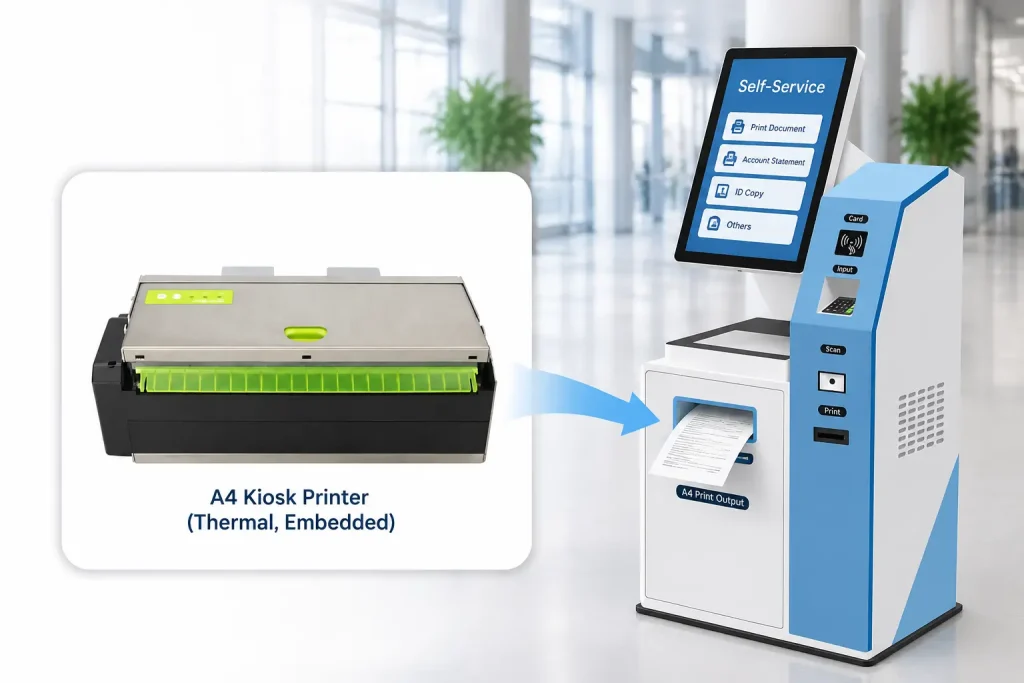
An A4 printer for self-service kiosk applications must do more than print full-page documents. It also needs to fit the kiosk’s installation space and support a reliable document output workflow.
A4 document printing is becoming an important requirement in many self-service kiosk applications.
Healthcare terminals may need to print medical reports and examination results. Banking kiosks may issue account statements and transaction documents. Government service terminals may need to print application forms and official records.
However, integrating a conventional office printer into a self-service kiosk can be challenging, especially when internal installation space is limited.
For kiosk manufacturers and system integrators, choosing a dedicated embedded A4 thermal printer can be a practical alternative.
In this guide, we explain the differences between conventional office printers and embedded A4 kiosk printers, key integration considerations, and how to choose between two A4 printer configurations from SNROTEK.
1. Why Is A4 Printing Challenging in Self-Service Kiosks?
Many self-service kiosks have limited internal installation space.
The cabinet must accommodate several hardware components, often including:
- Touchscreen displays
- Industrial computers
- Payment terminals
- Barcode and QR code scanners
- Card readers and card dispensers
- Power supplies and communication modules
- Printers and document output mechanisms
When a conventional office printer is selected, the engineering team must consider more than the printer body itself.
Paper trays, loading access, document output space and maintenance clearance can all affect the kiosk’s mechanical design.
Several challenges are particularly important.
Limited installation space
A kiosk printer must fit into the available cabinet space without interfering with other hardware components.
Paper loading and maintenance
The printer should be accessible for paper replacement and routine maintenance. The loading arrangement must match the kiosk’s service access design.
Document output
The printed A4 document must reach the user through a properly designed output opening.
Unattended operation
Unlike an office environment, a self-service kiosk needs to manage printing and document delivery as part of an automated transaction.
Mechanical integration
Mounting positions, cable routing, paper paths and front-panel openings should be considered before the kiosk enclosure design is finalized.
These requirements make dedicated embedded A4 printers an interesting option for kiosk OEM projects.
2. Embedded A4 Kiosk Printer vs. Traditional Office Printer
Both printer types can produce A4 documents, but their intended installation environments are different.
| Evaluation | Traditional Office Printer | Embedded A4 Kiosk Printer |
|---|---|---|
| Primary Design | Desktop office use | Self-service equipment integration |
| Installation | Desk or dedicated office space | Integrated into a kiosk enclosure |
| Paper Handling | Office-oriented paper tray and feeding system | Model-specific paper roll and feeding arrangement |
| Document Output | Conventional output tray | Configurable around the kiosk’s output opening |
| Automated Operation | Depends on the printer and application | Designed for integration into an automated printing workflow |
| Maintenance | Accessed as an office device | Planned around kiosk service access |
| Consumables | Depends on printing technology | Thermal paper for the models discussed in this guide |
The key difference is the overall hardware integration approach.
A dedicated kiosk printer allows the OEM engineering team to plan the printer, mounting arrangement, paper path and document output as part of the self-service machine.
However, the complete installation footprint must still be evaluated. An embedded A4 printer is not automatically suitable for every small kiosk.
3. Why Consider A4 Thermal Printing?
The two SNROTEK models discussed in this guide use thermal printing technology.
Unlike conventional laser or inkjet printing, thermal printing does not require toner cartridges, ink cartridges or ribbons.
The printing process uses compatible thermal paper, which reacts to heat generated by the printhead.
For kiosk applications, this provides several practical considerations:
- No ink or toner replacement
- A direct thermal printing mechanism
- Automatic document cutting
- A paper roll-based supply arrangement
- Integration through USB or RS232 interfaces
One important point should be understood before selecting this technology.
These printers require compatible thermal paper. They are not conventional office printers designed to print on ordinary A4 copier paper.
If your application requires standard plain paper, color printing or a specific document security feature, confirm the printing technology requirements before selecting the hardware.
4. Where Can A4 Kiosk Printers Be Used?
A4 printing is useful when a self-service machine needs to issue full-page documents instead of short receipts or tickets.
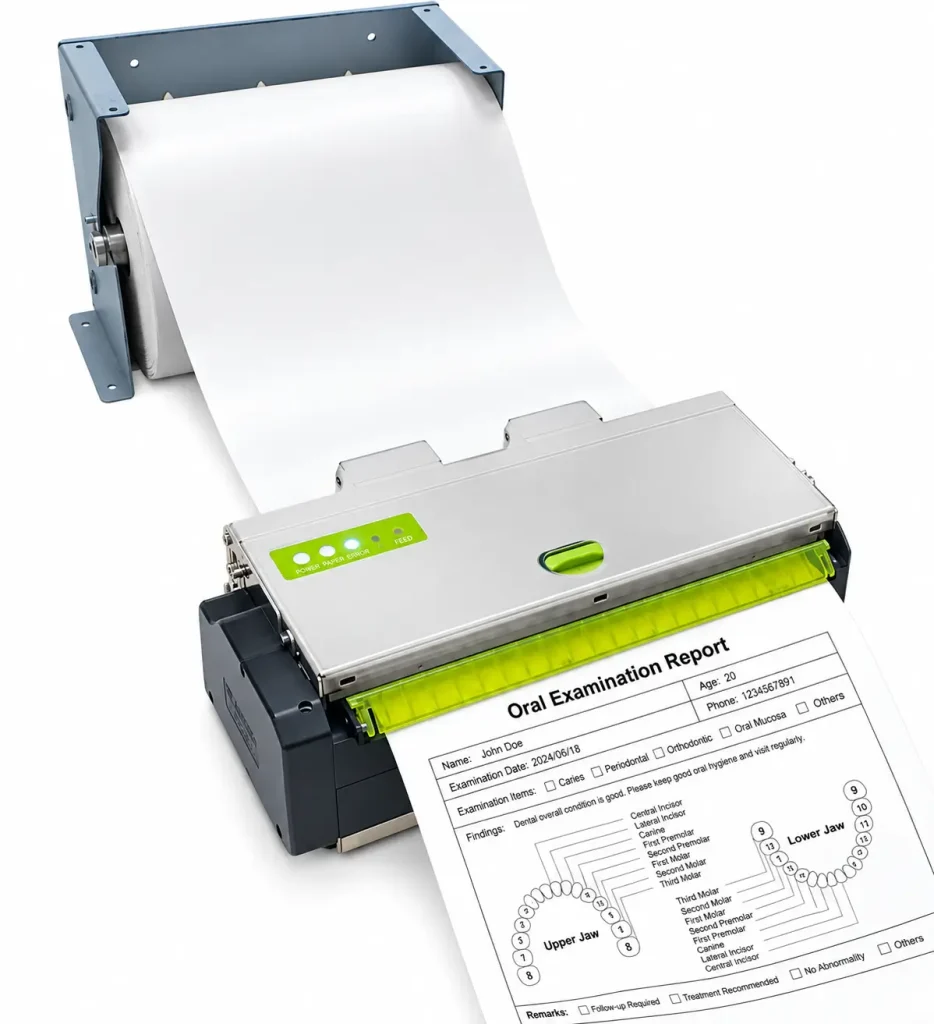
Healthcare Self-Service Kiosks
Healthcare terminals may need to print:
- Medical examination reports
- Patient registration records
- Laboratory results
- Appointment information
- Discharge-related documents
A4 thermal printing can be evaluated for healthcare workflows that accept compatible thermal media.
Banking and Financial Kiosks
Financial self-service applications may require:
- Account statements
- Transaction documents
- Customer application forms
- Service confirmations
The selected printer should be evaluated against the bank’s document format, media and operational requirements.
Government Service Kiosks
Government terminals may issue:
- Application forms
- Registration records
- Service documents
- Administrative confirmations
For these projects, check the required paper type and document presentation process before finalizing the printer.
Insurance Self-Service Kiosks
Insurance kiosks may need to print policy-related documents, claim confirmations and application records.
An embedded A4 printer can be considered when compatible thermal media meets the application’s document requirements.
Airport and Travel Self-Service Kiosks
Some travel-related terminals require full-page document output.
The printer configuration should be selected according to the actual document format, paper requirements and user collection workflow.
Office and HR Self-Service Terminals
Employee self-service systems may print internal records, reports and other HR documents.
An embedded A4 printer is worth evaluating when the project needs full-page output but cannot easily accommodate a conventional office printer.
5. Two A4 Kiosk Printer Configurations from SNROTEK
SNROTEK offers two A4 thermal printer configurations for document printing applications.
Both models feature:
- A4-compatible thermal paper support
- Automatic full cutting
- 203 dpi print resolution
- Maximum print speed of 150 mm/s
- USB 2.0 and RS232 interfaces
- 24V DC power input
The main difference is their paper output configuration.
SNR-KP216A-S: A4 Printer with Automatic Cutter
The SNR-KP216A-S is equipped with an automatic full cutter but does not include a presenter.
After printing, the document is cut and released through the printer’s output arrangement.
This configuration is suitable for projects that require A4 printing and automatic document separation without a presenter buffer.
Key published specifications:
| Parameter | Specification |
|---|---|
| Print Resolution | 203 dpi |
| Maximum Print Speed | 150 mm/s |
| Effective Paper Width | 150–216 mm |
| Compatible Paper Sizes | B5, A4 and compatible custom thermal media |
| Cutter | Automatic full cut |
| Cutter Life | ≥500,000 cycles |
| Presenter | Not included |
| Interface | USB 2.0 / RS232 |
| Power Input | DC 24V ±10% |
| Dimensions | 267 × 155 × 88 mm |
| Weight | Approx. 2.8 kg |
Recommended for: A4 kiosk printing projects that need automatic cutting but do not require a presenter mechanism.
Product details: SNR-KP216A-S A4 Thermal Printer
SNR-KP216A-P: A4 Printer with Automatic Cutter and Presenter
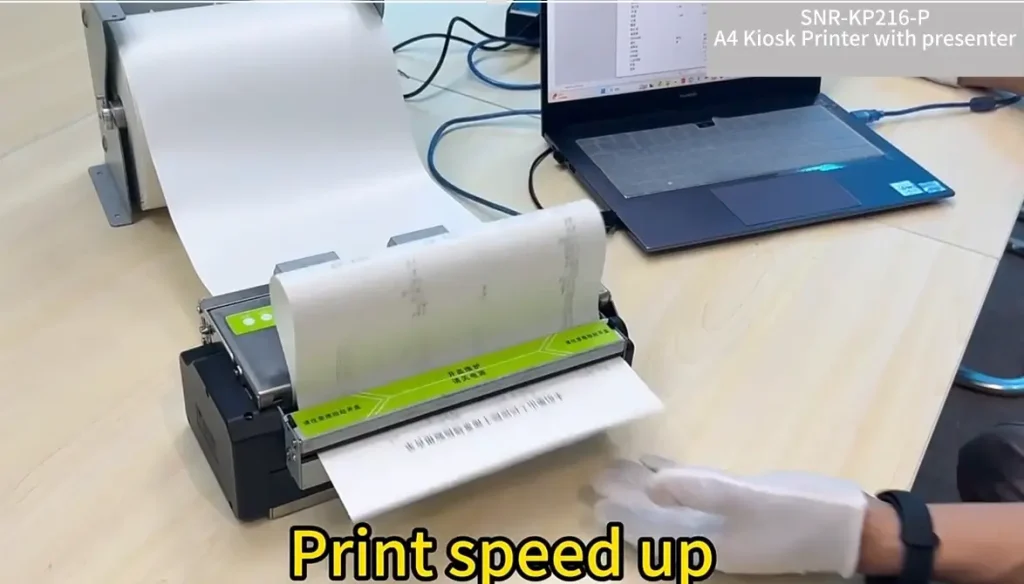
The SNR-KP216A-P adds a built-in paper presenter, also described as a paper accumulator.
The presenter provides a buffer for the printed document.
Its documented workflow is:
Print → Buffer → Cut → Present
The printer feeds the document into the presenter buffer while printing. After the print job is completed, the cutter separates the document, and the presenter delivers the finished output.
This arrangement helps prevent pulling or tension on the paper while printing.
It is particularly worth considering for unattended kiosks where controlled document presentation is important.
Key published specifications:
| Parameter | Specification |
|---|---|
| Print Resolution | 203 dpi |
| Maximum Print Speed | 150 mm/s |
| Effective Paper Width | 150–216 mm |
| Compatible Paper Sizes | B5, A4 and compatible custom thermal media |
| Cutter | Automatic full cut |
| Cutter Life | ≥500,000 cycles |
| Presenter | Included |
| Interface | USB 2.0 / RS232 |
| Power Input | DC 24V ±10% |
| Dimensions | 267 × 172 × 88 mm |
| Weight | Approx. 3.15 kg |
Recommended for: Self-service applications requiring A4 printing, automatic cutting and presenter-assisted document delivery.
Product details: SNR-KP216A-P A4 Thermal Printer with Presenter
6. SNR-KP216A-S vs. SNR-KP216A-P: Which Model Should You Choose?
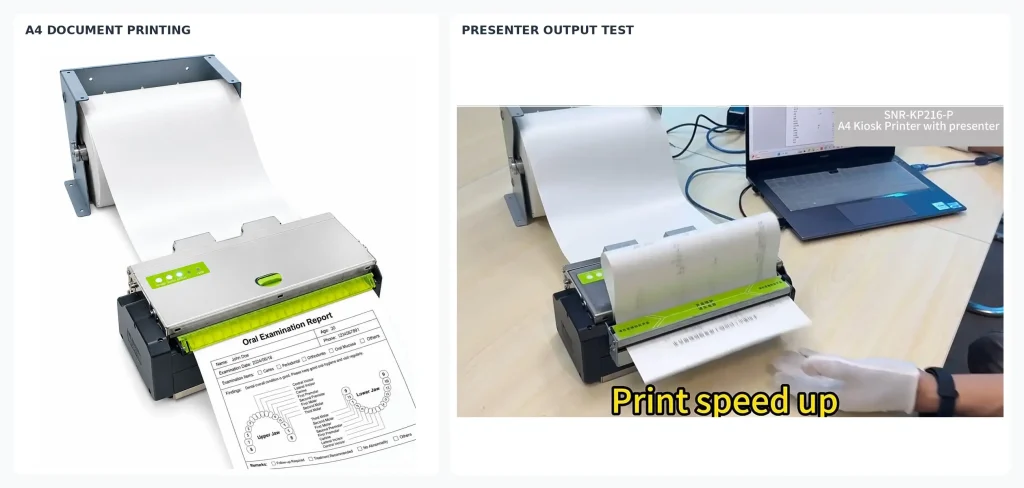
The selection mainly depends on how the completed document should be delivered to the user.
| Comparison | KP216A-S | KP216A-P |
|---|---|---|
| A4 Thermal Printing | Yes | Yes |
| Automatic Full Cutter | Yes | Yes |
| Presenter Buffer | No | Yes |
| Maximum Print Speed | 150 mm/s | 150 mm/s |
| Resolution | 203 dpi | 203 dpi |
| Interface | USB / RS232 | USB / RS232 |
| Dimensions | 267 × 155 × 88 mm | 267 × 172 × 88 mm |
| Weight | 2.8 kg | 3.15 kg |
The SNR-KP216A-S has a 17 mm smaller depth than the KP216A-P, based on the published dimensions.
This may be useful when the available installation depth is limited.
The KP216A-P requires additional space for its presenter mechanism, but offers a buffered document delivery workflow.
Our selection recommendation:
- Choose the SNR-KP216A-S when automatic cutting is sufficient and a presenter is not required.
- Choose the SNR-KP216A-P when the kiosk needs presenter-assisted document delivery after printing and cutting.
A presenter is not necessary for every A4 printing project. The right choice should follow the actual kiosk workflow.
7. What Should Kiosk Manufacturers Check Before Integration?
Selecting the printer is only the first step.
The mechanical and electrical design should be reviewed before finalizing the kiosk enclosure.
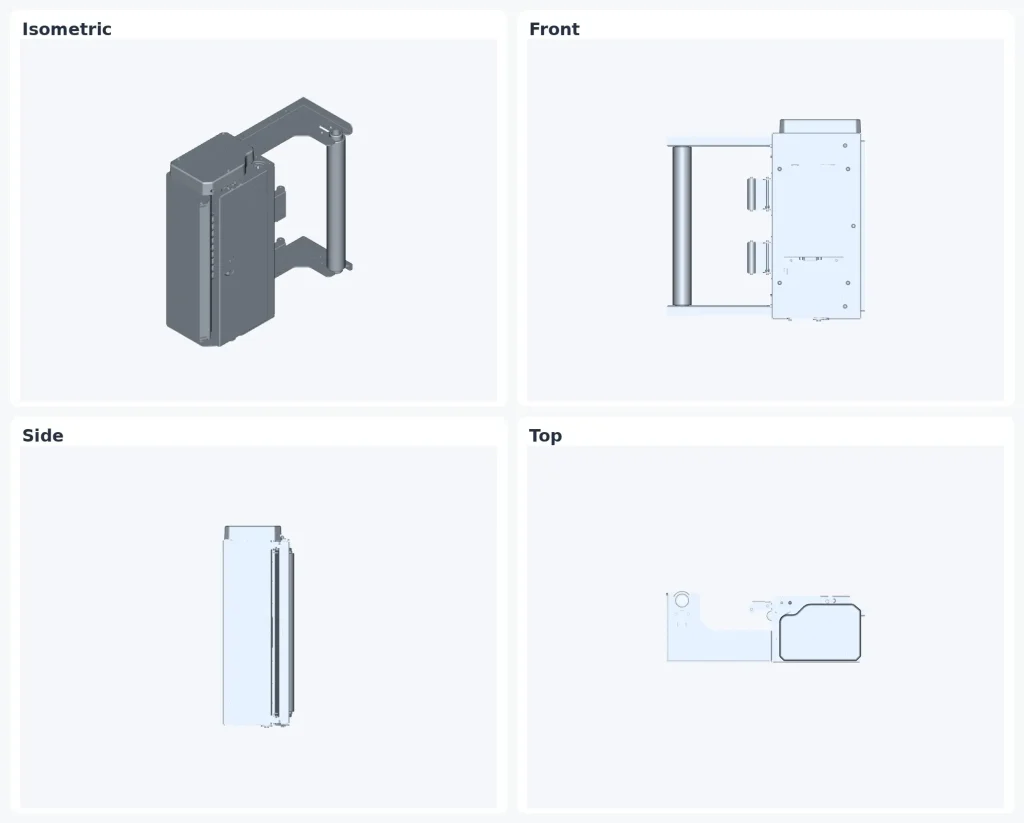
1. Installation Dimensions
Check the printer’s dimensional drawing against the available cabinet space.
Consider:
- Printer width, depth and height
- Mounting position
- Paper loading access
- Cable routing
- Moving mechanism clearance
- Maintenance space
For the two models discussed above, the published dimensions are:
- KP216A-S: 267 × 155 × 88 mm
- KP216A-P: 267 × 172 × 88 mm
Allow additional clearance where required by the actual installation and service procedure.
2. Paper Loading and Replacement
Confirm how the thermal paper will be replaced.
The kiosk cabinet should provide sufficient access for the maintenance team to load paper and inspect the paper path.
The paper roll dimensions and installation orientation should be included in the mechanical design.
3. Front-Panel Output Opening
The document output opening must match the selected printer configuration.
For the KP216A-S, plan the opening around its cut-and-output arrangement.
For the KP216A-P, also consider the presenter’s document delivery position and required clearance.
The final opening dimensions should be determined from the mechanical drawing and verified using a physical prototype.
4. Host Computer and Communication
Both models list USB 2.0 and RS232 interfaces.
Before integration, confirm:
- Host computer interface
- Operating system
- Printer driver requirements
- Command or software compatibility
- Application print format
- Required device status feedback
The complete printing workflow should be tested with the actual kiosk application.
5. Thermal Paper Compatibility
Paper selection is particularly important.
Confirm the thermal paper width, roll dimensions, thickness and surface characteristics with the printer supplier.
Do not assume that ordinary office paper can be used.
If the project requires a particular paper grade or document durability, test the actual media before approving the production design.
6. Maintenance and Serviceability
A self-service kiosk operates without continuous staff supervision, but it still needs a practical maintenance plan.
Consider how technicians will access:
- Paper loading area
- Printhead
- Cutter mechanism
- Paper path
- Electrical and communication connections
The maintenance process should be considered during the initial mechanical design rather than after the kiosk enters production.
8. A Practical Integration Workflow for OEM Projects
We recommend the following sequence when developing a self-service kiosk with A4 document printing.
Step 1 — Define the Document Requirement
Confirm the document size, thermal media, printing content and output workflow.
Step 2 — Select the Printer Configuration
Determine whether the application requires the KP216A-S or KP216A-P.
Step 3 — Obtain the Mechanical Drawing
Review the printer’s dimensions and mounting arrangement.
Step 4 — Design the Kiosk Enclosure
Plan the internal mounting, paper loading access and front-panel output opening.
Step 5 — Connect the Host System
Confirm the communication interface, driver and application compatibility.
Step 6 — Test the Complete Printing Workflow
Verify printing, automatic cutting and document output using the intended thermal paper.
Step 7 — Validate the Prototype
Check installation clearance, paper replacement, document collection and maintenance access.
This approach helps identify mechanical and software integration issues before moving into pilot production.
Frequently Asked Questions
Can an A4 kiosk printer print on ordinary A4 copier paper?
No. The SNR-KP216A-S and SNR-KP216A-P use thermal printing technology and require compatible thermal paper. They are not conventional laser or inkjet printers for ordinary copier paper.
What is the difference between the SNR-KP216A-S and KP216A-P?
Both models feature A4 thermal printing and automatic full cutting. The KP216A-S does not have a presenter, while the KP216A-P includes a paper accumulator for buffered document delivery.
Which model is better for a compact kiosk?
The KP216A-S has a published depth of 155 mm, compared with 172 mm for the KP216A-P. If installation depth is limited and a presenter is not required, the S model is worth evaluating.
Does the SNR-KP216A-P hold the document before delivering it?
Yes. Its presenter buffer receives the document during printing. The printer then cuts and presents the completed document.
What interfaces are available?
Both models list USB 2.0 and RS232 serial interfaces. Confirm the selected interface and software requirements before ordering.
Can these printers be integrated into healthcare or banking kiosks?
They can be evaluated for these applications when the document requirements are compatible with thermal printing. The project team should confirm media suitability, document format, installation and software compatibility.
Can SNROTEK provide mechanical drawings for kiosk development?
Mechanical resources should be confirmed for the selected model. Contact our team with your project requirements to obtain the applicable technical files.
Looking for an A4 Printer for Your Self-Service Kiosk?
If your kiosk project needs full-page A4 document printing but has limited installation space, SNROTEK offers two embedded A4 thermal printer configurations.
SNR-KP216A-S: A4 thermal printing with automatic full cutter.
SNR-KP216A-P: A4 thermal printing with automatic full cutter and paper presenter.
We support OEM manufacturers and system integrators with printer selection, available mechanical drawings and technical assistance during prototype evaluation.
Tell us about your project, including:
- Application and required document format
- Thermal paper specifications
- Available installation space
- Host operating system and interface
- Required document output method
- Estimated project quantity
Our team can help review the appropriate A4 printer configuration for your self-service system.